Account  |  Mobile  |  Help    
 
Home Database Live Audio Forums Wiki Classifieds Submit Info About

Go Back   The RadioReference.com Forums > Scanners and Receivers Forums > GRE Scanners


GRE Scanners A forum for the discussion of all GRE branded scanning radios and receivers.

Reply
 
LinkBack Thread Tools Search this Thread Display Modes
  #1 (permalink)  
Old 03-12-2009, 11:55 AM
Member
   
Join Date: Feb 2009
Location: Moscow
Posts: 25
Default Psr-500 Spectrum Sweeper disappointment

Hi !
Got my second Psr500 today, and went deeper into sweeper object.
Now, first off it misses alot, particulary for ex. i transmit at 433.0125 - swe gets 433.0100, although at 433.025 it gets it right. it's not a big problem.
big problem is that in Swe object, Allband mode, Range 5 (40x-470mhz as it claimed), it's full of holes. I can catch 499.950 but nothing 450 and upwards till about 463. this is quite unacceptable in enviroment of my city... many public services operate in this band.

perhaps i misunderstood something or doing something wrong ?
please comment

thanks !
P

ps. can i have some recomendation for bnc wideband (433-470 + 860 is most interesting) whip antenna for my psr ? thank you again

Last edited by lynzoid; 03-12-2009 at 11:58 AM..
Reply With Quote
Sponsored links
  #2 (permalink)  
Old 03-12-2009, 07:48 PM
ratboy's Avatar
Member
 
Premium Subscriber
 
Join Date: Nov 2004
Location: Toledo,Ohio
Posts: 95
Default

I think you're expecting too much. If you have any strong transmitter(s) nearby, it will make it miss a little sometimes. It's no big deal, just put a narrow range of freqs into a limit search and you will find it easily. It's not a perfect solution, but it works.
__________________
Pro-2004, 2005, 96, 197, and PSR-500
Kenwood TS-850SAT, JRC NRD-515, 525, Allied SX 190, Hammarlund HQ-100.
Reply With Quote
  #3 (permalink)  
Old 03-12-2009, 07:54 PM
Forts's Avatar
Member
 
Premium Subscriber
 
Join Date: Dec 2002
Location: Strathroy, Ontario Canada
Posts: 1,561
Send a message via ICQ to Forts
Default

I find when I'm in a dense urban area that the rubber ducky works much better with the sweeper than my external antenna, which makes sense.... because I only want strong nearby transmissions. What I did really notice right off the bat is that it seems fairly slow to catch a transmission. The Close Call on my BC246T seemed to be much faster. Maybe it just seems slower since you can watch it zero in on the frequency on the display. Kind of like watching the toaster, waiting for it to pop
__________________
Pro-106 - Pro-96 - BCT15 - BC780XLT - Pro-433 - Pro-2045 - BC-350 - Pro-43
Reply With Quote
  #4 (permalink)  
Old 03-15-2009, 03:46 PM
NDRADIONUT's Avatar
Member
 
Database Admin
 
Join Date: Jan 2005
Location: NORTH DAKOTA
Posts: 135
Smile

Set Your Zeromatic Thresholds Like This And You Will Be Much Happier


Zeromatic Thresholds:
5 Khz Other
In Lo 170 170
In Hi 480 480
Out Lo 150 150
Out Hi 530 530
Reply With Quote
  #5 (permalink)  
Old 03-15-2009, 08:46 PM
Member
   
Join Date: Feb 2009
Location: Moscow
Posts: 25
Default

Thank you ! Will certainly try that now.
Will report
Reply With Quote
Sponsored links
  #6 (permalink)  
Old 03-15-2009, 09:02 PM
Forts's Avatar
Member
 
Premium Subscriber
 
Join Date: Dec 2002
Location: Strathroy, Ontario Canada
Posts: 1,561
Send a message via ICQ to Forts
Default

I'll give this a try as well. Thanks for the tip!
__________________
Pro-106 - Pro-96 - BCT15 - BC780XLT - Pro-433 - Pro-2045 - BC-350 - Pro-43
Reply With Quote
  #7 (permalink)  
Old 03-24-2009, 09:16 PM
Member
 
Premium Subscriber
 
Join Date: Jul 2003
Location: Michigan
Posts: 123
Send a message via AIM to kb8rvp
Default Psr-500 Spectrum

Wondering if those changes helped?

Mike
__________________
kb8rvp
Reply With Quote
  #8 (permalink)  
Old 03-24-2009, 09:59 PM
Forts's Avatar
Member
 
Premium Subscriber
 
Join Date: Dec 2002
Location: Strathroy, Ontario Canada
Posts: 1,561
Send a message via ICQ to Forts
Default

To be honest I haven't had much of a chance to use Spectrum Sweeper on my Pro-106 of late. Haven't been anywhere new I guess! I'll make a point of playing around with it on some known freqs between now and the end of the week and see if I can notice a difference.
__________________
Pro-106 - Pro-96 - BCT15 - BC780XLT - Pro-433 - Pro-2045 - BC-350 - Pro-43
Reply With Quote
  #9 (permalink)  
Old 03-25-2009, 11:04 AM
Member
   
Join Date: Feb 2009
Location: Moscow
Posts: 25
Default

tweak helped alot ! recommended
Reply With Quote
Sponsored links
  #10 (permalink)  
Old 03-27-2009, 08:18 AM
DaveIN's Avatar
Member
 
Premium Subscriber
 
Join Date: Jan 2003
Posts: 4,443
Default

Nice tweak. I like that idea.
Reply With Quote
  #11 (permalink)  
Old 03-27-2009, 01:50 PM
Member
   
Join Date: Feb 2003
Posts: 424
Default

Can someone let me know the defaults for the Zeromatic as I made the change and my audio on some frequencies (424 MHz area) are worse than before .. so I would like to switch back.

I am using PSR Edit and the program doesn't revert back to the defaults.

Thanks ..
__________________
Kevin
Scanning the Airwaves
Reply With Quote
  #12 (permalink)  
Old 03-27-2009, 04:14 PM
mikey60's Avatar
Member
 
Premium Subscriber
 
Join Date: Sep 2003
Location: Oakland County Michigan
Posts: 2,174
Default

Quote:
Originally Posted by edmscan View Post
Can someone let me know the defaults for the Zeromatic as I made the change and my audio on some frequencies (424 MHz area) are worse than before .. so I would like to switch back.

I am using PSR Edit and the program doesn't revert back to the defaults.

Thanks ..
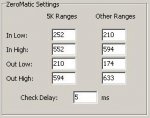
Here you go:

BTW, you can click on the button just above this part of the screen to reset all of those settings to their defaults.

Mike
Attached Images
 
__________________
http://www.psredit.com
Reply With Quote
  #13 (permalink)  
Old 03-27-2009, 09:04 PM
Member
   
Join Date: Feb 2003
Posts: 424
Default

Hi Mike ...

That button didn't reset them back for me, but thanks for posting this for me. I am running the most recent version on XP

Edit ... oops I did use the GLOBAL reset and it did change them. I was using the other reset button on the right.

Thanks
__________________
Kevin
Scanning the Airwaves

Last edited by edmscan; 03-27-2009 at 09:07 PM..
Reply With Quote
  #14 (permalink)  
Old 03-27-2009, 09:48 PM
mikey60's Avatar
Member
 
Premium Subscriber
 
Join Date: Sep 2003
Location: Oakland County Michigan
Posts: 2,174
Default

Quote:
Originally Posted by edmscan View Post
Hi Mike ...

That button didn't reset them back for me, but thanks for posting this for me. I am running the most recent version on XP

Edit ... oops I did use the GLOBAL reset and it did change them. I was using the other reset button on the right.

Thanks
Ok, the other button should have done that as well. I'll check that.

Mike
__________________
http://www.psredit.com
Reply With Quote
  #15 (permalink)  
Old 03-31-2009, 08:51 AM
SOFA_KING's Avatar
Member
   
Join Date: Apr 2004
Location: SE Florida
Posts: 625
Default

Quote:
Originally Posted by NDRADIONUT View Post
Set Your Zeromatic Thresholds Like This And You Will Be Much Happier


Zeromatic Thresholds:
5 Khz Other
In Lo 170 170
In Hi 480 480
Out Lo 150 150
Out Hi 530 530
Just what are you tweeking? Are those values supposed to be representing MHz?


Phil
Reply With Quote
Sponsored links
  #16 (permalink)  
Old 11-02-2009, 10:51 PM
Member
   
Join Date: Mar 2005
Location: Gilcrest, CO
Posts: 65
Smile

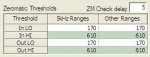
I had a chance to tweek the zeromatic functioning on my PSR500 & PSR-600. I found the following settings appear to work best on this end:

Threshold 5kHz Ranges Other Ranges
...In LO..........170..................170
...In HI...........610..................610
..Out LO........170..................170
..Out HI..........610..................610
Attached Images
 

Last edited by ScannerSK; 11-02-2009 at 11:04 PM..
Reply With Quote
  #17 (permalink)  
Old 11-03-2009, 08:32 AM
Member
 
Premium Subscriber
 
Join Date: Jun 2009
Location: So.Jersey
Posts: 233
Default

I have a 106 and am wondering what this feature does? Thanks to all who reply.
Reply With Quote
  #18 (permalink)  
Old 11-04-2009, 10:31 PM
Member
   
Join Date: Mar 2005
Location: Gilcrest, CO
Posts: 65
Default Zeromatic Feature

The zeromatic feature simply helps the scanner lock onto the correct frequency during search and sweeper modes. When zeromatic is turned off the scanner may stop on the frequency above or below the correct frequency.

Hope this helps!

Shawn
Reply With Quote
  #19 (permalink)  
Old 11-04-2009, 11:24 PM
Member
 
Premium Subscriber
 
Join Date: Jun 2009
Location: So.Jersey
Posts: 233
Default

So nothing to do with scanning just while searching?
Reply With Quote
  #20 (permalink)  
Old 11-05-2009, 12:03 AM
Member
 
Premium Subscriber
 
Join Date: Mar 2007
Location: Boca Raton, Florida
Posts: 81
Default

Correct.
__________________
KF4UUZ

Pro-106 X3
FT-60 X3
VX-170 X2
Sangean Super ATS 909
Reply With Quote
Reply

Bookmarks

Thread Tools Search this Thread
Search this Thread:

Advanced Search
Display Modes

Posting Rules
You may not post new threads
You may not post replies
You may not post attachments
You may not edit your posts

BB code is On
Smilies are On
[IMG] code is On
HTML code is Off
Trackbacks are On
Pingbacks are On
Refbacks are On


Similar Threads
Thread Thread Starter Forum Replies Last Post
PSR 500 or PSR 600 bee GRE Scanners 4 10-05-2008 12:14 PM
Question about the PSR 500. AlphaDelta10 GRE Scanners 4 07-20-2008 05:55 PM
PSR 500: Sweeper Distance ? BOBRR GRE Scanners 1 04-07-2008 01:21 AM
Radio shack Pro97 to PSR 500? Stavro35 GRE Scanners 3 01-05-2008 01:12 PM
Question on PSR 500 Multi Roam Programing scannerfan3155 GRE Scanners 7 12-25-2007 09:21 AM


All times are GMT -5. The time now is 04:30 PM.


Powered by vBulletin® Version 3.8.2
Copyright ©2000 - 2009, Jelsoft Enterprises Ltd.
All information here is Copyright 2009 by RadioReference.com LLC and Lindsay C. Blanton III.Ad Management by RedTyger
Copyright 2009 by RadioReference.com LLC Privacy Policy  |  Terms and Conditions