RadioReference on Facebook   RadioReference on Twitter   RadioReference Blog
 

Go Back   The RadioReference.com Forums > Commercial and Professional Radio > ICOM Land Mobile Radio


ICOM Land Mobile Radio Discussion forum for ICOM land mobile radio equipment such as the IC-F series radios. Please do not post amateur radio topics here.

Reply
 
LinkBack Thread Tools Search this Thread Display Modes
  #1 (permalink)  
Old 10-09-2012, 9:44 PM
Member
  Audio Feed Provider
Audio Feed Provider
 
Join Date: Aug 2011
Location: Tulare County, California
Posts: 100
Default Help with Icom f3gs

So i just got myself a used f3g, i have put my frequencies in it and it transmits and sounds good. The only issue i'm having is on some frequencies i'm receiving heavy static, even when there is no one transmitting. It seems like it's a squelch issue but i don't know anything about the squelch on this radio. If anyone can help i would be grateful, thanks!!
Reply With Quote
Sponsored links
  #2 (permalink)  
Old 10-09-2012, 9:55 PM
Member
  Audio Feed Provider
Audio Feed Provider
 
Join Date: Aug 2011
Location: Tulare County, California
Posts: 100
Default

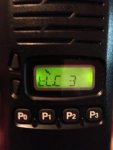
This picture shows what the screen says when it gives static. In the manual the busy indicator says it's receiving a signal or (the squelch is open).
Attached Images
 
Reply With Quote
  #3 (permalink)  
Old 10-10-2012, 12:01 AM
mmckenna's Avatar
Member
   
Join Date: Jul 2005
Location: SNCZCA51
Posts: 1,389
Default

There is a squelch adjustment in the programming software, I don't know where it is for sure, but search around, you'll find it.

The old F-4's I used to use had a "maintenance" function. There was a way to power it up while pressing two buttons. You could then hit one of the Px buttons and adjust the squelch. I don't remember what the procedure was, but likely there is something similar for the F3gs. Likely the service manual for that radio would have it in there, or a good web search would turn up the exact procedure.
Reply With Quote
  #4 (permalink)  
Old 10-10-2012, 12:16 AM
Member
  Audio Feed Provider
Audio Feed Provider
 
Join Date: Aug 2011
Location: Tulare County, California
Posts: 100
Default

Quote:
Originally Posted by mmckenna View Post
There is a squelch adjustment in the programming software, I don't know where it is for sure, but search around, you'll find it.

The old F-4's I used to use had a "maintenance" function. There was a way to power it up while pressing two buttons. You could then hit one of the Px buttons and adjust the squelch. I don't remember what the procedure was, but likely there is something similar for the F3gs. Likely the service manual for that radio would have it in there, or a good web search would turn up the exact procedure.
I think i have found the squelch adjustment in the program, it was at 80 but honestly i have no clue what to set it at.
Reply With Quote
  #5 (permalink)  
Old 10-10-2012, 5:39 PM
mmckenna's Avatar
Member
   
Join Date: Jul 2005
Location: SNCZCA51
Posts: 1,389
Default

Quote:
Originally Posted by zane018 View Post
I think i have found the squelch adjustment in the program, it was at 80 but honestly i have no clue what to set it at.
It may have a range of 1 to 256, so 80 might be kind of loose. If you write down the existing value, then try it to see how high and low it will go, it'll give you an idea. It sounds like it's set to loose, so adjusting it up will likely help.
Ideally, if you can find the manual method that you can do from the actual radio, that would be easier. The F-4 allowed adjustment on the fly, much easier to set it that way.
Reply With Quote
Sponsored links
  #6 (permalink)  
Old 10-10-2012, 5:41 PM
mmckenna's Avatar
Member
   
Join Date: Jul 2005
Location: SNCZCA51
Posts: 1,389
Default

Here ya' go, try this:

Turn the power ON while pushing the [^] and [V].
Push [P0] to switch the LCD contrast between AUT and LOW.
Push [P1] to switch the beep emission between ON and OFF.
Push [P2] to switch the LCD backlighting condition between ON, AUT and OFF.
Push [P3] to enter the noise squelch level adjusting mode. Push [^] or [V] to adjust the noise squelch level within 0–255 range, push [P3] again to set and return to previous indication.
Reply With Quote
  #7 (permalink)  
Old 10-11-2012, 10:52 AM
Member
  Audio Feed Provider
Audio Feed Provider
 
Join Date: Aug 2011
Location: Tulare County, California
Posts: 100
Default

Quote:
Originally Posted by mmckenna View Post
Here ya' go, try this:

Turn the power ON while pushing the [^] and [V].
Push [P0] to switch the LCD contrast between AUT and LOW.
Push [P1] to switch the beep emission between ON and OFF.
Push [P2] to switch the LCD backlighting condition between ON, AUT and OFF.
Push [P3] to enter the noise squelch level adjusting mode. Push [^] or [V] to adjust the noise squelch level within 0–255 range, push [P3] again to set and return to previous indication.
Not sure if this makes a difference but i noticed the static is coming from the channels that don't have tones. What if they don't have tones???
Reply With Quote
Reply

Thread Tools Search this Thread
Search this Thread:

Advanced Search
Display Modes

Posting Rules
You may not post new threads
You may not post replies
You may not post attachments
You may not edit your posts

BB code is On
Smilies are On
[IMG] code is On
HTML code is Off
Trackbacks are On
Pingbacks are On
Refbacks are On


All times are GMT -5. The time now is 3:29 AM.


Powered by vBulletin® Version 3.8.2
Copyright ©2000 - 2013, vBulletin Solutions, Inc.
All information here is Copyright 2012 by RadioReference.com LLC and Lindsay C. Blanton III.Ad Management by RedTyger
Copyright 2011 by RadioReference.com LLC Privacy Policy  |  Terms and Conditions