|
|
|
|
| Pictures Of Your Shack/Mobile Setup Here you can post pictures of your shack, mobile, or portable setup for everyone to be envious of. Don't forget to rate the threads of good setups. |

12-18-2012, 2:53 AM
|
|
|
Remote Mountaintop Setup
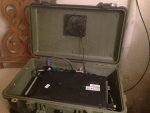
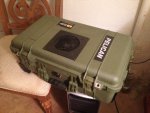
So, I guess you could call this my remote shack over IP. In the process of testing and running my new system. The setup is as follows:
Two BCD996T scanners
HP Pavillion Laptop
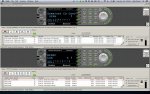
Bob's awesome program ProScan
Two $3.99 cheapo USB soundcards and two RS232 to USB dongles attached to a Belkin USB hub.
All this has been installed into a Pelican "suitcase", as it will end up being installed inside a shed at the top of a mountain. My very gracious father-in-law has some prime scanning property, and had already run up CAT-5 cabling and ac power lines to run a fridge and sound system in the shed at the top of a 600 foot high mountain ridge. The shed, aside from being waterproof, has no insulation, no heat or AC, and no forms of fan-based ventilation, so this should be interesting to see how it ends up working out.
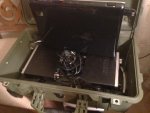
For once in my life, if only because I don't have to look at it constantly, the install didn't need to be neat and clean, so its a bit of a rat's nest of wires in that box.
Will advise further when torture testing has been completed, and has been installed remotely.
|

12-18-2012, 6:22 AM
|
|
Member
|
|
|
Join Date: Feb 2004
Location: Berlin, Germany
Posts: 73
|
|
Which USB soundcards do you use? Do they have a line-in or a microphone connector - or both?
Thanks.
|

12-18-2012, 8:08 AM
|
|
|
This is great!
About how far are the scanners from where you live?
What kind of antenna do you have?
Also, do you have any kind of power surge protector up there?
Might be a good idea......
__________________
 Supporter of Broadcastify!
Play "Travel Scrabble" here: Travel Scrabble (Word Game)
For ALL (not some) have sinned, and fall short of the glory of God! Romans 3:23
Don't be fooled, I'm not a LEO!
|

12-18-2012, 8:38 AM
|
 |
Member
|
|
|
Join Date: Aug 2011
Location: Connecticut
Posts: 2,053
|
|
Well that is a interesting idea.
|

12-18-2012, 6:35 PM
|
|
|
Quote:
Originally Posted by gr8rcall
This is great!
About how far are the scanners from where you live?
What kind of antenna do you have?
Also, do you have any kind of power surge protector up there?
Might be a good idea......
|
I am about 3 miles from where the scanners will be placed. Internet is a nice, solid, fat-piped Verizon Fios connection.
As much as I'd love to put up that 6 foot tall honking Scantenna, the father-in-law would like to keep massive antennas to a minimum. Honestly, I'm thinking about the RadioShack 20.176 "Sputnik" antenna. eham.net had some good reviews considering I'm compromising size and money for the value. Outdoor VHF-Hi/UHF Scanner Antenna : Scanner Antennas | RadioShack.com
The power running into the Pelican box is directly connected to a surge protector that's inside the suitcase. And you're right...that's a very good idea!
|

12-18-2012, 8:03 PM
|
 |
Member
|
|
|
Join Date: Jul 2005
Location: SNCZCA51
Posts: 1,389
|
|
New Jersey + Metal Shed + Mountain top + Antenna = lightning risk.
I'd strongly suggest installing a protection device on the antenna feed line and ground it well. It doesn't take a direct strike to hose you equipment.
|

12-18-2012, 9:24 PM
|
|
|
Quote:
Originally Posted by mmckenna
New Jersey + Metal Shed + Mountain top + Antenna = lightning risk.
I'd strongly suggest installing a protection device on the antenna feed line and ground it well. It doesn't take a direct strike to hose you equipment.
|
Yup, that's the plan. And its a wood shed, no metal...so I have that going for me.
|

12-18-2012, 9:54 PM
|
 |
Member
|
|
|
Join Date: Jul 2005
Location: SNCZCA51
Posts: 1,389
|
|
Cool. Nice looking set up. I'm a fool for just about anything in a pelican case.
I have a receiver on one of the rooftops at work that I can control remotely. It's a pretty nice thing to have, especially when you have some altitude. Should be interesting to see what you receive and from how far off.
|

12-18-2012, 10:00 PM
|
|
|
Quote:
Originally Posted by mmckenna
Cool. Nice looking set up. I'm a fool for just about anything in a pelican case.
I have a receiver on one of the rooftops at work that I can control remotely. It's a pretty nice thing to have, especially when you have some altitude. Should be interesting to see what you receive and from how far off.
|
I'm looking forward towards it too. I'm really just running it in the box at home for a few weeks now to ensure that the computer will run two instances of ProScan on Windows 7 Pro for extended periods of time without requiring a restart, or any major software problems/freezes. Once I'm comfortable with that, it's off to the mountain.
I'm in the bottom of my town with a very temporary antenna set up in an apartment building. Far from ideal!
|

12-18-2012, 10:31 PM
|
|
|
I had a couple similar setups going at local tower sites. One was a Dell laptop in a small metal outdoor rated repeater locker on the side of a tower with no insulation, heat or cooling and it ran fine.
I would suggest Teamviewer on the PC. I installed it on mine and it saved me untold number of trips. I could remotely adjust nearly anything to get things dialed in just right, or even restart the Proscan app or work on the IP settings etc...
|

12-18-2012, 10:59 PM
|
|
|
Quote:
Originally Posted by mancow
I had a couple similar setups going at local tower sites. One was a Dell laptop in a small metal outdoor rated repeater locker on the side of a tower with no insulation, heat or cooling and it ran fine.
I would suggest Teamviewer on the PC. I installed it on mine and it saved me untold number of trips. I could remotely adjust nearly anything to get things dialed in just right, or even restart the Proscan app or work on the IP settings etc...
|
Mancow,
I'm already using Remote Desktop to access the box remotely, via a dyndns.org address. I can access it from my Macbook Air, iPhone, iPad, or basically any computer I have at work that has internet access. Is there anything that Teamview would do differently for me that I can't already do with Remote Desktop?
Thanks!
|

12-18-2012, 11:48 PM
|
|
|
No I don't think so. It's just a dumb lazy guy's (like me) RDP.
That's a great idea using the case. I was lazy and just double sticky taped it all together to the PC lid. The box would be much handier.
|

12-26-2012, 4:55 PM
|
|
Member
|
|

Premium Subscriber
|
|
Join Date: Mar 2003
Location: Northeastern Pennsylvania
Posts: 43
|
|
More details
Can post a few more details about the inside and how you connected the power? I just might build one of these for myself.
Thanks,
Robert
|

12-26-2012, 7:50 PM
|
|
|
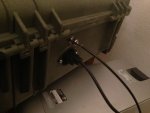
The inside I just used the scanner mounts and screwed them into the base of the pelican. The laptop rests on top.
To pass cables through, I used the following from amazon for power/coax:
http://www.amazon.com/gp/product/B00...ls_o04_s00_i01
http://www.amazon.com/gp/product/B00...ls_o04_s00_i00
I spliced the plug end of my surge protector and wired it up to the other end of the flanged inlet receptacle.
Out of concern for overheating during the winter months, I added the following, which just plugs into one of the spare USB ports:
http://www.amazon.com/gp/product/B00...ls_o00_s00_i01
This is not a mobile solution, as I don't plan on moving it or traveling with it, therefor I spent nearly no effort in securing the laptop or wires inside the pelican.
Hope that answers all of your questions!
__________________
Rob F.
KC2SQZ
|

12-27-2012, 7:33 AM
|
 |
Member
|
|

Amateur Radio
|
|
Join Date: Jun 2008
Location: Fern Park, Florida
Posts: 18
|
|
Quote:
Originally Posted by Fizz306
Mancow,
I'm already using Remote Desktop to access the box remotely, via a dyndns.org address. I can access it from my Macbook Air, iPhone, iPad, or basically any computer I have at work that has internet access. Is there anything that Teamview would do differently for me that I can't already do with Remote Desktop?
Thanks!
|
Not really, just an alternative way of getting in. For remote systems, I usually add Teamviewer as a backup just in case.
Very nice setup, I'm anxious to see how it works once deployed.
73,
|

12-29-2012, 11:06 PM
|
|
|
Looks pretty much fool proof! Nice job. Other than the above, the only other suggestion I would make is to use a multicoupler like a Stridsberg instead of the "T" connector. Being remote, it might make the difference in some situations.
__________________
VHF Astro Saber III
VHF A9 100w Spectra w/siren
UHF A9 45w Spectra w/siren
Pro-2022, 2006x4, 2026x2
Kenwood TM-721 & 733
Kenwood TS-430S
Kenwood TS-940S/AT
M/A Com 700ip
PSR-600
Icom R-2500
|

12-29-2012, 11:13 PM
|
|
|
See if your laptop's mobo would support Wake over LAN. If it can then you can get even more fancy and make it so you would really minimize your trips.
__________________
K7POL
Monitoring Snohomish County Emergency Radio System.
|

12-29-2012, 11:17 PM
|
|
|
I wish it did but no magic packet for me. the bios doesn't even support restarting after power failure, but life is full of compromises/disappointments. it's only a 10 minute trip from my house anyway...
__________________
Rob F.
KC2SQZ
|

12-29-2012, 11:19 PM
|
|
|
Then try to find an el-cheapo PC on a micro or mini ATX 
__________________
K7POL
Monitoring Snohomish County Emergency Radio System.
|
| Thread Tools |
Search this Thread |
|
|
|
| Display Modes |
Linear Mode
|
Posting Rules
|
You may not post new threads
You may not post replies
You may not post attachments
You may not edit your posts
HTML code is On
|
|
|
All times are GMT -5. The time now is 6:51 PM.
|
|
|
|
| |
|
|