Patriot2120
Member
This is what I get! I even tried downloading Lame_enc DLL and still wont open! Any ideas?
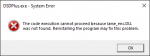



you downloaded lame_enc.dll, but is it in the working folder of the DSD+ instance you are trying to run?This is what I get! I even tried downloading Lame_enc DLL and still wont open! Any ideas?
View attachment 104748
Ok play stupid with me, working folder?you downloaded lame_enc.dll, but is it in the working folder of the DSD+ instance you are trying to run?

I think i got it!Working folder, in other words, do you have the lame file saved in the same folder where your DSDPlus.exe file is saved?
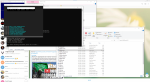
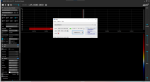 o to Zadig i now get this? Should i replace driver? CDC Interface 0?

You don’t get to use the one and only sdr plugged into the computer for 2 programs. Dsd will do all the work needed for cc and voice following
Ok I am a little confused. When in AirSpy, in the pull down menu for "Source" RTL-USB Dongle is not an option? What am i missing? I hit the play button and nothing connects.dsdplus has control of your dongle

Yes I did that.Did you run install-rtlsdr.bat that id part of the SDR# download? This has to be run in order to use dongles with SDR#.
in your "sdrsharp-x86-collapsible-panels" folder, do you see a file named rtlsdr.dll ?Yes I did that.
@echo off

mkdir tmp

echo Downloading RTLSDR Driver
httpget http://osmocom.org/attachments/download/2242/RelWithDebInfo.zip tmp\RelWithDebInfo.zip

echo Downloading Zadig
set zadig_url=b721/zadig-2.4.exe
ver | findstr /l "5.1." > NUL
if %errorlevel% equ 0 set zadig_url=v1.2.5/zadig_xp-2.2.exe
httpget http://github.com/pbatard/libwdi/releases/download/%zadig_url% zadig.exe

unzip -o tmp\RelWithDebInfo.zip -d tmp
move tmp\rtl-sdr-release\x32\rtlsdr.dll .

rmdir tmp /S /Q

pauseDSDPlus doesn't touch dongles. He'd have to be running FMP to tie up the dongle, but I don't see that in his screen grab.dsdplus has control of your dongle
I've never seen a dongle referred to as "CDC Interface". Is that really your SDR dongle? Proceed with caution...When i go to Zadig i now get this? Should i replace driver? CDC Interface 0?
good to know, i've never actually even ran the dsdplus.exe, when I started out last year everything dsdplus/sdr#/unitrunker looked so outdated, so when I decided to give dsdplus a go, I got the lifetime fastlane and have only ever used FMP'sDSDPlus doesn't touch dongles. He'd have to be running FMP to tie up the dongle, but I don't see that in his screen grab.
Well, i checked all of that and still no RTL-SDR USB option still not available! Not sure what the heck to do now!in your "sdrsharp-x86-collapsible-panels" folder, do you see a file named rtlsdr.dll ?
if not, in that folder you may need to run the install-rtlsdr.bat again
if you were to right click on the install-rtlsdr.bat and choose open with notepad, you would see
Code:@echo off mkdir tmp echo Downloading RTLSDR Driver httpget http://osmocom.org/attachments/download/2242/RelWithDebInfo.zip tmp\RelWithDebInfo.zip echo Downloading Zadig set zadig_url=b721/zadig-2.4.exe ver | findstr /l "5.1." > NUL if %errorlevel% equ 0 set zadig_url=v1.2.5/zadig_xp-2.2.exe httpget http://github.com/pbatard/libwdi/releases/download/%zadig_url% zadig.exe unzip -o tmp\RelWithDebInfo.zip -d tmp move tmp\rtl-sdr-release\x32\rtlsdr.dll . rmdir tmp /S /Q pause
so what it is doing is creating a temporary folding inside your "sdrsharp-x86-collapsible-panels" folder, then instructing the httpget.exe file in your folder to download RelWithDebInfo.zip & zadig.exe. it then instructs the unzip.exe file in your folder to unzip the RelWithDebInfo.zip into the tmp folder it previously created , it then grabs the rtlsdr.dll from within and places it inside your "sdrsharp-x86-collapsible-panels" folder, deletes the tmp folder it created and exits. you started out with 65 files with-in the "sdrsharp-x86-collapsible-panels" folder, you now have 67 files, zadig.exe & rtlsdr.dll being the two new ones.
sometimes even though you had previously ran the install-rtlsdr.bat, windows or a firewall/virus program may have interrupted it.
assuming you had previously had already ran zadig.exe and installed the driver and then ran sdrsharp version 1811 , then had choosen RTL-SDR USB (original) from the source drop menu and hit play, and it worked?
once you have ran the zadig.exe and have properly installed the driver, you should not have to run it again.
one thing I would do is create a folder on your desktop or documents folder, name it SDR Tools or something, download the RelWithDebInfo.zip into it
http://osmocom.org/attachments/download/2242/RelWithDebInfo.zip tmp\RelWithDebInfo.zip
unzip it , in it the will be a folder called rtl-sdr-release, there are tools in it, that as you progress with your sdr you will find a need for.


