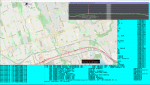
FMP-Map weirdness

Status
Not open for further replies.

DRL-XM43

Member
Joined
Jun 23, 2015
Messages
842
Reaction score
161
Location
Durham Region
So I launched the map as per usual and for a brief moment it showed the correct map and my location but then suddenly moved the map center to somewhere in the middle of Europe? After that it would not map to what FMP24 was doing.

So from a backup I replaced the config and dat files. What I notice is that when I launch map without FMP24/DSD+ running it has the right map tile and home location and says 17 points loaded. The mess occurs when I launch FMP24 combo - I see that when I do that it (map info) says it is connecting a server in Quebec and loads map points but then sends me off to Europe again?

Is this happening to others?
Is there something I need to check and fix?

Any insight on this is very welcome (PS I do not run the stunnel server anymore for a while)
 

KE5MC

Member
Premium Subscriber
Joined
Dec 19, 2002
Messages
1,262
Reaction score
217
Location
Lewisville, TX
I'm just diving deeper in my Fast Lane update. I notice that location is in a couple of different cfg files. I've not figured out how they are used or related, but maybe you have to change more than one cfg file. Posting more to see what help others my supply, but maybe my comment will help some... :)
 

DRL-XM43

Member
Joined
Jun 23, 2015
Messages
842
Reaction score
161
Location
Durham Region
I'm just diving deeper in my Fast Lane update. I notice that location is in a couple of different cfg files. I've not figured out how they are used or related, but maybe you have to change more than one cfg file. Posting more to see what help others my supply, but maybe my comment will help some... :)

I am trying to figure where Map gets home location from, the map center numbers in Map cfg do not seem to correlate to anything. LRRP Map seems to be working fine?
 

KE5MC

Member
Premium Subscriber
Joined
Dec 19, 2002
Messages
1,262
Reaction score
217
Location
Lewisville, TX
I'm using a RSPdx so FMPP.cfg is the file I have worked with and the last line of the cfg I changed to my location. I've not worked up to the map 'stuff' yet, but they seem to have something similar. Format looks better in notepad. :)

My FMPP.cfg file:
xxxxxxxx ; SDRPlay serial number list
3 ; sampling rate (3 Msps)
1024 ; spectrum window width
32 ; FFT size (16k, 32k, 64k)
10 ; spectrum update rate in Hz
5000 -6250 7500 12500 15000 25000 100000 ; step size table; units = Hz; negate default
. ; DSD+ path
.\FreqList.csv ; primary frequency list CSV path\filename
.\FreqList2.csv ; auxiliary frequency list CSV path\filename
miles and bearing ; miles or kilometers
99.9 ; search distance
33.0228 -097.0303 ; search origin
 

slicerwizard

Member
Joined
Sep 19, 2002
Messages
7,799
Reaction score
2,183
Location
Toronto, Ontario
Yep, pretty sure it's the search origin, e.g. your monitoring location, specified in FMP/FMPA/FMPP/FMP24 .cfg

You could try deleting the FMP-Map.dat file if things are wonky.


FMP Frequency Lists


Every time FMP is retuned, FMP will search the CSV files specified in FMP.cfg
for matching in-range frequency records. The CSV files can be created from
government data sources or Internet sites.

Each line in the files holds one TX frequency record or a record for
a TX/RX frequency pair. Each line contains eight fields. Text fields must
use enclosing quote characters. Fields must be separated by a comma and
a space.

Example data:

; TXfreq, RXfreq, Licensee, Location, Latitude, Longitude, first emission mode, second emission mode

461.1625, 466.1625, "example licensee", "example location", 35.1028, -80.9420, "16K0F3E", ""


When in-range matches are found, FMP displays them, sorted by distance,
in FMP's console window. FMP also passes the closest match to FMP-Map.


FMP-Map

FMP-Map is a near-clone of the LRRP.exe program. FMP-Map will display
your monitoring location and the database hits that FMP passes to it.

When accurate and comprehensive frequency lists are provided to FMP,
the transmitter locations that FMP-Map displays will usually show you
the correct signal sources.

Like LRRP.exe, FMP-Map uses a configuration file and the ? key brings up
a help overlay.
 

DRL-XM43

Member
Joined
Jun 23, 2015
Messages
842
Reaction score
161
Location
Durham Region
Thanks folks.

Things I have tried so far.
Delete Map dat file - result no change.

My CSV files for FMP24 seem fine - returning good info on hover and in display.
My FMP24 config looks fine with the correct lat long values.

LRRP Map is working as it should.

The problem happens as soon as I launch FMP24 - the Map info then shows connecting to server some addy info and then it downloads the bogus map tile(s) throwing home location into the middle of Europe.

I replace the Map config & dat files from backup, launch Map and it has the correct tile and 1 location from before. (It looks normal until I start FMP24?

This is driving me bonkers - willing to try anything - thnks for continued help.
 

slicerwizard

Member
Joined
Sep 19, 2002
Messages
7,799
Reaction score
2,183
Location
Toronto, Ontario
I never use FMP-Map, but I gave it a try just now and no issues. Set a home location in FMP24.cfg and tuned around for something local. Anything I tuned to resulted in a me here, it there map...

FMP-Map.png
 

DRL-XM43

Member
Joined
Jun 23, 2015
Messages
842
Reaction score
161
Location
Durham Region
Mine WAS working exactly like your images show.

I do not remember changing anything so I am stumped, it is easy to say it changed after the last update but I doubt it had anything to do with it.

This is the FMP-Map cfg (I don't understand what the 3rd line numbers are)

572 1022 ; first line must be map window height and width
11 ; second line must be map zoom level (0-18)
191126 146926 ; third line must be encoded map center
. ; fourth line must be path to OSM map data files
. ; fifth line must be path to FMP-Map.dat file
km ; sixth line must be miles or km plus optional bearing
----------------------------------------------------------------------------------------
This is FMP24 cfg

2.4 ; sampling rate (1.0, 2.0 or 2.4)
1024 ; spectrum window width
64 ; FFT size (16k, 32k, 64k)
15 ; spectrum update rate in Hz
5000 -6250 7500 12500 15000 25000 ; step size table; units = Hz; negate default
. ; DSD+ path
.\Canada.csv ; primary frequency list CSV
.\NY.csv ; auxiliary frequency list CSV
kilometers ; search units (miles or kilometers)
100 ; search distance
43.877523 -78.839893 ; search origin
-----------------------------------------------------------------------

When it was working and now - I zoomed out the now one so you can see where in the world it thinks I am.
 

Attachments

  • map-before.PNG
    map-before.PNG
    682.5 KB · Views: 18
  • map-now.PNG
    map-now.PNG
    702.5 KB · Views: 18
Last edited:

thewraith2008

Member
Joined
Nov 22, 2016
Messages
1,896
Reaction score
897
Mine WAS working exactly like your images show.

I do not remember changing anything so I am stumped, it is easy to say it changed after the last update but I doubt it had anything to do with it.

This is the FMP-Map cfg (I don't understand what the 3rd line numbers are)

572 1022 ; first line must be map window height and width
11 ; second line must be map zoom level (0-18)
191126 146926 ; third line must be encoded map center
. ; fourth line must be path to OSM map data files
. ; fifth line must be path to FMP-Map.dat file
km ; sixth line must be miles or km plus optional bearing
----------------------------------------------------------------------------------------
This is FMP24 cfg

2.4 ; sampling rate (1.0, 2.0 or 2.4)
1024 ; spectrum window width
64 ; FFT size (16k, 32k, 64k)
15 ; spectrum update rate in Hz
5000 -6250 7500 12500 15000 25000 ; step size table; units = Hz; negate default
. ; DSD+ path
.\Canada.csv ; primary frequency list CSV
.\NY.csv ; auxiliary frequency list CSV
kilometers ; search units (miles or kilometers)
100 ; search distance
43.877523 -78.839893 ; search origin
-----------------------------------------------------------------------

When it was working and now - I zoomed out the now one so you can see where in the world it thinks I am.
'search origin' is going to be your problem.

Look at the FMPx console window, look for the line: Base latitude/longitude:
Is the coordinates the same as whats in 'search origin' in 'FMP24.cfg'.

I bet it's showing:
Code:
Base latitude/longitude: 43.8775 23.0000


Make line in 'search origin' line in FMPx.cfg the following: (see below for more details about this)
Code:
43.8775 -78.8398               ; search origin


More details for those interested

Latest version of DSD+ (v2.228) has made internal changes to some of the external files used.

DSDPlus have failed to tell it's users of these changes which are causing havoc.

So far 'FMPx.cfg' and 'FMP-FreqList.csv' have been observed to have these changes.

In 'FMPx.cfg': The coordinates of the 'search origin' line.

The coordinates now MUST strictly follow this format:
Coordinates values are Latitude and Longitude
- Values MUST not be longer than x.xxxx or -x.xxxx (FMPx will pad if shorter)

If values are longer, then one of two errors occur.
1. If latitude uses x.xxxxzz, then the zz will be used as longitude value and real longitude value will be ignored.
- This will cause your position to be wrong and FMPx will not show frequency details from 'FMP-FreqList.csv' or your position in FMP-Map. LRRP may be affected too.

2. If latitude uses x.xxxx00, then the 00 will cause the 'Divide By Zero' error in FMPx.

The latitude and longitude value ranges are as follows:
Latitude: -90.0000 to 90.0000 (real range -89.9974 to 89.9974)
Longitude: -180.0000 to 180.0000 (real range -180.0000 to 180.0000)

If latitude or longitude value of "0" is required then 0.0001 is as close to 0 you can get before seeing the "Divide By Zero" error.

For some reason FMPx sees latitude and longitude value of 0 and any latitude value above -89.9974 or 89.9974 as been invalid. ('Divide By Zero' error)
Why is longitude range (-180.0000 to 180.0000) OK?
This is not a big deal unless you live at the poles or equator.


Those who create there own 'FMP-FreqList.csv', then problems can arise when the following is not done.

In 'FMP-FreqList.csv' The affected elements are 'TXfreq', 'Latitude', 'Longitude'
- 'TXfreq' this value MUST not be longer than x.xxxx (FMPx will pad if shorter)
- 'Latitude', 'Longitude' these values MUST not be longer than x.xxxx or -x.xxxx (FMPx will pad if shorter)

If 'TXfreq' values are longer, then entry will not be displayed.
If 'Latitude', 'Longitude' values are longer, then 'Latitude', 'Longitude' will interpreted incorrectly and the position could be
anywhere on map and most likely will be outside the 'search distance' set in 'FMPx.cfg'
 

DRL-XM43

Member
Joined
Jun 23, 2015
Messages
842
Reaction score
161
Location
Durham Region
THANK YOU!!! I am now out of Map jail :)

1) In FMP24 cfg I reduced the long lat by 2 digits, deleted FMP24 dat.
2) Deleted FMP Map dat.

Started both - issue solved.

THANKS AGAIN thewraith2008 !!!! Bravo for your help.
 
Status
Not open for further replies.
Top