Saqib

Member
Joined
Nov 2, 2025
Messages
40
Reaction score
3
I just Connected RTL-SDR with my PC and installed zadig driver. then i moved into DSD fastlane folder and run FMP24-CC.bat, where it has text inside "FMP24 -rc -i1 -o20001 -P0.0 -f935.0" and then 1R.bat "DSDPlus -r1 -i20001 >>1R-log.txt". but it gives error, sometime it gives error, "invalid argument parameter -i1" and after that "RTL-SDR device #1 is in use" while i doesn't used it anywhere else i just connected first time with my PC and install Zadig and just move towards DSD Fastlane folder. I've recently updates the files so everything is upto date. "RTL-SDR V4"
1765343455104.png
 

dave3825

* * * * * * * * * * * *
Premium Subscriber
Joined
Feb 17, 2003
Messages
10,123
Reaction score
5,713
Location
Suffolk County NY
It is seeing your dongle as being in use. Maybe a driver issue with your pc. Its also seeing 2 other sdr devices.

Try changing i1 to i0

FMP24 2.86


Usage:
FMP24 [options] Normal operation
FMP24 -h Show help

Options:
-i0 Use first available RTL SDR device [-i0]
-i<num> Use RTL SDR device specified by <num> (1-255)
-i"<ser>" Use RTL SDR device with specified serial number string
-o<num> Output audio device (1-255) [-o1]
-o<linkID> Output audio DSD+ Link ID (256-65535)
-oT<port> Output audio TCP port (256-65535)
 

Saqib

Member
Joined
Nov 2, 2025
Messages
40
Reaction score
3
It is seeing your dongle as being in use. Maybe a driver issue with your pc. Its also seeing 2 other sdr devices.

Try changing i1 to i0
i've tried those things but still facing the same issue.
and what about the 1R.bat "DSDPlus -r1 -i20001 >>1R-log.txt". where its showing error, "server is not listening on linked ID"
 

dave3825

* * * * * * * * * * * *
Premium Subscriber
Joined
Feb 17, 2003
Messages
10,123
Reaction score
5,713
Location
Suffolk County NY
If FMP24 does not launch, because its not seeing a free dongle, it not going to connect and will display that error.

To be clear, you edited your FMP24-CC.bat from,

FMP24 -rc -i1 -o20001 -P0.0 -f935.0
to
FMP24 -rc -i0 -o20001 -P0.0 -f935.0

How many dongles do you have total?


Can you post a pic of Device Manager with Universal Serial Bus devices expanded?

1765364821417.png
 

cg

Member
Premium Subscriber
Joined
Dec 13, 2000
Messages
5,121
Reaction score
1,606
Location
Connecticut
I would suggest using the single SDR method. You are starting a batch file that is using a SDR for Control and a different SDR for voice.

As Dave suggested, try i0 as that is the default for using the first available SDR:
Options:
-i0 Use first available RTL SDR device [-i0]
-i<num> Use RTL SDR device specified by <num> (1-255)
 

Saqib

Member
Joined
Nov 2, 2025
Messages
40
Reaction score
3
If FMP24 does not launch, because its not seeing a free dongle, it not going to connect and will display that error.

To be clear, you edited your FMP24-CC.bat from,

FMP24 -rc -i1 -o20001 -P0.0 -f935.0
to
FMP24 -rc -i0 -o20001 -P0.0 -f935.0

How many dongles do you have total?


Can you post a pic of Device Manager with Universal Serial Bus devices expanded?

View attachment 193657
below is the Screen shot of my Device manager.
 

Attachments

  • 1765422837294.png
    1765422837294.png
    23.3 KB · Views: 5

Saqib

Member
Joined
Nov 2, 2025
Messages
40
Reaction score
3
If FMP24 does not launch, because its not seeing a free dongle, it not going to connect and will display that error.

To be clear, you edited your FMP24-CC.bat from,

FMP24 -rc -i1 -o20001 -P0.0 -f935.0
to
FMP24 -rc -i0 -o20001 -P0.0 -f935.0

How many dongles do you have total?


Can you post a pic of Device Manager with Universal Serial Bus devices expanded?

View attachment 193657
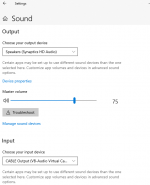
i did -i0 and it worked not, but i'm unable to hear any noise or sound or anything, why? while i've select input sound device and output sound device as, Cable Input(VB- Audio Virtual cable).
1765423336613.png
 

mtindor

FMP24 PRO USER
Database Admin
Joined
Dec 5, 2006
Messages
11,781
Reaction score
3,049
Location
Carroll Co OH / EN90LN
below is the Screen shot of my Device manager.

In Device Manager, right-click on Bulk-in, Interface, select the Driver tab, then click on Driver Details

What driver does it say is installed? Should be winusb.sys

Instead of using the batch file just run (for a test): fpm24 -i0

1. open command prompt
2. navigate to your dsdplus folder
3. type: fmp24 -i0 <hit enter>

What happens? What does the command prompt window show?
 

mtindor

FMP24 PRO USER
Database Admin
Joined
Dec 5, 2006
Messages
11,781
Reaction score
3,049
Location
Carroll Co OH / EN90LN
i did -i0 and it worked not, but i'm unable to hear any noise or sound or anything, why? while i've select input sound device and output sound device as, Cable Input(VB- Audio Virtual cable).
View attachment 193696

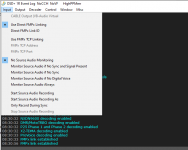
Your INPUT should be DIRECT LINKING
Your OUTPUT should be your SPEAKERS

Those are adjustable in the DSDPlus menu.

You aren't going to hear anything by default in FMP24. FMP24 is the SDR that feeds the audio over TCP to DSDPlus

FMP24-CC.bat
1R.bat

In DSDPlus main event window menu system:

INPUT --> should show direct linking
OUTPUT --> should show speakers

INPUT --> No source Audio monitoring (it won't monitor the adio being fed in by FMP24)
- you can change this to various options. Just look in the INPUT menu

Mike
 

Saqib

Member
Joined
Nov 2, 2025
Messages
40
Reaction score
3
1765423890712.png
Your INPUT should be DIRECT LINKING
Your OUTPUT should be your SPEAKERS

Those are adjustable in the DSDPlus menu.

You aren't going to hear anything by default in FMP24. FMP24 is the SDR that feeds the audio over TCP to DSDPlus

FMP24-CC.bat
1R.bat

In DSDPlus main event window menu system:

INPUT --> should show direct linking
OUTPUT --> should show speakers

INPUT --> No source Audio monitoring (it won't monitor the adio being fed in by FMP24)
- you can change this to various options. Just look in the INPUT menu

Mike
1765423909769.png1765423947307.png
 

mtindor

FMP24 PRO USER
Database Admin
Joined
Dec 5, 2006
Messages
11,781
Reaction score
3,049
Location
Carroll Co OH / EN90LN
Your INPUT should be DIRECT LINKING
Your OUTPUT should be your SPEAKERS

Those are adjustable in the DSDPlus menu.

You aren't going to hear anything by default in FMP24. FMP24 is the SDR that feeds the audio over TCP to DSDPlus

FMP24-CC.bat
1R.bat

In DSDPlus main event window menu system:

INPUT --> should show direct linking
OUTPUT --> should show speakers

INPUT --> No source Audio monitoring (it won't monitor the adio being fed in by FMP24)
- you can change this to various options. Just look in the INPUT menu

Mike

Once you have FMP24 and DSDPLus up and "talking" to each other, you can mouse-focus on FMP24 and then just type in a frequency and hit enter. You'll see the frequency being typed in at the top of the FMP24 window. You can adjust gain with G / g . You can adjust bandwidth with B / b.
 

mtindor

FMP24 PRO USER
Database Admin
Joined
Dec 5, 2006
Messages
11,781
Reaction score
3,049
Location
Carroll Co OH / EN90LN

Saqib

Member
Joined
Nov 2, 2025
Messages
40
Reaction score
3
nothing happpened.
Once you have FMP24 and DSDPLus up and "talking" to each other, you can mouse-focus on FMP24 and then just type in a frequency and hit enter. You'll see the frequency being typed in at the top of the FMP24 window. You can adjust gain with G / g . You can adjust bandwidth with B / b.

Once you have FMP24 and DSDPLus up and "talking" to each other, you can mouse-focus on FMP24 and then just type in a frequency and hit enter. You'll see the frequency being typed in at the top of the FMP24 window. You can adjust gain with G / g . You can adjust bandwidth with B /noth
 

Saqib

Member
Joined
Nov 2, 2025
Messages
40
Reaction score
3
What do you WANT to happen?

IF you want to HEAR what FMP24 is hearing, go into DSDPlus -- INPUT --> Monitor Source Audio Always
I have a DMR, whose frequency is set on D145.500 Ch:1, i want to get its signal and want to decode it. i also want to record it IQ.
 

mtindor

FMP24 PRO USER
Database Admin
Joined
Dec 5, 2006
Messages
11,781
Reaction score
3,049
Location
Carroll Co OH / EN90LN
And you can verify whether you are getting audio in from FMP24 into DSDPlus by going to DSDPlus --> Window --> Source Audio - Reset Location and Size. that will allow you to see the source audio window
 

mtindor

FMP24 PRO USER
Database Admin
Joined
Dec 5, 2006
Messages
11,781
Reaction score
3,049
Location
Carroll Co OH / EN90LN
I have a DMR, whose frequency is set on D145.500 Ch:1, i want to get its signal and want to decode it. i also want to record it IQ.

mouse-focus on FMP24. Type in 145.500 and press enter
- it will show 145.500 at the top of fmp24

You should start seeing something happen in the DSDPlus Event Window (the main window with the menu) IF the DMR is currently active.

If the DMR is a radio right next to you, you might swamp / overload the frontend of the dongle and it may not decode
 

mtindor

FMP24 PRO USER
Database Admin
Joined
Dec 5, 2006
Messages
11,781
Reaction score
3,049
Location
Carroll Co OH / EN90LN
I have a DMR, whose frequency is set on D145.500 Ch:1, i want to get its signal and want to decode it. i also want to record it IQ.

Once you have FMP24 <--> DSDPlus talking to each other, are tuned to an active DMR ffrequency, and can see DMR information at the bottom of the main DSD EVent window, then you can proceed to messing with recording IQ.

You record IQ via FMP24. In the command prompt window that corresponds to FMP24 (there is a command window associated with FMP24 and one associated with DSDPlus), do this:

1. open the command window for fmp24 so that you ccan see it
2. mouse-focus on FMP24 app
3. hit ?
4. Look at the command window for help
4. press R
5. Look at the bottom of the command window

I will indicating that recording to .WAV and .IQ has started and the top of FMP24 will say "RECORDING"

6. press R again to stop the recording
 

Saqib

Member
Joined
Nov 2, 2025
Messages
40
Reaction score
3
Yes now i got the data, but unable to hear decoded voice, also tell me how can i record its iq?
1765424877467.png
mouse-focus on FMP24. Type in 145.500 and press enter
- it will show 145.500 at the top of fmp24

You should start seeing something happen in the DSDPlus Event Window (the main window with the menu) IF the DMR is currently active.

If the DMR is a radio right next to you, you might swamp / overload the frontend of the dongle and it may not decode
 

Saqib

Member
Joined
Nov 2, 2025
Messages
40
Reaction score
3
Once you have FMP24 <--> DSDPlus talking to each other, are tuned to an active DMR ffrequency, and can see DMR information at the bottom of the main DSD EVent window, then you can proceed to messing with recording IQ.

You record IQ via FMP24. In the command prompt window that corresponds to FMP24 (there is a command window associated with FMP24 and one associated with DSDPlus), do this:

1. open the command window for fmp24 so that you ccan see it
2. mouse-focus on FMP24 app
3. hit ?
4. Look at the command window for help
4. press R
5. Look at the bottom of the command window

I will indicating that recording to .WAV and .IQ has started and the top of FMP24 will say "RECORDING"

6. press R again to stop the recording
Got it.
 
Top