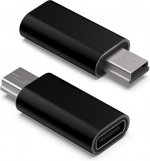
I unplug/plug from the Micro USB port for programing. I'm thinking I may have damaged the soldering inside. Do I to send it in for repair? Same for my G5. Any other ports I can use for programing.
You can always take out the SD card and use in a SD card reader. It's not as easy doing it to a SDS100 as a SDS200 but I wouldn't expect that the need to program comes that often. As you mention micro port it has to be the SDS200 so super simple to take out and insert the SD card.
If you get that USB micro port fixed then I would suggest to use a magnetic USB tip that stays permanently in the connector and you only pull the cable and it detaches from its magnetic connector.
As @Ubbe suggested, this is what I am using on my G5. So far, it is working out great with no issues. Note: it is a 5-Pin adapter which matches the G5. Not sure about the Uniden SDS series as I don't own one nor know the specs.
Wanted to share this 5-Pin Magnetic Micro-USB adapter option in case anyone is leery of damaging their Micro-USB connector because of high usage and looking for an alternative. Here is the kit I ordered through Amazon (not sure the red cable option is still available). I like that it offers...
I noticed that the cable I linked to only do charging, so do not get that version. It needs to be a cable that has data transfer capabilities.
Here's another that has data pins.