Multiple repeater frequencies in DMR OFT (DMR One Frequency) possible ?

Status
Not open for further replies.

rumcajs_tr

Member
Joined
Feb 16, 2014
Messages
264
Reaction score
87
Location
Europe, Czech Republic
Hi, I want to monitor a big number of DMR repeaters operated here in central Europe by a single company. There are about 23 frequency pairs (in/out) and the repeaters are distributed along the whole country. In uniden, they show DMR so they appear as a separate one frequency repeater each. They are not CON+ or CAP+ or DT3.
How to program these repeaters into into sentinel in a most efficient way?
I have 3 options:

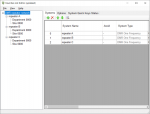
1. Create new favorite list for this, then create a separate system for each repeater and in this system create one site and in this site enter one of the frequencies. Repeat this for each frequency. But this means I can only have one frequency for one site and one department.
pos_4.png

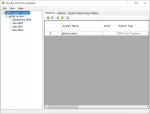
2. Create new favorite list for this, then create one global system for the whole set of repeaters and then in this one global system create multiple sites (for each frequency one site with only one frequency). This means I can have all repeaters in one global system with different sites and one common department.
pos_2.png

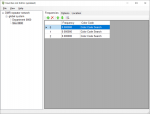
3. Create new favorite list for this, then create one global system for the whole set of repeaters and then in this one global system create only one site with multiple frequencies.. This means I can have all repeaters in one global system with single sites and one common department.
pos_3.png

Which approach would you choose? I thing that the first possibility is waste of space and I can't use common department for all the repeaters. The last one is the one that I am not sure will work as I never tested, how the scanner will work with multiple frequencies in one site. So I think I should go with the second possibility - creating one global system with one department but multiple sites (for each frequency one site).

Right now, I am not interested in following specific unit IDs or TGs, so everything shall be set to search.

Any help appreciated.
Thanks and Happy New Year !!!
 

jonwienke

More Info Coming Soon!
Joined
Jul 18, 2014
Messages
13,409
Reaction score
3,728
Location
VA
One OFT system, multiple Sites corresponding to physical transmitter locations, and Departments organized by city/region/area. ID Search ON to capture unknown talkgroups so you can label and add to the appropriate Department. You can add many frequencies to a "one frequency" system site, and many sites.
 

rumcajs_tr

Member
Joined
Feb 16, 2014
Messages
264
Reaction score
87
Location
Europe, Czech Republic
Thanks, jonwienke! So the right way is to go with one OFT system.
Just to be clear - is there any diference between multiple sites with one frequency each and single site with multiple frequencies in this site?
 

jonwienke

More Info Coming Soon!
Joined
Jul 18, 2014
Messages
13,409
Reaction score
3,728
Location
VA
If you don't use Location Control, the scanner doesn't care.

But if you use Location Control, you want to group frequencies into sites by physical location, so you don't have to enter a location and service radius for every frequency, and so all the frequencies at a site get turned on and off together as you go in or out of range.
 

rumcajs_tr

Member
Joined
Feb 16, 2014
Messages
264
Reaction score
87
Location
Europe, Czech Republic
Thank for explanation. I don't use location control ... so for first identification of the system, it is easier for me just to copy-paste all the repeater frequencies into one site. Later, I will see. Thanks again.
 

jonwienke

More Info Coming Soon!
Joined
Jul 18, 2014
Messages
13,409
Reaction score
3,728
Location
VA
Thank for explanation. I don't use location control ... so for first identification of the system, it is easier for me just to copy-paste all the repeater frequencies into one site.
That is totally fine. You'll eventually want to split frequencies up by actual site, though, so you can scan only site frequencies within reception range.
 

Ubbe

Member
Joined
Sep 8, 2006
Messages
10,599
Reaction score
4,380
Location
Stockholm, Sweden
If you want to make one system or seperate systems for each frequency depends of if the talkgroups are unique to the whole system or they use the same TG number on different frequencies but they have different uses depending of the frequency/site location.

If the company program radios to only use one site they probably let them use simple TG numbers like TG10 TG20 and so on and then use those same TG numbers for another site that have another group of toally different users that stays stationary and only are allowed to use that site.
Radioamateurs on DMR use single site repeaters that indicates as only DMR and not con or cap+ but are connected together so that one user can speak with another user on a different repeater. Then they must use an unique TG for the system.

To make it easier for you I suggest that you make an OFT system and one site for each frequency, so that you can name tag the frequency so you'll know what TG are used with each frequency. You can even put the TG number as they get active in the site name tag to keep track of what's happening.

/Ubbe
 

rumcajs_tr

Member
Joined
Feb 16, 2014
Messages
264
Reaction score
87
Location
Europe, Czech Republic
Hello Ubbe, I think my case is more similar to the Brandmeister HAM network. In my case, this is a radio network of one of biggest power supply distributors. They operate over whole country and have diiferent repeaters in different parts of the country. I think that the repeaters are somehow connected even if they indicate DMR only. So I am 99% sure that the IDs are unique.
I can't monitor all the network from my home QTH but I do a lot of traveling so I will slowly start to gather the IDs. But even though the IDs are unique, I think it may be later a good idea to separate the repeaters to unique sites (one frequency per site) as you suggest.
I just found an interesting SDS200 bug - when I changed the default names of the sites (Site001 etc) and I named them just by frequency (e.g. "152.625") without any alphanumeic characters, the scanner refused to scan the system. When I reverted the names to default, It scans again. Maybe I should test adding some letters instead of numbers only?
 

rumcajs_tr

Member
Joined
Feb 16, 2014
Messages
264
Reaction score
87
Location
Europe, Czech Republic
I just found an interesting SDS200 bug - when I changed the default names of the sites (Site001 etc) and I named them just by frequency (e.g. "152.625") without any alphanumeic characters, the scanner refused to scan the system. When I reverted the names to default, It scans again. Maybe I should test adding some letters instead of numbers only?
Ok, just came back to confirm, that when I name the site "152.625 MHz", it is scanning OK, while just "152.625" fails - "nothing to scan" ... strange
 

Ubbe

Member
Joined
Sep 8, 2006
Messages
10,599
Reaction score
4,380
Location
Stockholm, Sweden
It might be the same bug in BCD536, not a surprise as it is almost the same code being used, as almost all my site names also includes characters other than digits. But a few sites have only digits and I have never actually heard anything from those systems although they have been active while doing frequency range searches.

You know about the bug in the custom serch ranges that if you change the names from Custom 1 and Custom 2 and so on to something else they will not display all the data when they decode digital traffic. This migth be something similar that the firmware code are written incorrectly and filters out any character values below A(41hex) and then assumes incorrectly that the site does not exists and goes to the next one in the system.

Good catch. I will immediatly change my site names with all numbers and see if they start to receive anything in normal scan.

/Ubbe
 

rumcajs_tr

Member
Joined
Feb 16, 2014
Messages
264
Reaction score
87
Location
Europe, Czech Republic
You know about the bug in the custom serch ranges that if you change the names from Custom 1 and Custom 2 and so on to something else they will not display all the data when they decode digital traffic.
Hi, didn't know about this speciffic issue. I know that naming analog channels with other than default names, it doesn't diplay digital info at all but not about the Custom search ranges... will give it a try.
 

rumcajs_tr

Member
Joined
Feb 16, 2014
Messages
264
Reaction score
87
Location
Europe, Czech Republic
Yes, just go to channel settings, edit name, press "." (dot) few times to clear the current name, then save by "E", the scanner asks if you want to use default channel name, pres "E". After this, when scanner stops on such channel, it shows frequency as a default name and if the signal is digital, it will display TG, UID, CC, Slot, NetID, etc...

You can of course do it for multiple channels by Sentinel by copy-paste just the freqs into a department, but not pasting the names. Just the first line need a name, you can erase it later in the scanner using above procedure.
 

Ubbe

Member
Joined
Sep 8, 2006
Messages
10,599
Reaction score
4,380
Location
Stockholm, Sweden
Yes, just go to channel settings, edit name, press "." (dot) few times to clear the current name, then save by "E"
I just verified that on a channel and instantly got full info of the transmitted digital parameters!

So many bugs and so little resources at Uniden to fix them all.

/Ubbe
 
Status
Not open for further replies.
Top