

You are using an out of date browser. It may not display this or other websites correctly.
You should upgrade or use an alternative browser.
You should upgrade or use an alternative browser.
ProScan: Proscan no audio with direct LAN connection from SDS200 to Computer
- Thread starter EDscanner
- Start date
- Status
- Not open for further replies.


- Joined
- Jan 5, 2003
- Messages
- 13,921
- Reaction score
- 9,679
- Location
- Retired 40 Year Firefighter NW Tenn
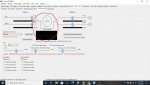
You have to go to the AUDIO SECTION and check mark LOOPBACK
- Joined
- Jan 5, 2003
- Messages
- 13,921
- Reaction score
- 9,679
- Location
- Retired 40 Year Firefighter NW Tenn
What is your PROSCAN Source Audio?
Do you hear the Audio through your computer speakers?
Until you hear the Audio through the computer speakers you will never hear audio through the Servers.
Do you hear the Audio through your computer speakers?
Until you hear the Audio through the computer speakers you will never hear audio through the Servers.

EDscanner
Select RSOIP in the Monitor & Test tab since that service is set to URL.
Select RSOIP in the Monitor & Test tab since that service is set to URL.
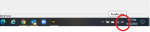
Realizing after the editing window is closed that I grabbed the wrong screenshot...that's @buddrousa, not the OP....you have the audio on your computer muted. look at your taskbar.View attachment 112579
:le sigh:
Double Click To Change Scope Mode
Thats how I originally had it set up but still not audio. One thing to mention I am not using a router rather its a direct ethernet connection to the computer. Not sure if this is possible but I dont want to run a cable from the router to my scanner on the other side of the house....you have the audio on your computer muted. look at your taskbar.View attachment 112579
One thing to mention I am not using a router rather its a direct ethernet connection to the computer. Not sure if this is possible but I dont want to run a cable from the router to my scanner on the other side of the house.
Virtual display shows so probably not that.
Try power cycling the scanner.
{edit} Is the Comm Port set to a serial port or URL?
One thing to mention I am not using a router rather its a direct ethernet connection to the computer. Not sure if this is possible but I dont want to run a cable from the router to my scanner on the other side of the house.
Virtual display shows so probably not that.
Try power cycling the scanner.
{edit} Is the Comm Port set to a serial port or URL?
[/QUOTE]
I've tried power cycling several times, and disabling the LAN on the scanner turning off and back on. Been all throughout the settings in Proscan. I'm not sure if there is something blocking the audio in windows 10. Checked inbound ports for Proscan in the firewall and they are set to allow all ports.
That might be why it's not working. Can you go to the scanner menu Settings - LAN Settings - Show IPs then see if the scanner acquired an IP Address or it shows 0.0.0.0
Virtual display shows so probably not that.
Try power cycling the scanner.
{edit} Is the Comm Port set to a serial port or URL?
I've tried power cycling several times, and disabling the LAN on the scanner turning off and back on. Been all throughout the settings in Proscan. I'm not sure if there is something blocking the audio in windows 10. Checked inbound ports for Proscan in the firewall and they are set to allow all ports.
[/QUOTE]
Com port is set to URL. I have full control of the scanner. I can control from the computer, update favorites, etc. Just cant get the audio to work.
I've tried power cycling several times, and disabling the LAN on the scanner turning off and back on. Been all throughout the settings in Proscan. I'm not sure if there is something blocking the audio in windows 10. Checked inbound ports for Proscan in the firewall and they are set to allow all ports.
Maybe the network guru's can chime in. One difference between the data LAN and the Audio LAN is the data uses UDP only and the audio uses TCP and UDP. I'm not sure if that has anything to do with it but could be part of the puzzle.Com port is set to URL. I have full control of the scanner. I can control from the computer, update favorites, etc. Just cant get the audio to work.
So here are the Port settings for ProScan both TCP and UDPMaybe the network guru's can chime in. One difference between the data LAN and the Audio LAN is the data uses UDP only and the audio uses TCP and UDP. I'm not sure if that has anything to do with it but could be part of the puzzle.


Yes IP is correct because I can connect to the scanner remotely and have full control. If you look at the first photo I posted in this forum you will see I am connected to audio with no errors in the TCP or UDP but there is no sound coming through.Is your ip set right
Try temporary disable any Internet Security or Antivirus software to help narrow down the problem.
- Joined
- Jan 5, 2003
- Messages
- 13,921
- Reaction score
- 9,679
- Location
- Retired 40 Year Firefighter NW Tenn
The Audio Address looks like this.
rtsp://123.123.123.123/au:scanner.au
rtsp://123.123.123.123/au:scanner.au

- Joined
- Aug 2, 2013
- Messages
- 2,567
- Reaction score
- 1,653
With those settings, why even have a firewall? You’re opening up all TCP and UDP ports. LolSo here are the Port settings for ProScan both TCP and UDP
This is the default setting when you install ProScan. I didn’t make changes.With those settings, why even have a firewall? You’re opening up all TCP and UDP ports. Lol
Not installing but clicking the 'Allow access' button in Windows Defender.This is the default setting when you install ProScan. I didn’t make changes.
- Status
- Not open for further replies.
Similar threads
- Replies
- 0
- Views
- 238

- Replies
- 3
- Views
- 473
- Replies
- 3
- Views
- 272
- Replies
- 1
- Views
- 247

- Replies
- 0
- Views
- 169