Hello, I have a large list of unit ids on my states system p25 phase 2, for my department written down that I have collected over a few days and am trying to upload them to my scanner, (bcd996p2) But After 30 mins of google searching, I am unable to find a way to get that to work. Is there someone that could please help me? Thanks


You are using an out of date browser. It may not display this or other websites correctly.
You should upgrade or use an alternative browser.
You should upgrade or use an alternative browser.
BCD325P2/BCD996P2: Unit Id's Help
- Thread starter drew7262
- Start date
- Status
- Not open for further replies.

What software are you using to program your scanner? ARCXT? You might be able to add them through that way. I know I have added them on a Whistler 1065 and a Radioshack Pro -197 through ARC500. Just have to set as private talkgroup but I looked and did not see that option in ARCXT. ProScan might also be able to add Unit Id's. There was a thread started on it BCD996P2: - Getting Started with UID's/RID's
I don't have a 996P2 to mess with at the moment so I probably can't be of much more help.
I don't have a 996P2 to mess with at the moment so I probably can't be of much more help.
Last edited:

- Joined
- Jun 30, 2020
- Messages
- 2,019
- Reaction score
- 2,584
In Sentinel, Edit your Favorites List, select the System, then click on the UNIT ID tab and add them there.

In Sentinel, Edit your Favorites List, select the System, then click on the UNIT ID tab and add them there.
Is it possible to import them using a csv file?
ka3aaa
Member
the uid's and rid's are part of each system under a seperate group that you program into the radio, and more info can be found in the users manual.
- Joined
- Jun 30, 2020
- Messages
- 2,019
- Reaction score
- 2,584
Is it possible to import them using a csv file?
Directly, no. But if you are familiar enough with programs such as Excel you can import CSV into that, manipulate the data to allow for the proper columns, then copy-n-paste that into Sentinel. You only have to worry about the first two columns (tag and UID), so it's a pretty easy manipulation.

I think you can program it as a TGID, but use an “i” I front of the radio id. So if RID is 12356 program it as i123456. Then put the alpha text.
ka3aaa
Member
proscan is better than freescan and does a lot more.
Does it matter if you program the unit ids? I also run the 996p2 with pro scan I love it!proscan is better than freescan and does a lot more.

I think you can program it as a TGID, but use an “i” I front of the radio id. So if RID is 12356 program it as i123456. Then put the alpha text.
Yes, this is correct, you program them like you would a talk group number, but put a lowercase "i" in front of the number along with your alpha tag just as you would a talk group. I just usually program them in the same "group" like you would a "channel" along with the respective TGID's, but they will show up as an alpha on any TG in the same system.
Got this to work. thanks to all for your helpI think you can program it as a TGID, but use an “i” I front of the radio id. So if RID is 12356 program it as i123456. Then put the alpha text.
Yeah - the x96 series requires an "i" at the front of the radio unit ID. They fixed that in later models (as in removing the requirement for an i) - those that are programmed with Sentinel.
While you can put Radio IDs in any group, most folks here will have a separate group just specifically for Unit IDs.
While you can put Radio IDs in any group, most folks here will have a separate group just specifically for Unit IDs.
- Joined
- Jun 30, 2020
- Messages
- 2,019
- Reaction score
- 2,584
Yes, I missed the 996P2 tag. What others have said will work.
The Radio ID feature was not "original equipment" on the x96 series of scanners. It came later on as part of a firmware upgrade. I suspect they were kind of tinkering with that notion and refined it in later models.

Can anyone post a photo of what the screen looks like when this is done successfully? Also is there a character limit? Thanks.
Can anyone post a photo of what the screen looks like when this is done successfully? Also is there a character limit? Thanks.
Here you go. I programmed my x96 scanners using ARC-XT. I have Unit IDs as a separate group, though it is not required - just makes it easier and fits my OCD better. I knew the scheme for the radio IDs, so I could "translate" them without having to do some logging, etc. (at least in the beginning). The i precedes the actual 6 digit radio ID. The system around here was 1 means it is a fire radio, next four digits was the call number and the last unit was 0 for mobiles and 1-9 for portables. So my old call number was "8001" and the Unit ID for my portable was 180011, which would be programmed into the scanner as "i180011".
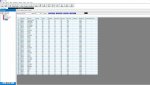

Display TGID L/O Pri Alt Tone Alt Level Alt Color Alt Patern Vol Adj AudioType Num Tag Rec Out CommentIm trying to make it so that I can essentially alpha tag the unit id's rather than just get a number
Dispatch 1 False False 0 0 Off On 0 All 1 False
Dispatcher i1 True False 0 0 Off On 0 All NONE False
Car88 i1188 False False 0 0 Off On 0 All 1 False
Car 20 i1120 False False 0 0 Off On 0 All NONE False
Car 21 i1121 False False 0 0 Off On 0 All NONE False
Car 22 i1122 False False 0 0 Off On 0 All NONE False
Car 23 i1123 False False 0 0 Off On 0 All NONE False
Car 24 i1124 False False 0 0 Off On 0 All NONE False
Car 25 i1125 False False 0 0 Off On 0 All NONE False
Car 26 i1126 False False 0 0 Off On 0 All NONE False
this is how I did it. Conventional Digital system I programmed as Digital Trunk and created TGID with Display for each UID I knew about
- Status
- Not open for further replies.
Similar threads


- Replies
- 0
- Views
- 280

- Replies
- 2
- Views
- 375