


As a died-in-the-wool Apple fan-boi who happily bathes in the Apple Kool-Aid (yuk!) I have all kinds of Apple devices. iPads, iPhones, Macs and AppleTVs infest my home, along with just a few Uniden scanners...
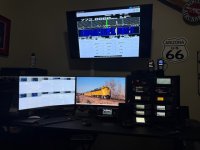
With the public release of the SDS150 and the U-Aware app I am now projecting the display of my SDS150 to my 50-inch TV in my office via my office iPad and using AirPlay.
For those unaware, Airplay is Apple's solution that allows you to project one device to another. I use it mostly to view my iPhone on a larger screen to share videos and pictures with the crowd in the house. It really works great. I am sure that there is similar solutions for the Android folks, but not having any of these devices I can't confirm that.
In my office I have an older iPad that I use for things like Zello, controlling home automation and occasional TV watching when I retire to my recliner for an afternoon nap. I also have AppleTV streaming devices on all my TV's in the house, including the ones above my computer and radio desks here in my office. By running U-Aware on the iPad and streaming that to the TV I can view the SDS150 in all it's large-screen glory. I can also mess with the wife and project it to the big TV in the living room while she is watching her shows. I don't however, as the last time I did I slept in the garage for a week.
Another alternative would be to use ProScan and connect my PC to the TV via an HDMI or DP cable and use it as a monitor but that would require a long cable and present other issues. That would allow me to use the mouse and keyboard to control it as it would just be another monitor but my way works better for me. I can do all this on the Mac if I wanted as I can run Windows on it via Parallels and ProScan works fine that way but I do keep a PC for running my radio stuff.
Of course there is no way to control the scanner from the AppleTV, it is view only but I can control the radio either from the iPad or the radio itself.
A normal Scan window:

Waterfall Display (I really like this view!):

Overall view:
With the public release of the SDS150 and the U-Aware app I am now projecting the display of my SDS150 to my 50-inch TV in my office via my office iPad and using AirPlay.
For those unaware, Airplay is Apple's solution that allows you to project one device to another. I use it mostly to view my iPhone on a larger screen to share videos and pictures with the crowd in the house. It really works great. I am sure that there is similar solutions for the Android folks, but not having any of these devices I can't confirm that.
In my office I have an older iPad that I use for things like Zello, controlling home automation and occasional TV watching when I retire to my recliner for an afternoon nap. I also have AppleTV streaming devices on all my TV's in the house, including the ones above my computer and radio desks here in my office. By running U-Aware on the iPad and streaming that to the TV I can view the SDS150 in all it's large-screen glory. I can also mess with the wife and project it to the big TV in the living room while she is watching her shows. I don't however, as the last time I did I slept in the garage for a week.
Another alternative would be to use ProScan and connect my PC to the TV via an HDMI or DP cable and use it as a monitor but that would require a long cable and present other issues. That would allow me to use the mouse and keyboard to control it as it would just be another monitor but my way works better for me. I can do all this on the Mac if I wanted as I can run Windows on it via Parallels and ProScan works fine that way but I do keep a PC for running my radio stuff.
Of course there is no way to control the scanner from the AppleTV, it is view only but I can control the radio either from the iPad or the radio itself.
A normal Scan window:
Waterfall Display (I really like this view!):
Overall view:


