BCD325P2/BCD996P2: Alvin Texas DMR

Status
Not open for further replies.

K5mow

Member
Joined
Apr 20, 2019
Messages
121
Reaction score
64
Location
Alvin TX
Good afternoon everyone

I am thinking about upgrading my Uniden BCD996P2 to DMR. I would like to listen to Alvin Texas schools buses. My question is. I am using the ARC software for this radio. In the software when you go to Internet radio reference. Put in Texas then Brazoria County then click on conventional systems. The Alvin school bus is DMR. When you transfer it to the software so you can upload it to the scanner it puts it in as a conventional frequency’s not DMR. Will I need to change this before uploading it to the radio or if the DMR is open on the radio will it recognize the transmission as DMR. I hope I am explaining this right. I believe these frequencies are not a trunk system just individual frequencies using DMR.

thank you Roger
 

hiegtx

Mentor
Premium Subscriber
Joined
May 8, 2004
Messages
11,848
Reaction score
4,234
Location
Dallas, TX
Good afternoon everyone

I am thinking about upgrading my Uniden BCD996P2 to DMR. I would like to listen to Alvin Texas schools buses. My question is. I am using the ARC software for this radio. In the software when you go to Internet radio reference. Put in Texas then Brazoria County then click on conventional systems. The Alvin school bus is DMR. When you transfer it to the software so you can upload it to the scanner it puts it in as a conventional frequency’s not DMR. Will I need to change this before uploading it to the radio or if the DMR is open on the radio will it recognize the transmission as DMR. I hope I am explaining this right. I believe these frequencies are not a trunk system just individual frequencies using DMR.

thank you Roger
I'm not using the ARC software; I use ProScan.

Both the bus frequencies for Alvin ISD are conventional frequencies. However, they are using talkgroups, and I see that frequency 453.0125 is used for two different channels. If you program these as conventional, the scanner can receive them as long as you have the DMR upgrade & enter the correct frequency & color code. You would not see the talkgroup and on 453.0125, you would hear both 'channels', but without any indication of which is in use. You would be better off to program these as One Frequency Trunked systems. Doing it that way, for frequency 453.0125, you can program the separate talkgroups that both use that frequency.

ProScan, when you do a web import of this type of frequency, asks if you want to create an OFT system. If the ARC software is not automatically offering that option, you can still create an OFT system manually.
 

K5mow

Member
Joined
Apr 20, 2019
Messages
121
Reaction score
64
Location
Alvin TX
I'm not using the ARC software; I use ProScan.

Both the bus frequencies for Alvin ISD are conventional frequencies. However, they are using talkgroups, and I see that frequency 453.0125 is used for two different channels. If you program these as conventional, the scanner can receive them as long as you have the DMR upgrade & enter the correct frequency & color code. You would not see the talkgroup and on 453.0125, you would hear both 'channels', but without any indication of which is in use. You would be better off to program these as One Frequency Trunked systems. Doing it that way, for frequency 453.0125, you can program the separate talkgroups that both use that frequency.

ProScan, when you do a web import of this type of frequency, asks if you want to create an OFT system. If the ARC software is not automatically offering that option, you can still create an OFT system manually.

Thank you very much for your reply. I decided to do the DMR upgrade on my SDS 200. I have it programmed in as the standard conventional and it is working great. I would like to however set it up and create OFT System manually. Would you be able to tell me how to do this.

thank you Roger
 

tvengr

Well Known Member
Joined
Feb 10, 2019
Messages
11,544
Reaction score
4,934
Location
Baltimore County, MD
I am thinking about upgrading my Uniden BCD996P2 to DMR. I would like to listen to Alvin Texas schools buses. My question is. I am using the ARC software for this radio.
Here are 2 ARC-XT files for the 2 frequencies for the Alvin school buses. Save the attached zipped file to your computer and extract. Open the 2 extracted files with ARC-XT and Upload to Scanner. You can assign the same system quick key to both sites.
 

Attachments

  • Alvin Buses.zip
    1.1 KB · Views: 0

K5mow

Member
Joined
Apr 20, 2019
Messages
121
Reaction score
64
Location
Alvin TX
Here are 2 ARC-XT files for the 2 frequencies for the Alvin school buses. Save the attached zipped file to your computer and extract. Open the 2 extracted files with ARC-XT and Upload to Scanner. You can assign the same system quick key to both sites.

thank you very much. I decided to upgrade my SDS200 to DMR. I did not upgrade my 996p2. I will save this file in case I decide to upgrade that scanner in the future.
 

hiegtx

Mentor
Premium Subscriber
Joined
May 8, 2004
Messages
11,848
Reaction score
4,234
Location
Dallas, TX
thank you very much. I decided to upgrade my SDS200 to DMR. I did not upgrade my 996p2. I will save this file in case I decide to upgrade that scanner in the future.
For your SDS100, or SDS200, you can create a system in Sentinel:
In Sentinel:
Click on the Plus sign (+) by USA in the main database section of Sentinel.
Scroll down through the list of states until you get to Texas.
Click on the Plus sign by Texas
Scroll down until you get to Brazoria County, & click the Plus Sign by Brazoria.
After expanding the Brazoria folder, click on the County Systems folder to expand it as well.
Under the County Systems folder, click on the item labeled simply as Brazoria,

In the list of departments under 'Brazoria', you'll see Alvin Independent School District.
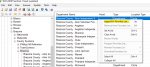
<Right><Click> on it.
Choose the item labeled Append to Favorites list.
1649121765545.png
Sentinel will then ask where to append it. You can send it either to an existing Favorites list, or create a new one.
(I'm sending it to a list that I use for doing screenshots when answering an inquiry.)
Select the list that you chose (or a new one) and open that list in the Favorites list Editor.

1649122006164.png
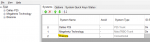
You see that when I appended it, it was done as a conventional system,
We're going to create an OFT system for this, but by appending the conventional channels, I've also brought over the location information.
Click the Green Plus sign in the Favorites editor to create a new system.
Choose DMR One Frequency and give it a name.
1649122320617.png
While holding on the system name (Alvin ISD Buses) click on the Departments tab & hit the green plus sign there, to add a Department for the talkgroups.
1649122651485.png
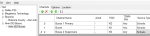
Now, enter the talkgroups as shown in the database. Use the Plus sign when the Department is selected to add the channels for the TGIDs.
1649122991589.png
Next, select the System's name again, and click on the tab labeled Sites.
Create a site for each frequency.

1649123201748.png

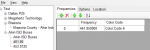
Enter the frequency & color code for each 'site'

1649123351860.png

If you are putting this system into a Favorites list where, on occasion, you might use Location Control, then add the location details to the Department as well as each frequency. That's why I first appended these channels as conventional, so that location data is copied into the list being edited, and you can cut and paste the data,
1649123731153.png
This same information would need to be entered into the department (for the buses) as well as the Sites (the two frequencies).
1649123971672.png

After getting it set up as an OFT system, I deleted the Conventional system as it is no longer needed. Note that, in an OFT system, you can specify the Slot being used (this is noted in the database), but that is not necessary since separate talkgroups are specified. There are some agencies that use the same talkgroup, but specify, for example, Police on Slot 1, and Fire on Slot 2.

I have exported the system into an *.hpe file. It is 'zipped' (compressed) because that is required to attach a file to a Forums post. Save Allen_ISD to your PC. Extract the hpe file using Windows Explorer (also called File Explorer) and import the hpe file into Sentinel and add to the Favorites list of your choice. (The Import link is under the drop-down File menu in Sentinel.)
 

Attachments

  • Allen_ISD.zip
    965 bytes · Views: 1

K5mow

Member
Joined
Apr 20, 2019
Messages
121
Reaction score
64
Location
Alvin TX
For your SDS100, or SDS200, you can create a system in Sentinel:
In Sentinel:
Click on the Plus sign (+) by USA in the main database section of Sentinel.
Scroll down through the list of states until you get to Texas.
Click on the Plus sign by Texas
Scroll down until you get to Brazoria County, & click the Plus Sign by Brazoria.
After expanding the Brazoria folder, click on the County Systems folder to expand it as well.
Under the County Systems folder, click on the item labeled simply as Brazoria,

In the list of departments under 'Brazoria', you'll see Alvin Independent School District.
<Right><Click> on it.
Choose the item labeled Append to Favorites list.
View attachment 119218
Sentinel will then ask where to append it. You can send it either to an existing Favorites list, or create a new one.
(I'm sending it to a list that I use for doing screenshots when answering an inquiry.)
Select the list that you chose (or a new one) and open that list in the Favorites list Editor.

View attachment 119219
You see that when I appended it, it was done as a conventional system,
We're going to create an OFT system for this, but by appending the conventional channels, I've also brought over the location information.
Click the Green Plus sign in the Favorites editor to create a new system.
Choose DMR One Frequency and give it a name.
View attachment 119220
While holding on the system name (Alvin ISD Buses) click on the Departments tab & hit the green plus sign there, to add a Department for the talkgroups.
View attachment 119221
Now, enter the talkgroups as shown in the database. Use the Plus sign when the Department is selected to add the channels for the TGIDs.
View attachment 119222
Next, select the System's name again, and click on the tab labeled Sites.
Create a site for each frequency.

View attachment 119223

Enter the frequency & color code for each 'site'

View attachment 119224

If you are putting this system into a Favorites list where, on occasion, you might use Location Control, then add the location details to the Department as well as each frequency. That's why I first appended these channels as conventional, so that location data is copied into the list being edited, and you can cut and paste the data,
View attachment 119226
This same information would need to be entered into the department (for the buses) as well as the Sites (the two frequencies).
View attachment 119227

After getting it set up as an OFT system, I deleted the Conventional system as it is no longer needed. Note that, in an OFT system, you can specify the Slot being used (this is noted in the database), but that is not necessary since separate talkgroups are specified. There are some agencies that use the same talkgroup, but specify, for example, Police on Slot 1, and Fire on Slot 2.

I have exported the system into an *.hpe file. It is 'zipped' (compressed) because that is required to attach a file to a Forums post. Save Allen_ISD to your PC. Extract the hpe file using Windows Explorer (also called File Explorer) and import the hpe file into Sentinel and add to the Favorites list of your choice. (The Import link is under the drop-down File menu in Sentinel.)

Wow. Thank you so much for the detailed instructions and the file. When I get off work today I will give it a try. Again thank you so much.

Roger
 
Status
Not open for further replies.
Top