• To anyone looking to acquire commercial radio programming software:

    Please do not make requests for copies of radio programming software which is sold (or was sold) by the manufacturer for any monetary value. All requests will be deleted and a forum infraction issued. Making a request such as this is attempting to engage in software piracy and this forum cannot be involved or associated with this activity. The same goes for any private transaction via Private Message. Even if you attempt to engage in this activity in PM's we will still enforce the forum rules. Your PM's are not private and the administration has the right to read them if there's a hint to criminal activity.

    If you are having trouble legally obtaining software please state so. We do not want any hurt feelings when your vague post is mistaken for a free request. It is YOUR responsibility to properly word your request.

    To obtain Motorola software see the Sticky in the Motorola forum.

    The various other vendors often permit their dealers to sell the software online (i.e., Kenwood). Please use Google or some other search engine to find a dealer that sells the software. Typically each series or individual radio requires its own software package. Often the Kenwood software is less than $100 so don't be a cheapskate; just purchase it.

    For M/A Com/Harris/GE, etc: there are two software packages that program all current and past radios. One package is for conventional programming and the other for trunked programming. The trunked package is in upwards of $2,500. The conventional package is more reasonable though is still several hundred dollars. The benefit is you do not need multiple versions for each radio (unlike Motorola).

    This is a large and very visible forum. We cannot jeopardize the ability to provide the RadioReference services by allowing this activity to occur. Please respect this.

Baofeng Baofeng DM-32UV Audio Issues

KC1ART

Member
Feed Provider
Joined
Jan 24, 2014
Messages
71
Reaction score
15
Location
Yarmouth, ME
I guess, my fault for trying to go cheap, but wondering if anyone has similar audio issues with this radio;

Trying to use the DM-32UV for a Zello scanner (listen only) feed.

- All the frequencies are programmed appropriately.
- The audio sounds fine from the radio’s internal speaker.
- The audio sounded fine when I had an external antenna attached, and moving around my house. https://a.co/d/090mUw41
- When I plug an audio cable into my computer, the radio won’t pass audio; just an ‘kerchunk’ every time someone transmits.
- Plug in the Baofeng’s collar mic, sounds fine.
-Plug a 3.5mm audio cable from the collar mic to my computer’s audio input…kerchunk only.
- Change 3.5mm cable back to Bearcat scanner, everything sounds fine on Zello.
- unplug/replug 3.5mm without changing any audio settings to the Baofeng, ‘kerchunk only’.

Feels like I’ve tried every combination of…everything…and haven’t figured out what the issue is yet.

Any ideas?
 

chief21

Member
Premium Subscriber
Joined
Mar 2, 2004
Messages
2,062
Reaction score
801
Location
Western NC (Summer); Tampa Bay FL (Winter)
Any ideas?
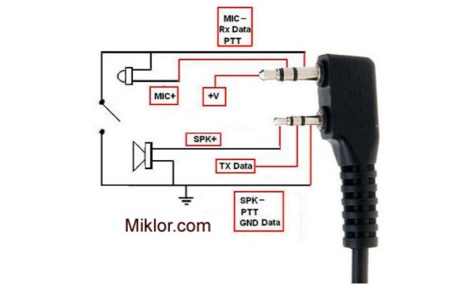
I'm not real clear on your description, but are you aware that the RX audio from the Baofeng is likely on the smaller pin rather than the 3.5mm pin?


KC1ART

Member
Feed Provider
Joined
Jan 24, 2014
Messages
71
Reaction score
15
Location
Yarmouth, ME
Yes. I was using a 2.5mm to 3.5mm audio cable out of the Baofeng, and into my USB sound card, but when that didn’t work, I tried a 3.5mm out of the aux port on the baofeng’s collar mic. It’s the weirdest thing that neither will send audio into the computer.
 

KC1ART

Member
Feed Provider
Joined
Jan 24, 2014
Messages
71
Reaction score
15
Location
Yarmouth, ME
Yeah. On a whim, I copy/pasted my entire first post into AI and asked it what the deal was. I got an interesting response.

Seems the issue might be that I can’t just plug a 2.5mm into the headphone side of the plug and expect it to work, because the full audio circuit relies on the 3.5mm microphone side being connected as well. Gonna buy a Kenwood 2-pin accessory cable and a TS mono cable and see if that solves the problem.

AI’s answer:

What you’re running into is a very common quirk with Baofeng-style radios (including the Baofeng DM-32UV): the accessory jack is not a simple “speaker out” like a scanner, and that’s why your Zello feed only hears the kerchunk.

IMG_7580.jpeg
Baofeng radios:
  • Mute or reroute audio unless the correct resistance/load is detected
  • Often require both pins (2.5mm + 3.5mm) to behave properly
Use a proper Kenwood 2-pin to line-out adapter. Look for something like:
  • “Kenwood 2-pin to 3.5mm audio adapter (line out)”
  • Sometimes sold as Baofeng audio adapter for streaming/scanning
Also:

Most Baofeng-style radios (including the DM-32UV) use a TRS (Tip-Ring-Sleeve) jack, but they often output a mono signal.

• The Issue: If you are using a standard 3.5mm stereo cable, the "Ring" on the computer side might be shorting the "Sleeve" (ground) on the radio side. This triggers a protection circuit or simply grounds out the audio signal before it hits your sound card.

• The Fix: Try using a 3.5mm Mono-to-Stereo adapter or a Mono cable.
 
Top