Can I tweak DSD Plus Fastlane for better audio?

bobruzzo

W1AV
Premium Subscriber
Joined
Nov 4, 2019
Messages
1,710
Reaction score
485
Location
Cranston, Rhode Island
Running DSD Plus monitoring state (RI) P25 Simulcast system. Works pretty good and has been updated but still having some garbled audio. In the 1R Event log under "input" and "Output" are some settings that I dont understand. Under "Input" I have "Use direct FMPx linking" chosen and "No source audio monitoring" chosen. Under "Output" I have my soundcard chosen, and "Synthesize all digital voice" and "No per call recording" chosen. There are other options in there but dont know if they would be of much use. Under "Decoder" there are more options that could possibly help but I dont understand how to use them. Right now I am only decoding P25. I am using a 7 element 800 Mhz yagi. LMR400 coax, about 50 feet. And an RTL-SDR dongle connected to a 6' USB cable to keep dongle away from computer so I dont pick up any noise from it. Even if connected directly to PC I dont have any noise but I figured that if dongle is further away its better. Anyway in the "1R DSD+" screen i occasionally see "ERR1" or "ERR2" scroll by. I have FMP24 set for bandwidth of 12.5, gain of 28.0 and step 6.25. I have played with the GAIN (G=up, g=down) but only slightly changes error showing up. The towers/antennae for the system I am listening to is approx 7 or 8 miles northeast of me. I also use SDR TRUNK but the audio is 100% better. So there must be a way to tweak DSDPlus audio(?)
 

Attachments

  • err1.png
    err1.png
    199.2 KB · Views: 7

dave3825

* * * * * * * * * * * *
Premium Subscriber
Joined
Feb 17, 2003
Messages
10,112
Reaction score
5,689
Location
Suffolk County NY
Its usually best to post a screenshot of FMP24 while receiving a signal. Gain @ 28 will be different in others listening environments. Also do not see any mention of PPM.
 

bobruzzo

W1AV
Premium Subscriber
Joined
Nov 4, 2019
Messages
1,710
Reaction score
485
Location
Cranston, Rhode Island
Its usually best to post a screenshot of FMP24 while receiving a signal. Gain @ 28 will be different in others listening environments. Also do not see any mention of PPM.
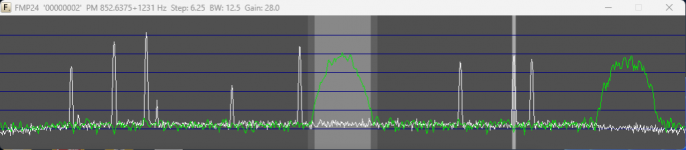
OK here is screen shot of FMP24....and also in SDR Trunk, the ppm is saying -1.411......if this helps....not sure how to set ppm in DSD Plus.....
 

Attachments

  • FMP24-CC.png
    FMP24-CC.png
    33.1 KB · Views: 19

dave3825

* * * * * * * * * * * *
Premium Subscriber
Joined
Feb 17, 2003
Messages
10,112
Reaction score
5,689
Location
Suffolk County NY
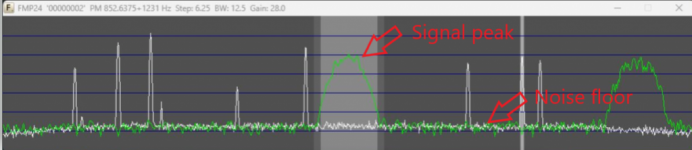
My only thought would be to manually set the PPM instead of using auto and see if that makes any difference.


For gain, I usually raise it until the signal peak reaches its highest point, and to where the noise floor just starts to rise, then I back it off a hair or two.

1740063389600.png
 

bobruzzo

W1AV
Premium Subscriber
Joined
Nov 4, 2019
Messages
1,710
Reaction score
485
Location
Cranston, Rhode Island
My only thought would be to manually set the PPM instead of using auto and see if that makes any difference.


For gain, I usually raise it until the signal peak reaches its highest point, and to where the noise floor just starts to rise, then I back it off a hair or two.

View attachment 178405
Where do I manually set the ppm?....WAIT. i THINK i FOUND IT...-p-1.411 entered in fmp24-cc....At top of FMP24 it is now showing "Corr: -1.4"
 
Last edited:

RaleighGuy

Member
Premium Subscriber
Joined
Jul 15, 2014
Messages
17,104
Reaction score
26,107
Location
Raleigh, NC
Where do I manually set the ppm?....WAIT. i THINK i FOUND IT...-p-1.411 entered in fmp24-cc....At top of FMP24 it is now showing "Corr: -1.4"
With the FMP24 screen active use P or p to adjust it while the program is active to see the results of the adjustments
 

mtindor

FMP24 PRO USER
Database Admin
Joined
Dec 5, 2006
Messages
11,760
Reaction score
3,037
Location
Carroll Co OH / EN90LN
What you really want to do is look at the top of FMP24

PM 852.6375+1231 Hz

1231 Hz is very much off frequency. So, you adjust your PPM until that is in the double digits and you should be good.

You also do not need 12.5 BW for P25. 9.5 BW is fine.
 

bobruzzo

W1AV
Premium Subscriber
Joined
Nov 4, 2019
Messages
1,710
Reaction score
485
Location
Cranston, Rhode Island
What you really want to do is look at the top of FMP24

PM 852.6375+1231 Hz

1231 Hz is very much off frequency. So, you adjust your PPM until that is in the double digits and you should be good.

You also do not need 12.5 BW for P25. 9.5 BW is fine.
OK I adjusted the PPM up and down and seems to be somewhat happy set for -1.8......it goes down into double digits like you said but sometimes spikes to -340......it has gone as low as -3! Set it for -1.7 and gets better...sometimes goes into +70 but hovering nice and low now......
 

mtindor

FMP24 PRO USER
Database Admin
Joined
Dec 5, 2006
Messages
11,760
Reaction score
3,037
Location
Carroll Co OH / EN90LN
OK I adjusted the PPM up and down and seems to be somewhat happy set for -1.8......it goes down into double digits like you said but sometimes spikes to -340......it has gone as low as -3!

When it switches to a voice channel, it could be that the voice channel itself is a hair off from center - or it could be just from switching to a voice channel that it momentarily gets as high as -340. But as long as you have it down in the double digits [or less!] most of the time, you should be fine.
 

dave3825

* * * * * * * * * * * *
Premium Subscriber
Joined
Feb 17, 2003
Messages
10,112
Reaction score
5,689
Location
Suffolk County NY
Is auto still on? Are you using single dongle mode? Sometimes a voice channels can be slightly off
 
Top