I did not see the post until now. Will look it this evening. ThanksDid you try the file I posted? If so, did it work?


I did not see the post until now. Will look it this evening. ThanksDid you try the file I posted? If so, did it work?

Noted. Kyle is a bit out of my area of interest. I’ve been able to program Hays conventional channels but no test drive yet. NBFD dispatch is hitting often while in NB
I'm throwing darts. Doing my best to understand all this but not successful. I downloaded the scan list 02a file but can only see it on my desktop screen. cant find it's path to import it. It does not appear in downloads. unable to import the file into scanner. i attempted to program the GATRRS system into scan list 06. nothing but silence. i see no channels listed i understand tagging the channels and led modes but that's a 'down the road' item. i will visit my pc geek son tomorrow and see if he can put me in the right direction.Here's your file as modified, if you want to try it.
I marked as "locked out" the Hays County TGIDs that are either full time encrypted, or P25 Phase II. I did leave TGID 11001 (New Braunfels PD dispatch) unlocked; it is P25 Phase I, and only marked as part time encrypted. When they are in the clear, you'd hear them. If encrypted, you'll hear garbled audio, sometimes described (in the forums) as R2D2 on steroids. I left those on your Scanlist 2
I added the public safety TGIDs for Comal, on GATRRS, that are not encrypted. All of the GATRRS talkgroups are P25 Phase I, so if you can hear the site(s), you'd hear activity. Obviously. if not of interest, either delete the GATRRS trunked system or lock it out. Those are enabled on Scanlist 4. I did not import GATRRS talkgroups marked as full time encrypted.
I did not alter what you had imported for conventional channels. You'll likely want to weed out a few of those, for example the water department. You had those assigned to Scanlist 3, but it was not enabled to scan; only Scanlist 2. LCRA. I enabled the conventionals.
Instead of seeing "Scanlist 2" (or 3, or 4) scroll across the bottom of your display, you can name the lists, such as LCRA for Scanlist 2. And, if you want, you can tag your conventional channels, as well as talkgroups, to use the LED display, such as Red for Fire talkgroups, Blue for Police. I use Red for Fire, Yellow for EMS, the light blue (Uniden labels it as Cyan) for city PDs, and the dark blue for state law enforcement (Tx DPS). You can also select any of them to flash, if you want to spot your more important channels when in use. Whether you do that or not is completely up to you.
You do not have Tx DPS talkgroups on LCRA imported, so I did not import them into GATRRS either. DPS does have some conventional frequencies, but I have no idea how much they are used in your counties of interest. They might use only the trunked systems. Whether you add their talkgroups, and/or conventional channels is up to you.
The file is zipped. Use Windows Explorer to unzip and then open in Win500 to take a peek.

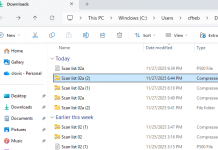
As garys has already noted, the file I posted is zipped. If you can see it on your desktop screen, then it did download.I'm throwing darts. Doing my best to understand all this but not successful. I downloaded the scan list 02a file but can only see it on my desktop screen. cant find it's path to import it. It does not appear in downloads. unable to import the file into scanner. i attempted to program the GATRRS system into scan list 06. nothing but silence. i see no channels listed i understand tagging the channels and led modes but that's a 'down the road' item. i will visit my pc geek son tomorrow and see if he can put me in the right direction.
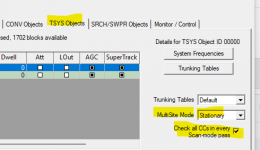
That's on the TSYS Objects tab.I cannot find this "multi-site table you posted.

this is what i get when i find the file.As garys has already noted, the file I posted is zipped. If you can see it on your desktop screen, then it did download.
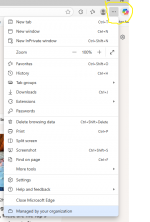
In Edge (the current name for what used to be called Internet Explorer, click on the three dots next to your avatar symbol.
View attachment 193167
With that dialog box displayed, click on Downloads.
That will give you a list of files downloaded. If you'll hover your mouse over the the file, you'll see a file folder icon beside the file name. CLick on that folder to see where on your PC the file landed when downloaded.
I zipped the file since *.p500 is not a valid file extension to attach to a forum post. Once you confirm where it was downloaded, you can <right><click> on the file to get the option to "Extract" (un-zip) the compressed file to the original file extension, which you can then import into Win500 and see it, and/oor load it to your scanner.
Here's a new link to the file in my One drive folder. That is not zipped. You should be able to open and import it into the Win500 software.
okay i fixed that bitThat's on the TSYS Objects tab.
View attachment 193168
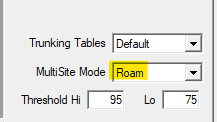
On your original file, you had it set as "Roam".
View attachment 193169
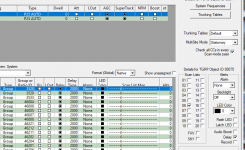
Set as "Roam", the scanner would look, and only use the control channel frequency with the best signal. Since the frequencies for several sites are loaded, you'd only hear traffic for that one site. For example, if it grabbed & used the control channel for the New Braunfels site, all you'd likely get would be NB talkgroups. You'd miss transmissions of other city or county users that were on one of the other sites, not the one assigned for New Braunfels.
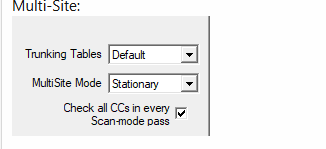
I set the MultiSite mode to Stationary, and checked the box to check all the Control Channels loaded each time the system was scanned. If it was set as Stationary, but the box was not checked, it would check the control channel for the first set of site frequencies on the first pass through the system.
On the next pass, it would look for the (different) control channel of the second site.
On the third pass, it would look at frequencies for the third site.
Once it had checked all control channels found, it would go back and start the cycle again, checking for the first site once more. That pattern repeats itself, cycling through the sets of control channels, one at a time. By checking the box, you're telling the scanner to use any sites control channel traffic each time the system comes up in the scan rotation.
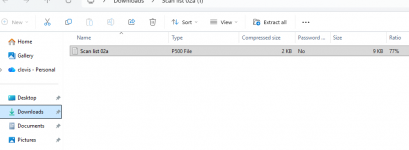
That view looks like it's still looking at the compressed file (that's the one highlighted in your post; out to the side it says "zipped".this is what i get when i find the file.
View attachment 193170
when i select the zipped file a text file appears
View attachment 193171
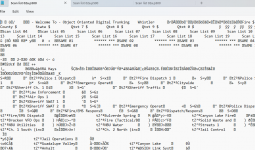
the unzipped file looks like this. once i am in win500 i cannot find the file from import. i know where it is but win500 is not seeing it.
View attachment 193172
It appears messages are going through. I was not able to upload the file so I’ve moved on. DL’d arc500. I was able to upload the GATRRS sites and TG I want. Now Comal SO patrol is hitting. Uploaded a few more sites,TG and conventional analog frequencies from CBP, DPS, ATF, etc. I anticipate that I will move forward by trial and error. Many thanks for the input so far. I wouldn’t mind taking a CE course on radio basics. My dad had a ham unit back in the day. I also volunteered as dispatcher in Harris County 45 years ago. LEO for HCCO Pct 4 patrol afterwardsThat view looks like it's still looking at the compressed file (that's the one highlighted in your post; out to the side it says "zipped".
Use the second link I posted. That file is not zipped, and once saved to your PC, you should be able to import it into Win500.
(To reduce 'confusion',delete the file that is zipped.)
That's likely a "false positive" error message. What are you clicking on when that message comes up? The link for the file I posted to my One Drive account? Or something different.Not sure if this message will reach you. On sign in a message says my IP has been banned and I can’t sign in to view support messages. No idea what has happened