mrc333777
Member
does dsdplus fl minimize at startup with -_ not working anymore?




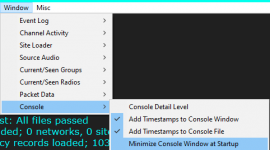
Even with this selected the fmp24 window will not start minimized. Where would the option for that be?
does not work

does not work
After reading my logs and the new documentation I removed all -e -E -T -_# commands from my command line. I then started getting the FMP24 windows not minimized on startup. I thought that I went back and tried to add the -_# commands and it still did not work. I must have only added back to the dsd.exe side of my command line and not the FMP24 side. I can confirm that the -_3 on the FMP24 batch file command does start with both windows minimized. I would recommend to update the documentation to reflect that the menus are for the dsd.exe batch file and to keep the command line arguments for the FMP24 batch files.On the FMP24 command line. -_1 minimizes FMP24's console window.
FMP24 -h reveals:
Options:
...
-_<num> Minimize windows at startup; bitmapped
So -_2 probably minimizes the RF spectrum window, -_3 probably minimizes the console window and the spectrum window.
I can't test it right now - no dongles handy.
Edit whatever batch file(s) you use to start FMP24 and add the appropriate -_# value to the command line and give it a test.

By the looks of it, both. Of course, DSD+ FL no longer supports that function on the command line.I'm a little confused here.
Are you trying to minimize FMP24 or DSDPlus?
They do if you're trying to start multiple processes.There has been a lot of discussion about FMP24 command line options, but your batch file applies the minimize parameter to DSDPlus.
Also, Windows batch files do not require "start" before the program name.
I'll bet that it does for whatever mode (VC/CC/1R/F1/F2/...) you were running.on the menu of window / minimize window does not stay selected upon exiting neither
DSDPLUSI'm a little confused here.
Are you trying to minimize FMP24 or DSDPlus?
There has been a lot of discussion about FMP24 command line options, but your batch file applies the minimize parameter to DSDPlus.
Also, Windows batch files do not require "start" before the program name.

Use the menu. There is an option to minimize that window on startup