Looking for some advice. I'm not new to radios or how TRS work. But I never set up an RTL-SDR.

RadioChief55

Member
Feed Provider
Joined
Dec 1, 2006
Messages
693
Reaction score
172
I want to monitor this new system. I have some of the FD's TG's that aren't in the DB yet. Most will be E so I know I can't hear them, but I'm told the dispatch and a FG TG will be in the clear.
Here's the system. https://www.radioreference.com/db/sid/12994
I was looking at the nooelec rtl-sdr v5 on Amazon. I also saw there is a bundle with a HAM UP or HAM DOWN. Do I need that?
Will one nooelec rtl-sdr v5 work for this system and 2 TG's or do I need 2 of them?
What else do I need hardware wise?
What software is recommended?
I read through posts in FB groups and in the RR forums and it confused me even more.
Thank you
 

dave3825

* * * * * * * * * * * *
Premium Subscriber
Joined
Feb 17, 2003
Messages
10,141
Reaction score
5,736
Location
Suffolk County NY
The site freqs span just under 4.5mhz. You just need 1 dongle if using DSDPlus fastlane single dongle mode. 2 dongles to use SDRTrunk. The latter can receive and record multiple talkgroups simultaneously and they can be played back with Trunking Recorder or RDIO Scanner. DSDPlus with one dongle will only capture one tg at a time. Not sure what DSDPlus with 2 dongles can monitor since I have not used that combo in a long time. There is also DSD FME but I am not familiar with its requirements. Those 3 are for Windows. If Linux then SDRTrunk, OP25 or Trunk Recorder. You do not need any Ham It Up stuff.
 
Last edited:

RadioChief55

Member
Feed Provider
Joined
Dec 1, 2006
Messages
693
Reaction score
172
The site freqs span just under 4.5mhz. You just need 1 dongle if using DSDPlus fastlane single dongle mode. 2 dongles to use SDRTrunk. The latter can receive and record multiple talkgroups simultaneously and they can be played back with Trunking Recorder or RDIO Scanner. DSDPlus with one dongle will only capture one tg at a time. Not sure what DSDPlus with 2 dongles can monitor since I have not used that combo in a long time. There is also DSD FME but I am not familiar with its requirements. Those 3 are for Windows. If Linux then SDRTrunk, OP25 or Trunk Recorder. You do not need any Ham It Up stuff.
Thank you for this info. I appreciate it. Is there a prefered RTL-SDR dongle to use?
 

HopperD

Member
Joined
Jul 7, 2012
Messages
160
Reaction score
3
Location
Los Angeles
Thank you for this info. I appreciate it. Is there a prefered RTL-SDR dongle to use?
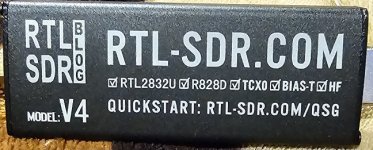
I have both the RTL-SDR attached in the photo and the nooelec with Ham It Up. For me the RTL-SDR works a little better.

Although you don't need the nooelec Ham It Up converter, it definitely does help to upcovert incoming signals by about 20% in my opinion.

The RTL-SDR has a built in HF upconverter which works great for me.

I hope this answers your question.
 

Attachments

  • RTL.jpg
    RTL.jpg
    97.5 KB · Views: 13

dave3825

* * * * * * * * * * * *
Premium Subscriber
Joined
Feb 17, 2003
Messages
10,141
Reaction score
5,736
Location
Suffolk County NY
Pretty much all user preference. Rtl Sdr is one of a few I don't own. I have many NooElec, a few Airspy, one HackRf and even cheap china blue no name. The NooElec are nice because of the size and it allows them to sit close to another in usb hubs. The Airspy, HackRf, Sdrplay give you more bandwidth than the 2.4 Mhz dongles. There are also the Orange FlightAware dongles that have a built in 20db amp as well as their competition, Airplanes Live.
 

RadioChief55

Member
Feed Provider
Joined
Dec 1, 2006
Messages
693
Reaction score
172
Thank you for this info, I'm just going to be using it to monitor Phase 2 TRS, one in the 460 range and the others in the 700 and 800 range.
 

theoleman

Member
Joined
Apr 4, 2008
Messages
58
Reaction score
21
Location
Somewhere In, TX; at the moment
Use the quick start guide listed on the side of the dongle picture above, RTL-SDR.COM/QSG, This is a good source of info.

It is easy to follow information for setting up your computer, esp the portion for verifying your computer has the necessary software.

Go to youtube and watch the videos they have about selecting the dongle and its version before purchasing one along with using the hardware and software.

I purchased a $100 discontinued ASUS laptop yesterday and installed the the dongle in the picture, a V4. The hardest part discovering mode S in the version of Windows 11 the laptop had installed and getting it turned off. Then finding the location for getting NET 8.0 and Visual Basic C++ downloaded. So a 10 minute delay while exploring google.

Step outside FB & RR and get more info first. And start checking out your computer.

Good luck and enjoy the discovery of a new experience in listening. I am.
 

MetalSmith

Newbie
Joined
Oct 24, 2024
Messages
1
Reaction score
2
I have both the RTL-SDR attached in the photo and the nooelec with Ham It Up. For me the RTL-SDR works a little better.

Although you don't need the nooelec Ham It Up converter, it definitely does help to upcovert incoming signals by about 20% in my opinion.

The RTL-SDR has a built in HF upconverter which works great for me.

I hope this answers your question.
I am a fan of this particular SDR (RTL-SDR BLOG V4) I own two.
The dongle does get pretty warm/hot depending on the settings you use like refresh rate but there are a couple options out there for clamp on heat sinks (I think they were on the ETSY marketplace).
I have found that a small USB powered 5" desk fan keeps them sufficiently cool for my needs.
 

theoleman

Member
Joined
Apr 4, 2008
Messages
58
Reaction score
21
Location
Somewhere In, TX; at the moment
if you want to install SDRTrunk, check your computer first to determine if you have JAVA 8 installed. If not you will want to download and install it first before starting up SDRTrunk.
 
Top