SDS100/SDS200: SDS 200 WAN Connection to Web Server Troubleshooting

bostonkid

Member
Joined
Aug 13, 2008
Messages
25
Reaction score
3
I have been struggling to set up Proscan to receive outside (WAN) connections on port 5000, with the aim of connecting to my web server outside of my home.
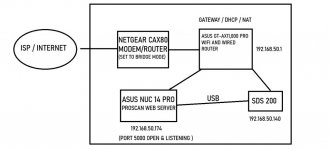
As illustrated in the attached image; my ISP connection enters my house and connects to a Netgear Nighthawk CAX80 in my basement. This modem/router combo has been disabled for any routing capabilities, wifi, and set to bridge mode. I am currently unable to connect to it anywhere on the network by typing in the router's address and can only connect by physically connecting an ethernet cable directly to it in the basement.

Upstairs, in my office, I have an ASUS GT-AX 11000 Pro Tri-band Wifi router, which is the main router for our home. This has ethernet cables, connecting an ASUS Nuc 14 Pro (acting as a home server/ProScan server) and my SDS 200. The SDS 200 is further connected to the NUC via USB cable.

Currently, I can start the web server via ProScan, and connect to it INSIDE my LAN, by navigating a browser window to 192.168.50.174:5000. When attempting to connect to this same open port from outside of my network, the connection is refused. I have used various network monitoring tools, and command line (netstat) prompts to view open/listening ports, and verified that ProScan is indeed listening on port 5000, not just on 127.0.0.0 localhost, but also via 0.0.0.0

My next troubleshooting step was to conduct a deep dive into windows defender on the Asus NUC and verify there was no traffic being restricted on this port, and to add a rule allowing it if so - no problems there. I then connected to my Asus Router and proceeded to verify that port 5000 was being forwarded and not blocked by a router-level firewall - again no issues there. Out of fear that I may have a double NAT connection (either from ISP or the CAX 80 in the basement) I have checked my external WAN IP address through various online tools, making sure there wasn't more than one hop from the same WAN IP I see in ProScan - again, nothing indicating this.

ProScan is giving me no issues with audio configuration over URL or anything else. I am enjoying audio recording and txt logging on the NUC PC without problems. If I navigate to the NUC's ip address and port 5000 from within my LAN, I can connect to the scanner web server without problems, listen to the audio, and even control the scanner remotely. Any outside connection is refused.


I feel as if I've exhausted all troubleshooting steps I can think of and am truly stumped. I have googled and read through several forum posts here, as well as the online manual. Any help would be much appreciated. Thank you in advance!

Jim
 

Attachments

  • home network layout.jpg
    home network layout.jpg
    51.7 KB · Views: 24

bostonkid

Member
Joined
Aug 13, 2008
Messages
25
Reaction score
3
Well @bostonkid were you able to find out a solution today from Comcast/Xfinity or anyone else?
No luck with xfinity - on their end they say they are not restricting port 5000 and told me to make sure the service is listening (it is.)

I've been going down the rabbit hole googling reddit and asus forums to see if it's my GT AX11000 that's creating the port forwarding issue/blocking the traffic. No luck yet.
 

buddrousa

Member
Premium Subscriber
Joined
Jan 5, 2003
Messages
13,826
Reaction score
9,457
Location
Retired 40 Year Firefighter NW Tenn
If Proscan was not listening it would not work on your network from inside your network. So Proscan is listening. You have a Router Port Forwarding issue. You have already passed the Windows Firewall test so it only leaves your Router. It might be time for you to look into a company that does networking in your area and pay them to fix your problem.
 

cavmedic

Member
Premium Subscriber
Joined
Sep 2, 2012
Messages
1,011
Reaction score
699
Location
Pottstown Pa
I would eliminate that NighHawk router combo unit and get a stand alone modem, then do what you want to do from your other router.
I've never had issues with any port forwarding with comcast when hosting anything from the house up to and including Moto DMR IPSC master, FlightAware feeds where one could remote in to see the local coverage maps, MMDVM's and other Allstar nodes with incoming connections. All were done using a stand alone modem first in the chain.
 

ProScan

Software Provider
Premium Subscriber
Joined
Jul 2, 2006
Messages
8,228
Reaction score
4,527
Location
Ontario, Calif.
I would double and triple check the following:
1. The server is running
2. The router Port Forwarding port matches the server port
3. Check if more than 1 firewall or internet security program preventing outside connections

Use Open Port Check Tool -- Verify Port Forwarding on Your Router to see if the port can be seen from the outside

To dig deeper into the problem: Google -> use wireshark troubleshoot port forwarding
 
Last edited:

scanbc780

Usually Lurking
Joined
Aug 30, 2002
Messages
436
Reaction score
63
Location
Maricopa/Yavapai Counties, Arizona
One thing you could try, and not have to worry about port the port forwarding, is try Cloudflare Zero Trust tunnel (they have a free plan), and make Cloudflare the middleman. This video walks you through it, but the setup is now a bit different, but you'll get the general idea on how to set it up. All you'd need is a domain name from your favorite registrar. This would defeat any blocks your ISP could potentially have on your connection/router/etc. I did some testing with Rdio-Scanner and it worked flawlessly.
Something to put in your idea box.
 

bostonkid

Member
Joined
Aug 13, 2008
Messages
25
Reaction score
3
One thing you could try, and not have to worry about port the port forwarding, is try Cloudflare Zero Trust tunnel (they have a free plan), and make Cloudflare the middleman. This video walks you through it, but the setup is now a bit different, but you'll get the general idea on how to set it up. All you'd need is a domain name from your favorite registrar. This would defeat any blocks your ISP could potentially have on your connection/router/etc. I did some testing with Rdio-Scanner and it worked flawlessly.
Something to put in your idea box.
Thanks everyone. I know people think the modem and router are the source of the problem - but oddly, every other service is working without issue. For example, Plex Media server is running on the very same PC as ProScan, has a port for outside WAN connections, and is working just fine.

My Asus router is receiving the same WAN address as I can see from the outside; so there are no hops or extra layers, and it seems bridge mode is functioning correctly from the modem, since other services with ports needing forwarding are working correctly. Very strange.
 

bostonkid

Member
Joined
Aug 13, 2008
Messages
25
Reaction score
3
Is Plex server running on same pc as ProScan ? Or on a pc connected to secondary router that is in bridge mode ?

Is there any way DHCP is running on "secondary router" ?
The Plex Server is running on the same NUC PC as ProScan and is functional.

The only device providing DHCP on the network is my Asus GT-AX11000 router.
 

ProScan

Software Provider
Premium Subscriber
Joined
Jul 2, 2006
Messages
8,228
Reaction score
4,527
Location
Ontario, Calif.
I would try another port near 32400 since the plex media server uses a default port of 32400 and that port isn't blocked, Change the router Port Forwarding rule to match the port set in the server.

Your ISP may not officially block port 5000, but maybe equipment upstream in the ISP is misconfigured.

{edit} It sounds like you are suspecting the ProScan Web Server. I would do more testing. The Web Server feature has been around since ver 3.0. 16 years or Oct 9, 2009 to be exact. I've seen this issue many times where the server can't be seen from the outside. Usually it's a port forwarding misconfig or a double NAT issue and changing the router to bridge mode would fix it. I've seen just 1 or 2 times at the most, where the issue remained unresolved due to either a CGNAT issue or the OP didn't get back with us.
 
Last edited:

ProScan

Software Provider
Premium Subscriber
Joined
Jul 2, 2006
Messages
8,228
Reaction score
4,527
Location
Ontario, Calif.
I see that the plex media server default port 32400 timed out when using this tool

I don't know if you change the default port on the plex media server or it's offline. I would do more tests to get a better ideal of where the problem is.

{edit}
but oddly, every other service is working without issue. For example, Plex Media server is running on the very same PC as ProScan, has a port for outside WAN connections, and is working just fine.
I don't see a Port Forwarding rule other than 5000 per your screenshot here.

So I don't know what to make of this.
 
Last edited:

bostonkid

Member
Joined
Aug 13, 2008
Messages
25
Reaction score
3
@bostonkid

ROG Rapture GT-AX11000 Manual

See page 42. Firewall section. "The Firewall feature is enabled by default"
Perhaps temporarily disable it to see if that's the cause. I would think if the port forwarding rule is set then this shouldn't matter but just in case.
I will try again to check the AX11000 firewall config and double check that it is disabled.

Just to be clear - I'm throwing no blame at ProScan or it's web server feature - it's working locally for me and I'm sure it's not the root of this problem. It is definitely some unknown mundane part of my setup that is tripping me up, whether it's a firewall, port issue, etc. But please don't think I am blaming the ProScan software - I am not. Just to clarify hehe. 👍
 

bostonkid

Member
Joined
Aug 13, 2008
Messages
25
Reaction score
3
Well here's an update - I have replaced my Nighthawk CAX80 (Modem/Router Combo) in the basement with a brand new Arris S34 Surfboard Docsis 3.1 Modem. It is a MODEM only - no routing capabilities or wifi whatsoever. It is up and running, providing internet to my router and throughout the house, and yet - still no luck with the ProScan server. I really have no idea what's going on, and just by process of elimination, I'm thinking it HAS to be my router? But even so - I have firewall exceptions listed as well as port forwarding enabled for 5000. Even when the router firewall is completely disabled, as is Windows defender etc, no luck. I'm stumped.
 

ProScan

Software Provider
Premium Subscriber
Joined
Jul 2, 2006
Messages
8,228
Reaction score
4,527
Location
Ontario, Calif.
Well here's an update - I have replaced my Nighthawk CAX80 (Modem/Router Combo) in the basement with a brand new Arris S34 Surfboard Docsis 3.1 Modem. It is a MODEM only - no routing capabilities or wifi whatsoever. It is up and running, providing internet to my router and throughout the house, and yet - still no luck with the ProScan server. I really have no idea what's going on, and just by process of elimination, I'm thinking it HAS to be my router? But even so - I have firewall exceptions listed as well as port forwarding enabled for 5000. Even when the router firewall is completely disabled, as is Windows defender etc, no luck. I'm stumped.
I'm stumped too. Just to confirm, the server is running and it's using port 5000.
Can canyouseeme.org see port 5000?
 
Last edited:
Top