SDS100/SDS200: SDS100 and GPS

Status
Not open for further replies.

shansmi

Member
Joined
Aug 20, 2022
Messages
133
Reaction score
56
Ok so I am trying to keep things as simple as possible. I have a LEA favorites list that consists of cities around my hometown. Everything seems to be working great, all I have to do is my normal "stuff" and I am covered.

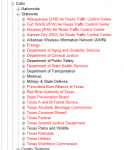
My plan is to fire up the GPS if I go anywhere outside of my home area. I have ran a few tests with the GPS. My first test I count as a failure on my part due to inexperience with the SDS. I had all the Nationwide Systems stuff ON so the SDS was constantly scanning finding very little useful local LEA info. Once all those were disabled and only Law Dispatch, Law Talk and Law Tac were enabled under Service Types things were much better however some Statewide "stuff" is still enabled like Texas Department of Public Safety and Texas Parks and Wildlife - Game Wardens. I can find no way to disabled these from ever loading.

Am I missing something easy?

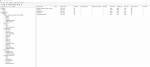
I attached my fav. Now building this all I did was create a new list named after my hometown then went through the USA >> Texas >> Collin County list for all the LEA and FD stuff I wanted to add. I added the city stuff but all the "Simulcast" entries were added by the Sentinel as I added each city of interest. As I stated earlier, I only run with the 3 "Law" Service Types enabled; everything else is off.
 

Attachments

  • Screenshot 2022-08-30 195918.png
    Screenshot 2022-08-30 195918.png
    166.1 KB · Views: 11

dave3825

* * * * * * * * * * * *
Premium Subscriber
Joined
Feb 17, 2003
Messages
10,076
Reaction score
5,654
Location
Suffolk County NY
Once all those were disabled and only Law Dispatch, Law Talk and Law Tac were enabled under Service Types things were much better however some Statewide "stuff" is still enabled like Texas Department of Public Safety and Texas Parks and Wildlife - Game Wardens. I can find no way to disabled these from ever loading.

I can find no way to disabled these from ever loading.
Hook the scanner up to Sentinel and read it. Then go in the db in Sentinel and avoid any and everything you wish to not hear. Go into Texas, then Statewide, and avoid that stuff you want off. Then write back to scanner
 
Last edited:

shansmi

Member
Joined
Aug 20, 2022
Messages
133
Reaction score
56
oh wow. Thanks for the idea. I just found the database itself can be set to "Avoid". That means from within Sentinel go to USA >> Texas >> Collin >> Statewide and right click on "Texas Parks and Wildlife", "Set Avoid" is an option. Now I ASSuME that if I do this in the database itself that I must then re-write the database to the SD card under "Write to Scanner" and check the box to "Force Write Full Database". Remember I do not have locations as a favorite when using the GPS. The SDS is loading things up as my position changes based on the GPS.
 

hiegtx

Mentor
Premium Subscriber
Joined
May 8, 2004
Messages
11,846
Reaction score
4,232
Location
Dallas, TX
oh wow. Thanks for the idea. I just found the database itself can be set to "Avoid". That means from within Sentinel go to USA >> Texas >> Collin >> Statewide and right click on "Texas Parks and Wildlife", "Set Avoid" is an option. Now I ASSuME that if I do this in the database itself that I must then re-write the database to the SD card under "Write to Scanner" and check the box to "Force Write Full Database". Remember I do not have locations as a favorite when using the GPS. The SDS is loading things up as my position changes based on the GPS.
Note that, on the scanner itself, on the "Set Scan Selection" menu, you can 'Set Nationwide Systems'. These are the categories such as Air Shows, Rail, Aircraft, National Parks (among many others) that get dredged up to scan if using the main database. You can toggle these on, or off, if using the main database. You do not have the option to edit these selections in Sentinel, only on the scanner.
 

shansmi

Member
Joined
Aug 20, 2022
Messages
133
Reaction score
56
Note that, on the scanner itself, on the "Set Scan Selection" menu, you can 'Set Nationwide Systems'. These are the categories such as Air Shows, Rail, Aircraft, National Parks (among many others) that get dredged up to scan if using the main database. You can toggle these on, or off, if using the main database. You do not have the option to edit these selections in Sentinel, only on the scanner.


Actually you can set them to avoid for state and nationwide. I just did it and pushed it to the scanner. I have never looked at Nationwide before until now. I had them disabled in the scanner and when I expanded them in Sentinel, all the USA stuff was red. I went ahead and set all the CAN stuff to avoid as well. We shall see how this works when I test things out tomorrow. I will set the ZIP to like 59101 and fire up the GPS.
 

Attachments

  • Screenshot 2022-08-30 222847.png
    Screenshot 2022-08-30 222847.png
    11.2 KB · Views: 6
  • Screenshot 2022-08-30 222924.png
    Screenshot 2022-08-30 222924.png
    26.5 KB · Views: 6

dave3825

* * * * * * * * * * * *
Premium Subscriber
Joined
Feb 17, 2003
Messages
10,076
Reaction score
5,654
Location
Suffolk County NY
I went into Sentinel a long time ago and avoided all of the nationwide entries. I took what I was interested in and appended to my own favorites list. Much quicker turning that stuff on and off with quick keys.
 
Status
Not open for further replies.
Top