emtd99
Member
what exact option is it that will allow me to set the time and date on my display screen? I recently hooked it up to Sentinel and now the time and date are not present.
Thank you,
Thank you,


I recently hooked it up to Sentinel and now the time and date are not present.

Yes...Thank you, Can it be done on the radio its self?
when you read from the scanner, it reads the FL too and all settings correct?Yes...
Menu --> Display Options ---> Customize
Much easier to make those changes in Sentinel. If you make changes through the scanner's on-screen menu system, be sure you read from the scanner into Sentinel so that next time you write from Sentinel to the scanner for database updates etc., you won't write the older settings from Sentinel back into the scanner.
Yes.when you read from the scanner, it reads the FL too and all settings correct?
initial meaning factory or the initial software settingYou have 2 choices. First read the scanner into Sentinel.
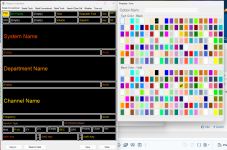
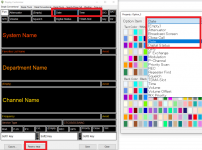
Click the areas where the date and time were and set them again. (top)
Or if you did not have any customization you could "Reset To Initial" (bottom)
Then write to the scanner.
View attachment 156878
It resets the display to the factory default color scheme and display items. The 'copy to' button duplicates settings. So, if you set up 'simple analog' the way you like it, you click that button to apply the exact same settings to 'simple trunk'.initial meaning factory or the initial software setting