

After a Win 10 reinstall I was finally able to get a Sabrent USB Audio stick to install properly via PnP. I read both ProScan's Audio setup info and many posts here on same.
Am getting crappy audio with a low whine or hum and fast thumping clicking noise. Actual scanner traffic audio can be heard in background but at VERY low level. Am attaching a mp3 of the audio I recorded from PC's speakers (while Proscan's loopback selected) with phone.
Here's my setup and some of Proscan's settings.
1. Sabrent Audio stick is connected to a powered USB 3 hub on desktop
2. BCT15X has a 3.5mm stereo cable from the REC output connected to the stick's MIC (pink) input. Cable is new https://www.amazon.com/gp/product/B00NO73MUQ
3. Scanner connected to PC using Uniden's USB cable.
4. Audio Control, Recorder, Capture Screen: Input Device is Primary Sound Capture Device. NOTE: Level meters very LOW unless scanner volume up HIGH. Nothing shows on Signal Scope. See screenshot
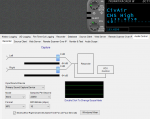
5. Windows Mixer:
Playback Tab= PC's Speakers (Realtek Audio, Default Device).
Recording Tab: Microphone - USB Audio Device, default.
Mic Properties: "Listen to this device" NOT checked.
Custom Tab: AGC checked. Note: I tried disabling AGC and makes no diff.
Levels: Mic is set at 86
Advanced Tab: Sample Rate/Bit Depth: 1 channel, 16 bit, 44100Hz
6. RECORDER Screen: While recording I can see via the Record Level Meter that it's tied to scanner volume.
Please ask away if more info needed.
Two issues:
1. Interference from what and how to fix?
2. How do I set a fixed record audio volume/level vs. dependent on scanner's volume?
Am getting crappy audio with a low whine or hum and fast thumping clicking noise. Actual scanner traffic audio can be heard in background but at VERY low level. Am attaching a mp3 of the audio I recorded from PC's speakers (while Proscan's loopback selected) with phone.
Here's my setup and some of Proscan's settings.
1. Sabrent Audio stick is connected to a powered USB 3 hub on desktop
2. BCT15X has a 3.5mm stereo cable from the REC output connected to the stick's MIC (pink) input. Cable is new https://www.amazon.com/gp/product/B00NO73MUQ
3. Scanner connected to PC using Uniden's USB cable.
4. Audio Control, Recorder, Capture Screen: Input Device is Primary Sound Capture Device. NOTE: Level meters very LOW unless scanner volume up HIGH. Nothing shows on Signal Scope. See screenshot
5. Windows Mixer:
Playback Tab= PC's Speakers (Realtek Audio, Default Device).
Recording Tab: Microphone - USB Audio Device, default.
Mic Properties: "Listen to this device" NOT checked.
Custom Tab: AGC checked. Note: I tried disabling AGC and makes no diff.
Levels: Mic is set at 86
Advanced Tab: Sample Rate/Bit Depth: 1 channel, 16 bit, 44100Hz
6. RECORDER Screen: While recording I can see via the Record Level Meter that it's tied to scanner volume.
Please ask away if more info needed.
Two issues:
1. Interference from what and how to fix?
2. How do I set a fixed record audio volume/level vs. dependent on scanner's volume?


