• To anyone looking to acquire commercial radio programming software:

    Please do not make requests for copies of radio programming software which is sold (or was sold) by the manufacturer for any monetary value. All requests will be deleted and a forum infraction issued. Making a request such as this is attempting to engage in software piracy and this forum cannot be involved or associated with this activity. The same goes for any private transaction via Private Message. Even if you attempt to engage in this activity in PM's we will still enforce the forum rules. Your PM's are not private and the administration has the right to read them if there's a hint to criminal activity.

    If you are having trouble legally obtaining software please state so. We do not want any hurt feelings when your vague post is mistaken for a free request. It is YOUR responsibility to properly word your request.

    To obtain Motorola software see the Sticky in the Motorola forum.

    The various other vendors often permit their dealers to sell the software online (i.e., Kenwood). Please use Google or some other search engine to find a dealer that sells the software. Typically each series or individual radio requires its own software package. Often the Kenwood software is less than $100 so don't be a cheapskate; just purchase it.

    For M/A Com/Harris/GE, etc: there are two software packages that program all current and past radios. One package is for conventional programming and the other for trunked programming. The trunked package is in upwards of $2,500. The conventional package is more reasonable though is still several hundred dollars. The benefit is you do not need multiple versions for each radio (unlike Motorola).

    This is a large and very visible forum. We cannot jeopardize the ability to provide the RadioReference services by allowing this activity to occur. Please respect this.

KPG-89D - Font Size

WormtownNative

Newbie
Premium Subscriber
Joined
Jun 27, 2017
Messages
4
Reaction score
0
A question for the hive mind. I've been teaching myself programming via a new to me TK-3180 and KPG-89D, but as of late, KPG has reduced the text/font size in the Zone Name and Channel Name. I don't even know how this happened - I'm guessing I hit something, but I don't know what.

I've tried the help file and Google, but I'm not finding a setting to change it. Any suggestions on where to look?
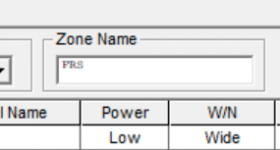

Screenshot 2025-09-30 191722.png

Screenshot 2025-09-30 191705.png
 

n7maq-1

Member
Premium Subscriber
Joined
Mar 12, 2004
Messages
329
Reaction score
271
Location
Oregon
It is not in the software alone, it is a combo of Windows and the FPU. I delt with it for some time, one of the other techs here at the shop figured it out IIRC, I'll ask him tomorrow.
 

kd4efm

Member
Premium Subscriber
Joined
Jul 14, 2002
Messages
3,186
Reaction score
1,332
Location
EL98 Florida
System font size settings. Can't say where to look, but it will be in system settings.
 

WormtownNative

Newbie
Premium Subscriber
Joined
Jun 27, 2017
Messages
4
Reaction score
0
System font size settings. Can't say where to look, but it will be in system settings.
That does not appear to be a solution. It increases banner text size, but not text in those boxes.

It is not in the software alone, it is a combo of Windows and the FPU. I delt with it for some time, one of the other techs here at the shop figured it out IIRC, I'll ask him tomorrow.
Thank you!
 

hill

Member
Premium Subscriber
Joined
Dec 19, 2002
Messages
2,116
Reaction score
1,378
Location
Middle River, MD
That's a new one on me to see small font on Kenwood KPG software.

I have around 5 software packages to program my various Kenwood including KPG-89 and none
of them have ever had this issue.

Going forward I am thinking it's something with your computer and it's settings and not a setting within KPG-89.
 

wd8chl

Member
Joined
Apr 4, 2007
Messages
488
Reaction score
211
That can't be a KPG issue, since that software is too old, and has not been updated in a very long time. It HAS to be a change in your PC.
And to be clear, I just fired up KPG-89D on my XP laptop. No change.
 

WormtownNative

Newbie
Premium Subscriber
Joined
Jun 27, 2017
Messages
4
Reaction score
0
That can't be a KPG issue, since that software is too old, and has not been updated in a very long time. It HAS to be a change in your PC.
And to be clear, I just fired up KPG-89D on my XP laptop. No change.

Understood. Probably doesn't help I'm trying to run it on Windows 11 then.
 

sallen07

Member
Premium Subscriber
Joined
Dec 22, 2013
Messages
1,335
Reaction score
1,116
Location
Rochester, NY
Understood. Probably doesn't help I'm trying to run it on Windows 11 then.
Another vote for "system setting". I am running it on Windows 11 without any issues. Note that I have the opposite situation (won't call it a problem): The channel name is bigger than the other fields!

If you go to Settings/System/Display/Scale, what do you have it set at? Mine is at 125% (old eyes!).
 

Attachments

  • kp89.png
    kp89.png
    54.8 KB · Views: 11

AM909

Radio/computer geek
Premium Subscriber
Joined
Dec 10, 2015
Messages
1,663
Reaction score
711
Location
SoCal
Back in WinXP, there was this Advanced Appearance dialog that let you set the size of various individual UI items, like listbox text, scrollbars, etc. At some point in Windows evolution, I think it disappeared, but the underlying registry values may still be around, just manipulated to the "right" values by the higher-level settings (i.e., when you change "font size" or whatever a theme is called now). The key may be to manipulate your Windows appearance settings to make it rewrite those values.

It's also possible, even likely, that KPG-* uses a Windows API to store its window positions and settings in the registry so when you customize a window and close it, it can (theoretically) re-open the window in an appropriate way. That may unfortunately include the font size and other things that KPG-* have no way to set.

For KPG-89DN, the key may be Computer\HKEY_CURRENT_USER\SOFTWARE\KENWOOD\KPG89DN\Backup , values LastModel and LastWinPos.

You could copy those values and then remove them to see if KPG-89DN re-initializes them to something sane on restart.

As always, YMMV, take great care with registry edits, IANAE, blah blah blah.
 

WormtownNative

Newbie
Premium Subscriber
Joined
Jun 27, 2017
Messages
4
Reaction score
0
I'm running it at 100%.

It is annoying, but it's something that I can live with. I only use it for the 3180, the two main radios I've been playing with (TK-5220 and TK-5230) use a different software.
 
Top