
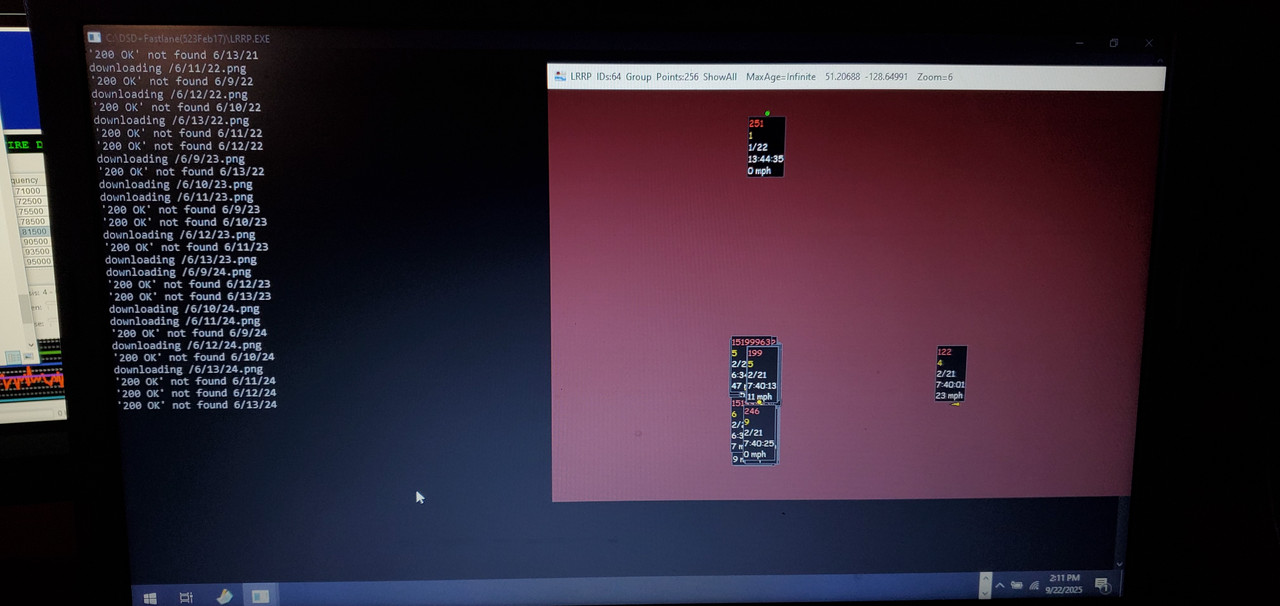
Anyone else unable to download newtiles??


 operations.osmfoundation.org


Same! I seem to be having the same issue here. I see the map, but the more you zoom in on a specific location, the blurrier the map becomes.
There have been no updates on my end recently to DSD+ or anything similar. It just stopped working on its own....Strange. I tried loading a random tile from a URL on the web, and the tile(s) load fine. It might be an issue with DSD+.
View attachment 190522
Any workaround for this to get the tiles to load corectly?


 community.openstreetmap.org
Yeah, I agree, this is not an OpenStreetMap problem—the tiles on the web load without any issues for me.It's not an Openstreetmap problem.... As you can see on official website everything it's fina...
I think this might be the actual issue here. That DSD may be having a problem grabbing the tiles from OSM. I was trying to find a configuration file in DSD that allowed me to change the data source, but I couldn't locate one; it must be hardcoded into the program.or DSDplus is pointing to a now defunct source for the tiles or something.
I believe I saw this explained in the notes.txt for a LRRP.exe update a few months ago.The LRRP may not be capable of HTTPS. I believe normally it uses HTTP to call the tiles. And at least at this moment, OSM automatically redirects HTTP requests to HTTPS. If LRRP doesn't support HTTPS, that's the issue.
LRRP 1.15

    Code changes have reduced the size of the LRRP.exe file by 35 kB

    User-selected distance units (miles or km) are now saved in the LRRP.cfg file

    Pressing 'B' now moves the LRRP map display to the background, i.e. behind all other
    visible windows. LRRP.exe remains in focus, which lets you manipulate the map while
    other windows (DSD+. FMP24/FMPA) are visible in the foreground.

    LRRP.exe uses the HTTP protocol to connect to Open Streetmap servers to download map tiles,
    but those servers now only accept HTTPS connections. We will not be modifying LRRP.exe
    to use HTTPS; instead, LRRP.exe now makes local HTTP connections to port 3000.
    To enable retrieval of OSM map tiles, users must download and install the stunnel proxy.

    The current download location is:  https://www.stunnel.org/downloads

    Download and run stunnel-x.xx-win32-installer.exe

    The stunnel installer will walk you through the setup process.

    Install stunnel for all users and select all of the default choices.

    In the text window that opens, just press Enter at each prompt.

    The stunnel.conf file has to be edited; these lines should be present at the end of the file:

      [mylocalproxy]
      client = yes
      accept = 127.0.0.1:3000
      connect = tile.openstreetmap.org:443

    When stunnel is installed and configured correctly, LRRP.exe will be able to download
OSM map tiles through the stunnel proxy.LRRP 1.17
Open Streetmap servers have returned to accepting HTTP connections, so the stunnel
program is currently not needed to download map tiles. LRRP 1.17 connects directly
to the Open Streetmap servers instead of relying on HTTPS connections through stunnel.Tried stunnel myself, no luck there. I believe lrpp is blocked because it doest give accreditation on the mapYeah, I agree, this is not an OpenStreetMap problem—the tiles on the web load without any issues for me.
I think this might be the actual issue here. That DSD may be having a problem grabbing the tiles from OSM. I was trying to find a configuration file in DSD that allowed me to change the data source, but I couldn't locate one; it must be hardcoded into the program.
I believe I saw this explained in the notes.txt for a LRRP.exe update a few months ago.
Found it this morning, around line 1760. It explains something about using stunnel. All tho I still haven't gotten it to work. But I can try again. Here's the direct quote from the note.txt file
Code:LRRP 1.15 Code changes have reduced the size of the LRRP.exe file by 35 kB User-selected distance units (miles or km) are now saved in the LRRP.cfg file Pressing 'B' now moves the LRRP map display to the background, i.e. behind all other visible windows. LRRP.exe remains in focus, which lets you manipulate the map while other windows (DSD+. FMP24/FMPA) are visible in the foreground. LRRP.exe uses the HTTP protocol to connect to Open Streetmap servers to download map tiles, but those servers now only accept HTTPS connections. We will not be modifying LRRP.exe to use HTTPS; instead, LRRP.exe now makes local HTTP connections to port 3000. To enable retrieval of OSM map tiles, users must download and install the stunnel proxy. The current download location is: https://www.stunnel.org/downloads Download and run stunnel-x.xx-win32-installer.exe The stunnel installer will walk you through the setup process. Install stunnel for all users and select all of the default choices. In the text window that opens, just press Enter at each prompt. The stunnel.conf file has to be edited; these lines should be present at the end of the file: [mylocalproxy] client = yes accept = 127.0.0.1:3000 connect = tile.openstreetmap.org:443 When stunnel is installed and configured correctly, LRRP.exe will be able to download OSM map tiles through the stunnel proxy.
In addition to my post above. It appears that the stunnel program is only needed for LRRP 1.15. In the Notes.txt file for LRRP 1.17, it states that stunnel is not required for OSM to function. Im using LRRP 1.26 (latest).
Code:LRRP 1.17 Open Streetmap servers have returned to accepting HTTP connections, so the stunnel program is currently not needed to download map tiles. LRRP 1.17 connects directly to the Open Streetmap servers instead of relying on HTTPS connections through stunnel.
Im at a loss here lol. I guess my question is: Is there a way to change the OSM data source in DSD+? It must be hardcoded into the program. I was going to check if the link that DSD+ is using to retrieve tiles from OSM is broken or not, and if I can modify it to point correctly from my end.
Mike @mtindor, you mentioned that you emailed the DSD+ authors about this issue. Any Response?
If that were the case, you'd see a screenfile of tiles indicating that it blocked due to lack of attribution.Tried stunnel myself, no luck there. I believe lrpp is blocked because it doest give accreditation on the map
Ok thanks! I just tried to get stunnel up and running and had no luck again. I might be missing something. Im a little slow lol. Im having trouble getting past this step:They said they think it's the HTTPS thing again. So at this time you will have to use stunnel -- and probably forever into the future, because I doubt OSM will revert back to allowing access to the tiles over HTTP, and from the notes.txt file it looks like the author has no plan in the future to ever add support for HTTPS in the LRRP app itself.
The stunnel.conf file has to be edited; these lines should be present at the end of the file:

      [mylocalproxy]
      client = yes
      accept = 127.0.0.1:3000
      connect = tile.openstreetmap.org:443

    When stunnel is installed and configured correctly, LRRP.exe will be able to download
    OSM map tiles through the stunnel proxy.
Ok thanks! I just tried to get stunnel up and running and had no luck again. I might be missing something. Im a little slow lol. Im having trouble getting past this step:
Code:The stunnel.conf file has to be edited; these lines should be present at the end of the file: [mylocalproxy] client = yes accept = 127.0.0.1:3000 connect = tile.openstreetmap.org:443 When stunnel is installed and configured correctly, LRRP.exe will be able to download OSM map tiles through the stunnel proxy.
I have the [mylocalproxy] entry in the stunnel.conf file. However, it doesn't seem to be connecting correctly, as per the stunnel log and the LRRP app. Any guidance would be appreciated. TIA.View attachment 190589
Ok, Thanks for your help, Mike!Wish I could help. I don't use stunnel. I did install the latest version though and get the same message. I'm guessing older versions (that were available back when DSDPlus notes were added with stunnel instructions) did not concern themselves with MITM attacks and thus didn't require authentication. It's probably going to require an SSL cert or some keys of some sort to be generated and then added to the conf file under the server and client sections in order for it to work.
Ok, Thanks for your help, Mike!
This stuff is a headscratcher for me for sure. Frustrating. I want it to work because I believe the LRRP map in DSD+ is the best map available compared to some other programs. However, it's weird that this happened all of a sudden when everything was working fine before (a week ago or so). Something must have happened on the backend, likely due to conflicts with the OSM HTTPS and its communication with DSD+. Hopefully, a solution other than stunnel can be found.
I started working on something in stunnel with PSK auth. Not successful yet, but probably because I'm confused about the PSK Server / PSK Client IP/Port information that needs to be entered. If I get it working I'll be sure to share. Wont' be tonight though. Sleep is calling.
psk.txt
-------
test1:oaP4EishaeSaishei6rio6xeeph3az

psk1.txt
---------
test1:oaP4EishaeSaishei6rio6xeeph3az


