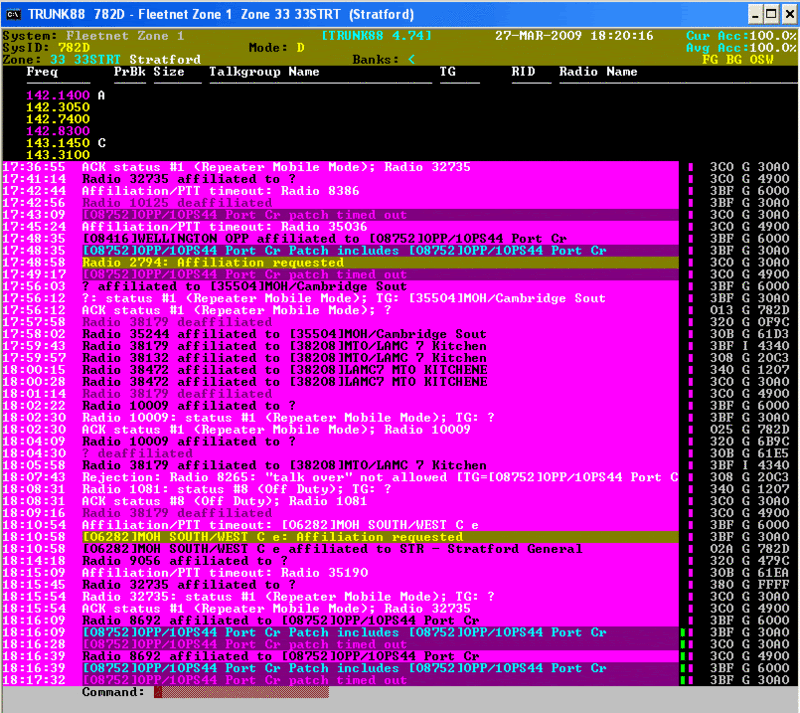
Ran Trunk88 for 24 hours and 142.8300 showed up but in pink like the Alternate CC. Maybe Andrew can enlighten us on the reason for the different colour.
Channels that are in a zone's channel list (e.g. channels that TRUNK88 saw at some point in the past) that haven't been used for a period of time (e.g. a period that exceeds that defined by TRUNK88's Inactive Channel Timeout parameter) are displayed in the color specified by the Inactive Channel Color parameter.
That color would be color #13 which, in a Windows console application, defaults to that ghastly bright magenta. FYI, I would be most grateful if you would take a moment to change the RGB values for colors 5 (default = magenta) and 13 (default = bright magenta) in the properties of the shortcut/icon that you use to run TRUNK88. Detailed instructions are included in the ReadMe file that comes with every TRUNK88 release. Suggested RGB values for color #5 are 70-70-70. For color #13, 140-120-80 looks nice. Feel free to tweak them to what you like best, but please lose the magenta...
A channel that is displayed in the Inactive Channel Color may be:
- a regular channel; if the system/zone isn't very active, channels can go unused for long periods. Typically, most of the channels will end up displayed in this manner on a quiet system/zone. The current control channel will always display as an active channel.
- a channel that was recorded in error, perhaps a bad OSW decode occurred, or the user briefly tuned to another zone's control channel where the channel was in use and TRUNK88 didn't have enough time to detect the zone change. If a channel was recorded in error, its Comms Count will be very low (check via System Command / Edit Channels). You can try deleting a channel and see if it eventually comes back (e.g. gets used). A channel entry will only be recreated if the system is seen using it (e.g. as a voice or control channel); systems only broadcast voice channel information
when a channel is carrying traffic - there is no way for TRUNK88 to log channels until the system uses them. If you have enabled Detailed Comms Logging and FG Activity Logging, you can search through your .log files for channel grants (voice traffic) on a specific channel/frequency to see when a specific voice channel was logged.
- a channel that is no longer in use, e.g. removed from service. You can try deleting it and see if it comes back, or just record its current Comms Count and see if it ever goes up.
- a protected channel; Protected channels are used for voice traffic only when all non-protected channels are already in use or otherwise unavailable to fulfill a channel grant request (e.g. out of service).
Reasons for protecting a channel:
- it is an alternate control channel (ACC); it is protected to increase the likelihood of it being immediately available when needed (e.g. when the primary control channel fails)
- it is an interconnect-capable channel (e.g. it is connected to a phone line and selected subscriber radios can make and receive half duplex phone calls); it is protected to increase the likelihood of it being available when needed for phone traffic. With cellular phone service being so cheap these days, most trunking systems don't have interconnect capability.
- it is a digital-capable channel in a mixed mode (digital and analog) system that has some analog-only repeater channels; it is protected to increase the likelihood of it being available for digital traffic.
- it is a channel that may receive interference from another system (a different trunking or conventional system or another zone within the same system) or may interfere with another system / zone; it is protected to minimize the amount of service degradation that users experience.
- it is a channel that has other issues (poor RX sensitivity, low TX power, prone to overheat / fail / trigger alarms, etc.); it is protected to increase the likelihood that the techs will get a good night's sleep every night.