

You are using an out of date browser. It may not display this or other websites correctly.
You should upgrade or use an alternative browser.
You should upgrade or use an alternative browser.
Uniden Remote Head Project
- Thread starter MA-radio-guy
- Start date

May I please get added to this list? Been looking for something like this since the RH780 left the scene. I had not even fathomed the thought of RPi... GREAT JOB!!I'll add you to the list.
Do you use an Android or an IPhone?May I please get added to this list? Been looking for something like this since the RH780 left the scene. I had not even fathomed the thought of RPi... GREAT JOB!!


Danny37
Member
Are there videos showing how the unit works. I did a youtube search and nothing showed up

Link from pg 37 of this thread... there are probably more out there...Are there videos showing how the unit works. I did a youtube search and nothing showed up
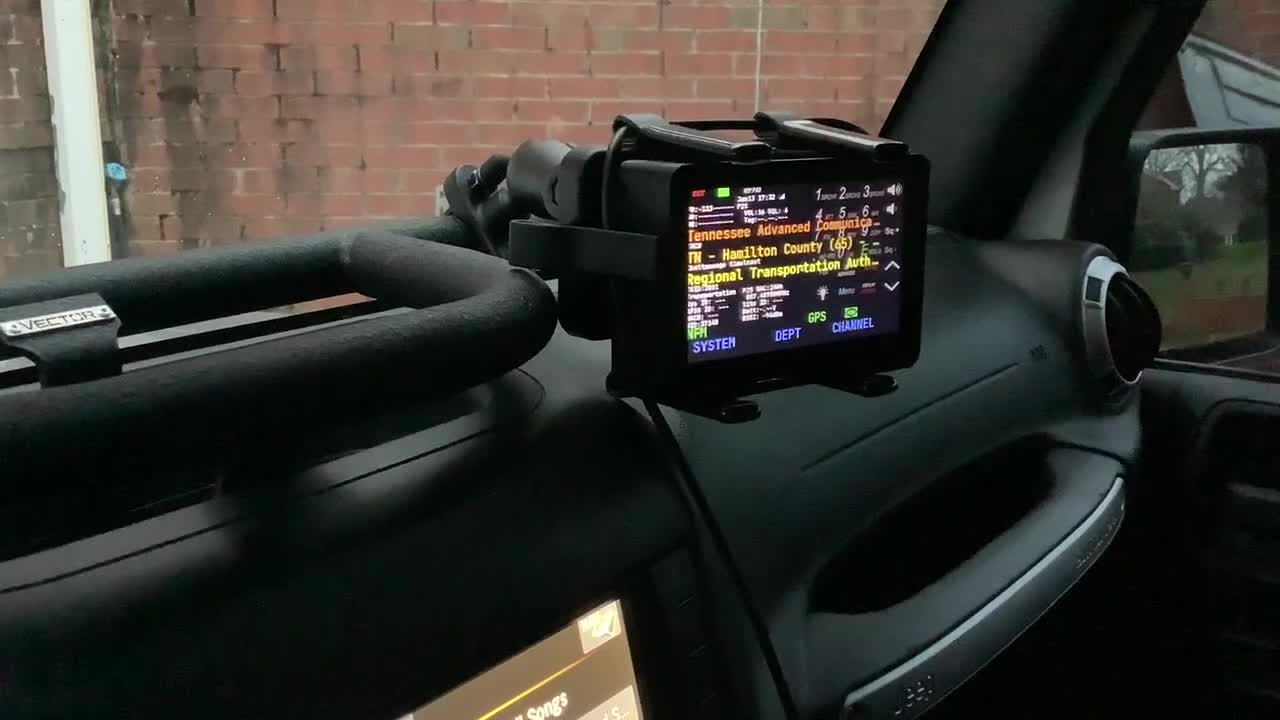
Uniden SDS200 and Remote Head (touch scanner)
Touch-scanner.com Vector Offroad bar for a 2011-2018 Jeep Wrangler JKU with the added lift spacer. RAM Mounts RAM-B-201U Double Socket Arm (Medium) Compatible with RAM B Size 1" Ball Components RAM Mo
 rumble.com
We never really created any videos of it, it's pretty simple depending on the scanner you're using. Tell me the model and I'll see if we can help you out. Working on some amazing new developments. Are you an Android or IOs user?Are there videos showing how the unit works. I did a youtube search and nothing showed up
Robert
Danny37
Member
I have a uniden sds200 and an android phone (samsung s23 ultra)We never really created any videos of it, it's pretty simple depending on the scanner you're using. Tell me the model and I'll see if we can help you out. Working on some amazing new developments. Are you an Android or IOs user?
Robert
This is what we mailed out with the devices when were selling them.I have a uniden sds200 and an android phone (samsung s23 ultra)
Cable requirements for the Touch Scanner
 | These 2 blue USB 3.0 ports are where you plug the cable from the scanner into. |
| Once the scanner is plugged in via USB as shown above and powered on via the USB C Port shown nere on the right, the device will power on and connect directly to the scanner. That's really all that was to it. |  |
Robert
Danny37
Member
However like stated before there's no way to soft power on/off the unit from remote head?This is what we mailed out with the devices when were selling them.
Cable requirements for the Touch Scanner
View attachment 199587 These 2 blue USB 3.0 ports are where you plug the cable from the scanner into. Once the scanner is plugged in via USB as shown above and powered on via the USB C Port shown nere on the right, the device will power on and connect directly to the scanner. That's really all that was to it. View attachment 199588
Robert
Also the android app, will it support voice coming over the device speaker?

I think this is a great idea! I would love to be able to use my SDS200 in my vehicle, but too big to mount anywhere! I would be able to put the SDS under the seat and just have the remote head! I signed up for the email list.

I have one of the original units on an SDS-200. It works well. The SDS screen is hard to read at off angles, the remote head is easy to read for off angles. Both the scanner and the remote are powered on and off using the accessory switched power. The scanner and the head all boot up when power is applied. You want to power both off at the same time or the head becomes confused.
My scanner was mounted such that the volume knob of the scanner can be adjusted. This is kind of important since the HMI volume button is not as precise as the volume knob.
My scanner was mounted such that the volume knob of the scanner can be adjusted. This is kind of important since the HMI volume button is not as precise as the volume knob.
Yes and a whole lot more.....However like stated before there's no way to soft power on/off the unit from remote head?
Also the android app, will it support voice coming over the device speaker?
But only for the SDS150.Yes and a whole lot more.....
Danny37
Member
Read the thread, this is for the sds100/200. Uniden already has their own app for the 150But only for the SDS150.
And I was responding to the comment about the Android app, which I assumed was referring to the U/Aware app.Read the thread, this is for the sds100/200. Uniden already has their own app for the 150
Danny37
Member
The android app is referring to touch scanner. Why would we bring up the U/Aware app when its available on the app store/play store from uniden. This thread is about the SDS100/200, please dont make assumptions as it confuses the readers.And I was responding to the comment about the Android app, which I assumed was referring to the U/Aware app.
Yes, and much more.However like stated before there's no way to soft power on/off the unit from remote head?
Also the android app, will it support voice coming over the device speaker?
Let's clarify this to avoid any and all confusion. I have designed and built a full fledged SDS Android app. I'm not referring to the Uniden U/Aware app in any way shape or form. I'm also not referring to the touch scanner Raspbery PI that Mancow and I were selling. Before anyone asks, no, it's not available yet, I'm working on a test plan to get it out to a beta team that has yet to be selected. And yes, once approved by Google, will be available on the play store. Until that approval, it wil be available to those who are selected as testers via an apk file only. I'm hoping to post some screenshots and videos over the next couple of days. I'll also be posting a link to a questionnaire here in the next few days to select the beta test team.The android app is referring to touch scanner. Why would we bring up the U/Aware app when its available on the app store/play store from uniden. This thread is about the SDS100/200, please dont make assumptions as it confuses the readers.
Robert
Similar threads

- Replies
- 7
- Views
- 519


- Replies
- 0
- Views
- 144

- Replies
- 3
- Views
- 743

- Replies
- 0
- Views
- 137