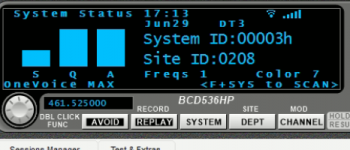
BCD436HP/BCD536HP: Analyze-System Status

Status
Not open for further replies.

KevinC

32D2T/957.282
Super Moderator
Joined
Jan 7, 2001
Messages
14,827
Reaction score
24,596
Location
I'm everywhere Focker!
When using analyze-system status with ProScan via WiFI on on Tier III system ProScan will lose connection with the 536 every-single-time after less than a minute. The only way to fix it is to reset the 536. I seem to recall this being an issue several years ago and I guess it never got resolved, but I could be misremembering. My 536 is rock solid on ProScan via WiFI otherwise.

Anyone else able to replicate this? It doesn't appear to do it on P25 trunked, but maybe I'm not waiting long enough.

 

KevinC

32D2T/957.282
Super Moderator
Joined
Jan 7, 2001
Messages
14,827
Reaction score
24,596
Location
I'm everywhere Focker!
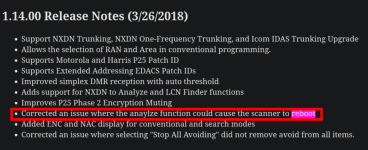
Found an old thread with similar issues...


Whiskey3JMC

Surfer of the Delaware Valley Airwaves
Premium Subscriber
Joined
Jul 16, 2006
Messages
10,775
Reaction score
9,503
Location
Simulcastylvania, TE
Assuming you're running most recent FW? Apparently issue was corrected on 1.14.00

1751232105907.png
 

N9JIG

Sheriff
Moderator
Joined
Dec 14, 2001
Messages
6,600
Reaction score
6,203
Location
Far NW Valley
I programmed in a local T-III system and dug out my WiFi adapter, so far it is working fine.

I also ran it via USB and no issues.

I also tried a P25 system, the same as I had had an issue with in the referenced thread, so issues there either with the new firmware.

What is the Year Code on your 536? (5th digit of the SN)
 

N9JIG

Sheriff
Moderator
Joined
Dec 14, 2001
Messages
6,600
Reaction score
6,203
Location
Far NW Valley
So that is a newer (2023) unit (Character 4 would be a "C").

The newest unit I have is a 2021 version, also with a "C" in the 4th character of the SN (That replaced the "Z" since it has been out for more than 10 years now...)

On my newer unit I still have not had any issues, but will run it for a while.

I would suggest that you reformat your SD Card or try a different one, there could be a bad bit there or something.

The issue I was having a few years back was the radio rebooting, not just losing connection. I suspect that it was a RAM shortage of some sort, I know they had to do some work on the radio RAM to accommodate the addition of NXDN, I don't know if this was related or not.
 

KevinC

32D2T/957.282
Super Moderator
Joined
Jan 7, 2001
Messages
14,827
Reaction score
24,596
Location
I'm everywhere Focker!
So that is a newer (2023) unit (Character 4 would be a "C").

The newest unit I have is a 2021 version, also with a "C" in the 4th character of the SN (That replaced the "Z" since it has been out for more than 10 years now...)

On my newer unit I still have not had any issues, but will run it for a while.

I would suggest that you reformat your SD Card or try a different one, there could be a bad bit there or something.
I must have looked at the wrong 5th digit, I've had mine since 2013 or 2014. Different card makes no difference and I tried my 436 and it does it on this system also. I remember it doing this on a different Tier III system as well and I gave up trying.
 

N9JIG

Sheriff
Moderator
Joined
Dec 14, 2001
Messages
6,600
Reaction score
6,203
Location
Far NW Valley
I must have looked at the wrong 5th digit, I've had mine since 2013 or 2014. Different card makes no difference and I tried my 436 and it does it on this system also. I remember it doing this on a different Tier III system as well and I gave up trying.
The digit in question is the SN, were you looking at the ESN instead? The SN should start with 375Z (536) or 376Z (436). If it is the ESN then it would be the 7th character (375260_... or 376260_...)
 

KevinC

32D2T/957.282
Super Moderator
Joined
Jan 7, 2001
Messages
14,827
Reaction score
24,596
Location
I'm everywhere Focker!
The digit in question is the SN, were you looking at the ESN instead? The SN should start with 375Z (536) or 376Z (436). If it is the ESN then it would be the 7th character (375260_... or 376260_...)
It's a 3 no matter which I look at. I got it in December of 2013.
 

N9JIG

Sheriff
Moderator
Joined
Dec 14, 2001
Messages
6,600
Reaction score
6,203
Location
Far NW Valley
OK, then I will try it on my older radio from 2017 (the oldest one I have with DMR). My 2014 radio doesn't have DMR.
 

jasonhouk

Uniden AlphaMan
Uniden Representative
Joined
Mar 29, 2013
Messages
1,357
Reaction score
1,984
Location
Marion, Ohio
Maybe @jasonhouk or @N9JIG can provide some input since they both had the issue and are both beta testers.
Unfortunaley, I was not in on the 536 Beta test but still may be able to help and send a message to the Beta Group to look into the issue and see if they can reproduce.
 

N9JIG

Sheriff
Moderator
Joined
Dec 14, 2001
Messages
6,600
Reaction score
6,203
Location
Far NW Valley
So I have been running it for several days on two of my 536's with DMR on a local system. One radio is connected via WiFi and the other via USB using ProScan.

Neither radio has rebooted or shown any other errors.

I also ran it on a P25 system on a different 536 and still no errors on that one either.
 

KevinC

32D2T/957.282
Super Moderator
Joined
Jan 7, 2001
Messages
14,827
Reaction score
24,596
Location
I'm everywhere Focker!
After more investigation this issue only happens if the system is extremely busy, I mean crazy busy like it was Saturday and Sunday. It will also populate the "frequencies" field way past what the system actually has.

I suspect it will be crazy busy again this Saturday, maybe I'll remember how to do the logging and capture it happening. The scanner appears to track the system properly, just the analyze feature seems to have issues. And just like the issue @N9JIG reported in 2018 it doesn't happen on all systems.
 

N9JIG

Sheriff
Moderator
Joined
Dec 14, 2001
Messages
6,600
Reaction score
6,203
Location
Far NW Valley
That reinforces my suspicion that it is an internal memory overload. I do not have a super busy system near my home to try to replicate it, one of the problems living on the edge of civilization I suppose.
 

KevinC

32D2T/957.282
Super Moderator
Joined
Jan 7, 2001
Messages
14,827
Reaction score
24,596
Location
I'm everywhere Focker!
Crazy busy again and I confirmed the scanner locks up, it's not just the connection to ProScan. Moral of the story may be don't use analyze on extremely busy CapMax systems.
 

N9JIG

Sheriff
Moderator
Joined
Dec 14, 2001
Messages
6,600
Reaction score
6,203
Location
Far NW Valley
Do you have access to an SDS100 or SDS200 with DMR? If so can you try that same system with the SDS and see if it happens there?
 
Status
Not open for further replies.
Top