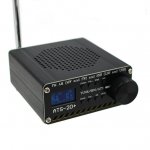
ATS-20plus?

Status
Not open for further replies.

Rq17954z

Member
Joined
Feb 4, 2022
Messages
50
Reaction score
42
Location
Waterbury CT
Hi, recently purchased a ATS -20 plus for the price I can say it receive,s better than anything else I have! The one thing I have learned is depending on what is connected to the radio makes a huge difference in how it performs . I have 2 blue tooth speakers that I use as external speakers with the radio. The sound is much better with one vs the other. On a different radio they both sound very good. curious why this happens and and anything I could do to change that? One speaker is a Sony and the other is a Anker and I use the same 3.5mm cord for both speakers. With the Anker the radio will receive the same FM station in stereo as it would with just the stock internal speaker with the Sony it wont receive it in stereo.
With shortwave it's reception and noise.
 

TAC4

Member
Joined
Oct 10, 2015
Messages
553
Reaction score
460
Location
Ontario, Canada πŸ‡¨πŸ‡¦
The only thing I can think of is the impedance match of the ATS-20 audio output favors the Anker or the Anker has multi speakers
in it for stereo setup and Sony speaker is mono only, at any rate those radios look fun to tinker with but are small AF.
 

Attachments

  • 23298fca-5d47-4a81-b9ea-e8cfe81c16e3.6e29a0d5f7d78dfc5a24c03f8a3ad858.jpeg
    23298fca-5d47-4a81-b9ea-e8cfe81c16e3.6e29a0d5f7d78dfc5a24c03f8a3ad858.jpeg
    28.1 KB · Views: 14

Rq17954z

Member
Joined
Feb 4, 2022
Messages
50
Reaction score
42
Location
Waterbury CT
Thanks, never seen reception change because of a external speaker.before. the speaker is mono only but the stereo reception symbol on the ATS-20PLUS is present when using the stock speaker also.
 

TAC4

Member
Joined
Oct 10, 2015
Messages
553
Reaction score
460
Location
Ontario, Canada πŸ‡¨πŸ‡¦
Well you inspired me to get one lol. They are not bad but not a barn burner. I had low expectations going in and for $40 I paid for it I was not expecting Drake R8 like performance out of it lol.

I also know I was late to the party and this radio has been out for some time now. To me it looks like it was marketed as an experiment radio for the Audrino crowd with lots of firmware updates.

But that crowd is not for me and I hate computers lol
and some of the updates you see on the net went horribly wrong with lots of failures but I guess that is why it is called experimenting.

So anyway I got this radio to add to my collection and to use it as is out of the box as a shortwave radio with no updates. Here is my mini review:

good

-great value for the price point
-very nice robust metal case
-crystal clear audio out of such a small speaker
-nice band width filters
-nice tuning step features
-very nice SSB performance, would make a great
QRP receiver if you could get the T/R switching right
-nice built in battery

bad

-the display screen is rediculious small and the digits
are even smaller, I guess the Chinese are thinking of
cost control and not eyesight readable, if the case
size and display were double it would be perfect

-not a DX radio, more suited for strong shortwave station content listening not DX, you need an outside
long wire antenna with a lightening disconnect outside to pick up stations. the bnc antenna is dismal in performance

-bnc antenna always swings over

-my unit, the MW band does not work but it may need
a loop antenna also the ACG ON has no effect

So is this radio worth it and to add to your collection
YES just keep your expectations low. It is a fun radio
to operate and listen to. Also the little dimple on the
front of the tuning dial is for use with a stylus to make
tuning easier.
 

Attachments

  • 20240928_121948_copy_1305x979.jpg
    20240928_121948_copy_1305x979.jpg
    122.3 KB · Views: 18
Last edited:

Rq17954z

Member
Joined
Feb 4, 2022
Messages
50
Reaction score
42
Location
Waterbury CT
Interesting, mine on FM is better than my Tec sun 880 never received WGBH in Boston in stereo. It does much better than the 880 on the shortwave broadcast stations also. If you have a antenna that it likes it really performs good. Never was impressed with my ML 30 loop antenna but it works very good with my radio. Not as easy to tune in shortwave sideband as the 880. For the price it's quite good!
 

TAC4

Member
Joined
Oct 10, 2015
Messages
553
Reaction score
460
Location
Ontario, Canada πŸ‡¨πŸ‡¦
Interesting, mine on FM is better than my Tec sun 880 never received WGBH in Boston in stereo. It does much better than the 880 on the shortwave broadcast stations also. If you have a antenna that it likes it really performs good. Never was impressed with my ML 30 loop antenna but it works very good with my radio. Not as easy to tune in shortwave sideband as the 880. For the price it's quite good!
I agree "For the price it's quite good."
 

DerpteenMhz

Newbie
Joined
Nov 27, 2024
Messages
2
Reaction score
1
Thanks @TAC4! I picked an ATS20+ up on the recent singles day sale at aliexpress for $20'ish with 9 day shipping to the states based on your pros. I had to adjust the bandplan on the "SI473X_ALL_IN_ONE_OLED_RDS_CHINESE_V8r" sketch to make it user-friendly for the US market. That put my firmware at V3.0.8 by pu2clr and displays the bands for HAM, SW1-SW13, CB and WWV in the top-left corner (which makes ease-of-use on the custom firmware 10x better than stock for RF novices like myself).

I opened "SI473X_ALL_IN_ONE_OLED_RDS_CHINESE_V8r-UPGRADED_BANDPLAN.ino" file in arduino-1.8.16 from the ATS Starter Pack v2.1 and adjusted the following (2) sections: Line 254 for the bandplan and line 850 for the 4-character band info on the display.

Code:
/*
   Band table
   YOU CAN CONFIGURE YOUR OWN BAND PLAN. Be guided by the comments.
   To add a new band, all you have to do is insert a new line in the table below. No extra code will be needed.
   You can remove a band by deleting a line if you do not want a given band.
   Also, you can change the parameters of the band.
   ATTENTION: You have to RESET the eeprom after adding or removing a line of this table.
              Turn your receiver on with the encoder push button pressed at first time to RESET the eeprom content.
*/
Band band[] = {
  { MW_BAND_TYPE, 540, 1720, 750, 3, 4 },    // AM/MW from 540 to 1720kHz; default 750kHz; default step frequency index is 3 (10kHz); default bandwidth index is 4 (3kHz)
  { SW_BAND_TYPE, 1800, 2000, 1800, 0, 2 },  // 160 meters
  { SW_BAND_TYPE, 3500, 4000, 3600, 0, 2 },  // 80 meters
  { SW_BAND_TYPE, 7000, 7300, 7125, 0, 2 },  // 40 meters
  { SW_BAND_TYPE, 14000, 14350, 14150, 0, 2 },  // 20 meters
  { SW_BAND_TYPE, 18068, 18168, 18110, 0, 2 },  // 17 meters
  { SW_BAND_TYPE, 21000, 21450, 21200, 0, 2 },  // 15 meters
  { SW_BAND_TYPE, 24890, 24990, 24930, 0, 2 },  // 12 meters
  { SW_BAND_TYPE, 26965, 27405, 27025, 3, 2 },  // CB band (11 meters)
  { SW_BAND_TYPE, 28000, 29700, 28300, 0, 2 },  // 10 meters
  { SW_BAND_TYPE, 2300, 2495, 2300, 0, 2 },  // 120m SW 2.3–2.495
  { SW_BAND_TYPE, 3200, 3400, 3200, 0, 2 },  // 90m SW 3.2–3.4
  { SW_BAND_TYPE, 3900, 4000, 3900, 0, 2 },  // 75m SW 3.9–4
  { SW_BAND_TYPE, 4750, 4995, 4750, 0, 2 },  // 60m SW 4.75–4.995
  { SW_BAND_TYPE, 5900, 6200, 5900, 0, 2 },  // 49m SW 5.9–6.2
  { SW_BAND_TYPE, 7200, 7450, 7200, 0, 2 },  // 41m SW 7.2–7.45
  { SW_BAND_TYPE, 9400, 9900, 9400, 0, 2 },  // 31m SW 9.4–9.9
  { SW_BAND_TYPE, 11600, 12100, 11600, 0, 2 },  // 25m SW 11.6–12.1
  { SW_BAND_TYPE, 13570, 13870, 13570, 0, 2 },  // 22m SW 13.57–13.87
  { SW_BAND_TYPE, 15100, 15830, 15100, 0, 2 },  // 19m SW 15.1–15.83
  { SW_BAND_TYPE, 17480, 17900, 17480, 0, 2 },  // 16m SW 17.48–17.9
  { SW_BAND_TYPE, 21450, 21850, 21450, 0, 2 },  // 13m SW 21.45–21.85
  { SW_BAND_TYPE, 25670, 26100, 25670, 0, 2 },  // 11m SW 25.67–26.1
  { SW_BAND_TYPE, 2500, 2500, 2500, 0, 4 },  // WWV 2.5Hz
  { SW_BAND_TYPE, 5000, 5000, 5000, 0, 4 },  // WWV 5Hz
  { SW_BAND_TYPE, 10000, 10000, 10000, 0, 4 },  // WWV 10Hz
  { SW_BAND_TYPE, 15000, 15000, 15000, 0, 4 },  // WWV 15Hz
  { SW_BAND_TYPE, 20000, 20000, 20000, 0, 4 },  // WWV 20Hz
  { SW_BAND_TYPE, 25000, 25000, 25000, 0, 4 },  // WWV 25Hz
  { SW_BAND_TYPE, 1800, 30000, 1800, 0, 3 },  // All 1.8 Mhz to 30 Mhz
  { FM_BAND_TYPE, 8400, 10800, 10150, 3, 0 }
};

And the following code is around line 850 to display the band in the top-left corner. I adjusted/removed overlapping frequencies (SW3 for example) and was surprised to see that single frequencies could be programmed in for WWV as well for an easy signal strength sweep.

Code:
/**
   Shows band information
*/
void showBandDesc() {
  char *bandMode;
  if (currentFrequency < 520){
    bandMode = (char *)"LW  ";
  } else if (currentFrequency >= 1800 && currentFrequency <= 2000){
    bandMode = (char *)"160M";
  } else if (currentFrequency >= 3500 && currentFrequency <= 4000){
    bandMode = (char *)"80M ";
  } else if (currentFrequency >= 7000 && currentFrequency <= 7300){
    bandMode = (char *)"40M ";    
  } else if (currentFrequency >= 14000 && currentFrequency <= 14350){
    bandMode = (char *)"20M ";
  } else if (currentFrequency >= 18068 && currentFrequency <= 18168){
    bandMode = (char *)"17M ";    
  } else if (currentFrequency >= 21000 && currentFrequency <= 21450){
    bandMode = (char *)"15M ";
  } else if (currentFrequency >= 24890 && currentFrequency <= 24990){
    bandMode = (char *)"12M ";  
  } else if (currentFrequency >= 26650 && currentFrequency <= 27405){
    bandMode = (char *)"CB  ";
  } else if (currentFrequency >= 28000 && currentFrequency <= 29700){
    bandMode = (char *)"10M ";    
  } else if (currentFrequency >= 2300 && currentFrequency <= 2495){
    bandMode = (char *)"SW1 ";
  } else if (currentFrequency >= 3200 && currentFrequency <= 3400){
    bandMode = (char *)"SW2 ";    
  } else if (currentFrequency >= 4750 && currentFrequency <= 4995){
    bandMode = (char *)"SW4 ";
  } else if (currentFrequency >= 5900 && currentFrequency <= 6200){
    bandMode = (char *)"SW5 ";  
  } else if (currentFrequency >= 7301 && currentFrequency <= 7450){
    bandMode = (char *)"SW6 ";
  } else if (currentFrequency >= 9400 && currentFrequency <= 9900){
    bandMode = (char *)"SW7 ";    
  } else if (currentFrequency >= 11600 && currentFrequency <= 12100){
    bandMode = (char *)"SW8 ";
  } else if (currentFrequency >= 13570 && currentFrequency <= 13870){
    bandMode = (char *)"SW9 ";    
  } else if (currentFrequency >= 15100 && currentFrequency <= 15830){
    bandMode = (char *)"SW10";
  } else if (currentFrequency >= 17480 && currentFrequency <= 17900){
    bandMode = (char *)"SW11";  
  } else if (currentFrequency >= 21451 && currentFrequency <= 21850){
    bandMode = (char *)"SW12";
  } else if (currentFrequency >= 25670 && currentFrequency <= 26100){
    bandMode = (char *)"SW13";    
  } else if (currentFrequency == 2500){
    bandMode = (char *)"WWV1";
  } else if (currentFrequency == 5000){
    bandMode = (char *)"WWV2";    
  } else if (currentFrequency == 10000){
    bandMode = (char *)"WWV3";
  } else if (currentFrequency == 15000){
    bandMode = (char *)"WWV4";  
  } else if (currentFrequency == 20000){
    bandMode = (char *)"WWV5";
  } else if (currentFrequency == 25000){
    bandMode = (char *)"WWV6";
  } else {
    bandMode = (char *)bandModeDesc[currentMode];
  }
  oled.setCursor(0, 0);
  oled.print("    ");
  oled.setCursor(0, 0);
  oled.invertOutput(cmdBand);
  oled.print(bandMode);
  oled.invertOutput(false);
}

If you do not mind a little out-of-the-box configuration/tinkering, this radio is perfect for casual shortwave listening and exploring all the rag-chewing and shoptalk on HAM bands as time permits (SSB performance has been adequate thus far). I set it up with the LZ1AQ magnetic loop kit and prefer the ATS20+ over using an SDR for most HF listening now. The thumb operations for AVC, AGC and bandwidth to tune-out static on the signal has become second nature already after two-weeks of use with the updated firmware. Auto-scanning on shortwave bands has also been working well. I couldn't ask for anything more from such an inexpensive radio with its feature set!

Links used to update the firmware:
V3.0.8.by pu2clr

ATS20 Starter Pack
 
Last edited:
Status
Not open for further replies.
Top