DSD-FME DSD fme

Status
Not open for further replies.

Yazombek

Member
Joined
Feb 4, 2025
Messages
12
Reaction score
2
Please please please
Could someone help me with start to use dsd fme, i cant understand how to make it work on windows... Please i need a little push of knowledge and then i will continue on my own, just the basic if someone want to help i will be happy 😁
 

Whiskey3JMC

Just another pesky scannist
Premium Subscriber
Joined
Jul 16, 2006
Messages
10,515
Reaction score
9,224
Location
Simulcastylvania, TE
Welcome to the RR forums. From the github page:

Information​

See the examples folder for information on cloning and installing, example usage, and trunking examples.

See also the existing DSD-FME thread
 

Yazombek

Member
Joined
Feb 4, 2025
Messages
12
Reaction score
2
Yes i saw that but i cant start it to work... I need begainer help please
 

Whiskey3JMC

Just another pesky scannist
Premium Subscriber
Joined
Jul 16, 2006
Messages
10,515
Reaction score
9,224
Location
Simulcastylvania, TE
For starters, have you launched 1aa - start-dsd-fme.bat from the root directory? That's step 1 to at minimum get the app to run. What make & model dongle(s) are you running? What app are you using the drive it/them? How are you feeding audio?
 

Yazombek

Member
Joined
Feb 4, 2025
Messages
12
Reaction score
2
Ok so
Im using noolec RTL usb V5 dongle
I use the fast lane dsd
And im want to stream to vb cable or the speakers.
 

RaleighGuy

Member
Premium Subscriber
Joined
Jul 15, 2014
Messages
17,651
Reaction score
27,838
Location
Raleigh, NC
Ok so
Im using noolec RTL usb V5 dongle
I use the fast lane dsd
Please please please
Could someone help me with start to use dsd fme,

Let's figure out what exactly you are talking about. In the title you have both DSD FME and DSDPlus. In the first post you say it is DSD FME. In your last post you say "fast lane dsd". DSD FME and DSD+ Fast Lane are two different programs, and how you use them are different. Please tell us which one you are talking about so we can help you.
 
Last edited:

Yazombek

Member
Joined
Feb 4, 2025
Messages
12
Reaction score
2
Dsd fast lane im fine, im use it for years.
I need to understand how i start using DSD FME, i downloaded it for windows from github, and i dont understand nothing.
Im want to use it from my rtl sdr dongle and to receive p25 phase 2 and also dmr.
Im want to stream it to zello via VB cable.
Hope this help you to help me ☺️
 

Yazombek

Member
Joined
Feb 4, 2025
Messages
12
Reaction score
2
Im new to DSD FME, i want to know and understand how to make it work with my RTL sdr usb dongle and make it recive DMR hytera and stream the audio on my speakers.
But its hard and i cant understand the guide of to strat it.
Please help me i really want to make it run.
 

RaleighGuy

Member
Premium Subscriber
Joined
Jul 15, 2014
Messages
17,651
Reaction score
27,838
Location
Raleigh, NC
Im new to DSD FME, i want to know and understand how to make it work with my RTL sdr usb dongle and make it recive DMR hytera and stream the audio on my speakers.
But its hard and i cant understand the guide of to strat it.
Please help me i really want to make it run.
Welcome to the RR forums. From the github page:

Information​

See the examples folder for information on cloning and installing, example usage, and trunking examples.

See also the existing DSD-FME thread

The post #2 by @Whiskey3JMC lists the thread you need to read, it is also the best source of information since the DSD FME author is on there and can help you. I have used it before, but prefer DSD+ myself and don't remember all the settings.
 

Whiskey3JMC

Just another pesky scannist
Premium Subscriber
Joined
Jul 16, 2006
Messages
10,515
Reaction score
9,224
Location
Simulcastylvania, TE
There's going to be a significant learning curve involved if you have little to no experience with SDR decoding apps, no ifs ands or buts about it, there's really no way to "dumb it down". Be prepared to spend days, weeks to learn at your own pace. Start the app as I outlined in post #4, hitting the ESC key brings up menu options so you can get a sense of the app's capabilities. But you're going to need to review example scripts, proper syntax, how to create batch files & spreadsheets with freq lists to get it to trunk track anything. Review the information links I gave you & take it one step at a time. Plenty of resources right here at your disposal on the forums, particularly on the thread I gave you in post #2.

Best wishes!
 
Last edited:

Yazombek

Member
Joined
Feb 4, 2025
Messages
12
Reaction score
2
I already open the app and succeed to strat run the p25 phase 2 system... I have 1 problem i cant hear nothing... I see the system working and i see calls working... But no sound... Can you tell how i make the sound work with my speakers of the pc...?
 

lwvmobile

DSD-FME
Joined
Apr 26, 2020
Messages
1,485
Reaction score
1,027
I already open the app and succeed to strat run the p25 phase 2 system... I have 1 problem i cant hear nothing... I see the system working and i see calls working... But no sound... Can you tell how i make the sound work with my speakers of the pc...?

May not look exactly like this, but if you open the Volume mixer, you should see something like this. See where the audio is being routed to. Also, I seem to remember perhaps a quirk, but if you set it to where you want it to go, you may need to restart dsd-fme afterwards.

Screenshot_85.png

Also, of note, if the system is encrypted, and no key is supplied, it usually mutes itself by default so you don't hear the garbled cipher frames.
 

Yazombek

Member
Joined
Feb 4, 2025
Messages
12
Reaction score
2
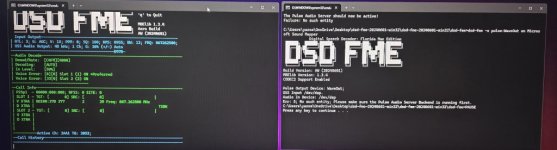
Here a picture of my system it looks decode but no sound, how i write or choose to stream the sound to my pc speakers
Pleae help me understand that.
I attached photo.20250205_172214.jpg
 

Whiskey3JMC

Just another pesky scannist
Premium Subscriber
Joined
Jul 16, 2006
Messages
10,515
Reaction score
9,224
Location
Simulcastylvania, TE
If you're trying to follow a trunked radio system you'll need to program each voice frequency into a .csv spreadsheet, generate a batch file to start dsd-fme & therefore point to said spreadsheet then use rigctl with an app like SDR++ to tune to each applicable voice channel. Page 62 of the SDR++ manual explains the use of rigctl. You may want to consider using sdrtrunk for trunked system tracking in place of DSD-FME, fewer steps involved. Investing in a Radioreference premium subscription allows for easy import of RRDB data so you can create sdrtrunk playlists. Also the Nooelectric V5 covers 3.2MHz of bandwidth so if the trunked system you're monitoring encompasses more than that then you'll need an additional dongle to cover the remaining spectrum.

sdrtrunk

A cross-platform java application for decoding, monitoring, recording and streaming trunked mobile and related radio protocols using Software Defined Radios (SDR).
 
Last edited:

Yazombek

Member
Joined
Feb 4, 2025
Messages
12
Reaction score
2
Ok i understand that trunking is more advanced for me now.
But if i just want to listen to hytera dmr without trunk just single frequency is it possible only with dsd fme?
 

lwvmobile

DSD-FME
Joined
Apr 26, 2020
Messages
1,485
Reaction score
1,027
Here a picture of my system it looks decode but no sound, how i write or choose to stream the sound to my pc speakers
Pleae help me understand that.
I attached photo.

Okay, a few things. First photo, whatever command you ran to produce that, when running ncurses, you need to send to use a 2> ONUL or 2> NUL or 2> log.ans to route that console print to somwhere so it doesn't jumble up.

Second photo, you are trying to route out to a device but that formatting is incorrect. Just omit the -o pulse "device" altogether, it'll still route to the default audio device if it is there or not.

Also, might consider using snip tool in Windows for screenshots.
 
Status
Not open for further replies.
Top