DSDplus Fast Lane Issues

Status
Not open for further replies.

erjr00

Member
Premium Subscriber
Joined
Feb 17, 2021
Messages
22
Reaction score
-4
Location
Bruce County
Hey all, wondering if anyone else is having issues with DSDplus Fast Lane recently. It's trying to update, but I keep getting this error:

"
Updated DSDPlus.bin
DSD+ update is available
Downloading DSDPlus2p523.zip
DSD+ update zipfile downloaded
Initiating FMPx link using link ID 20001...
FMPx link error = -5
[Server is not listening on selected link ID]


0 P25 records saved
Initiating FMPx link using link ID 20001...
FMPx link error = -5
[Server is not listening on selected link ID]


Initiating FMPx link using link ID 20001...
FMPx link error = -5
[Server is not listening on selected link ID]


Initiating FMPx link using link ID 20001...
FMPx link error = -5
[Server is not listening on selected link ID]


Initiating FMPx link using link ID 20001...
FMPx link error = -5
[Server is not listening on selected link ID]
"

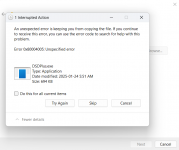
I'm trying to reinstall DSDplus Fast Lane from scratch as my previous folder seems to have died on me and won't start now. If anyone has had this issue as well before, I've attached a picture of what the old DSDplus Fast Lane folder of mine is doing now for no reason (I didn't change anything). So, ya I've got two separate issues essentially.
 

Attachments

  • Screenshot.png
    Screenshot.png
    226.4 KB · Views: 22

DaveNF2G

Active Member
Premium Subscriber
Joined
Jul 8, 2023
Messages
641
Reaction score
18
Location
Latham, NY
1) You are trying to open a nonexistent audio input.
2) The TCP settings in FMP and DSDPlus do not match.

Both of these problems can be corrected by editing the batch files.
 

mtindor

FMP24 PRO USER
Database Admin
Joined
Dec 5, 2006
Messages
11,922
Reaction score
3,186
Location
Carroll Co OH / EN90LN
1) You are trying to open a nonexistent audio input.
2) The TCP settings in FMP and DSDPlus do not match.

Both of these problems can be corrected by editing the batch files.

They both can be addressed via the INPUT and OUTPUT menus as well, a bit easier.

erjr00


Should not have to adjust batch files. In the DSDPlus CTRL menu, select "combined CC/VC monitor". In the INPUT menu select "Use Direct FMPx Linking" In the DSDPlus OUTPUT menu, select your speakers

Run FMPx-CC.bat and 1R.bat (assuming you haven't ruined them by modifying them without knowing what you had modified). Pristine FMPx-CC.bat and 1R.bat files should allow DSDPlus to fire up and operate just fine as long as the devices are available/detected.
 

erjr00

Member
Premium Subscriber
Joined
Feb 17, 2021
Messages
22
Reaction score
-4
Location
Bruce County
They both can be addressed via the INPUT and OUTPUT menus as well, a bit easier.

erjr00


Should not have to adjust batch files. In the DSDPlus CTRL menu, select "combined CC/VC monitor". In the INPUT menu select "Use Direct FMPx Linking" In the DSDPlus OUTPUT menu, select your speakers

Run FMPx-CC.bat and 1R.bat (assuming you haven't ruined them by modifying them without knowing what you had modified). Pristine FMPx-CC.bat and 1R.bat files should allow DSDPlus to fire up and operate just fine as long as the devices are available/detected.
The only problem is this error opens up in a seperate window when I go to start DSDplus.exe, and the program doesn’t fully open. I exit out of that error window and the whole thing shuts down.

Where could I get new FMPx-CC.bat and 1R.bat files? So far I’ve been using DADplus in direct monitor mode or whatever it’s called.

Haven’t been able to figure out how to make networks or sites. Seemingly complicated and I’ve gotten lost on that seperate front.
 

mtindor

FMP24 PRO USER
Database Admin
Joined
Dec 5, 2006
Messages
11,922
Reaction score
3,186
Location
Carroll Co OH / EN90LN
The only problem is this error opens up in a seperate window when I go to start DSDplus.exe, and the program doesn’t fully open. I exit out of that error window and the whole thing shuts down.

Where could I get new FMPx-CC.bat and 1R.bat files? So far I’ve been using DADplus in direct monitor mode or whatever it’s called.

Haven’t been able to figure out how to make networks or sites. Seemingly complicated and I’ve gotten lost on that seperate front.
Are you running an RTL dongle, and Airspy or an RSP? Need to know if you are using FMP24-CC.bat, FMPA-CC.bat or FMPP-CC.bat
 

mtindor

FMP24 PRO USER
Database Admin
Joined
Dec 5, 2006
Messages
11,922
Reaction score
3,186
Location
Carroll Co OH / EN90LN
If you are running an RTL dongle, then you'll use FMP24-CC.bat. I can't "attach" batch files to a post but I'll provide you the contents.

I would delete (or at least rename) dsdplus.bin before running anything. I think that deleting or renaming dsdplus.bin should return all DSDPlus settings to default (which should set it to use Direct Linking and Combined CC/VC Monitor mode.

Then I'd run FMP24-CC.bat and 1R.bat

FMP24-CC.bat
FMP24 -rc -i0 -o20001 -P0.0 -f935.0

1R.bat
DSDPlus -r1 -T -E -Pwav -i20001 >>1R-log.txt

PS: I believe the author would probably consider my suggestion of deleting/renaming dsdplus.bin "hokum" or "baloney". But when I think I've got wrong settings, I always just delete dsdplus.bin and then go back and set my settings to what i want once it's actually up and running/working.
 
Last edited:

cg

Member
Premium Subscriber
Joined
Dec 13, 2000
Messages
5,158
Reaction score
1,657
Location
Connecticut
When you did the update download, did you unzip the downloaded file using your password and copy the files to your DSDPlus folder?
 

dave3825

* * * * * * * * * * * *
Premium Subscriber
Joined
Feb 17, 2003
Messages
10,266
Reaction score
5,853
Location
Suffolk County NY
Where could I get new FMPx-CC.bat and 1R.bat files? So far I’ve been using DADplus in direct monitor mode or whatever it’s called.

If you ever downloaded DSDPlusBasefiles.zip, they would be in there. If not,
 

Attachments

  • BatchFiles.zip
    1.5 KB · Views: 12

erjr00

Member
Premium Subscriber
Joined
Feb 17, 2021
Messages
22
Reaction score
-4
Location
Bruce County
When you did the update download, did you unzip the downloaded file using your password and copy the files to your DSDPlus folder?
[UPDATE] When I extracted it with Windows's native extractor, it didn't ask for the Fastlane password (derp). I extracted it with WinRAR and put the password in, and it worked fine! Thank you.

It won't even let me extract the update file... Nothing is running or being used.Screenshot 2025-05-26 135649.png
 
Last edited:

erjr00

Member
Premium Subscriber
Joined
Feb 17, 2021
Messages
22
Reaction score
-4
Location
Bruce County
If you are running an RTL dongle, then you'll use FMP24-CC.bat. I can't "attach" batch files to a post but I'll provide you the contents.

I would delete (or at least rename) dsdplus.bin before running anything. I think that deleting or renaming dsdplus.bin should return all DSDPlus settings to default (which should set it to use Direct Linking and Combined CC/VC Monitor mode.

Then I'd run FMP24-CC.bat and 1R.bat

FMP24-CC.bat
FMP24 -rc -i0 -o20001 -P0.0 -f935.0

1R.bat
DSDPlus -r1 -T -E -Pwav -i20001 >>1R-log.txt

PS: I believe the author would probably consider my suggestion of deleting/renaming dsdplus.bin "hokum" or "baloney". But when I think I've got wrong settings, I always just delete dsdplus.bin and then go back and set my settings to what i want once it's actually up and running/working.
I deleted the dsdplus.bin and it worked! Thank you! It looks like it created a new one in my folder too, so I should be all set?
 

dave3825

* * * * * * * * * * * *
Premium Subscriber
Joined
Feb 17, 2003
Messages
10,266
Reaction score
5,853
Location
Suffolk County NY
Fastlane updates will not extract using microcrap stuff. Have to use 7zip or winrar.
 
Status
Not open for further replies.
Top