DSDTCP - SDR# Plugin

Status
Not open for further replies.

thewraith2008

Member
Joined
Nov 22, 2016
Messages
1,898
Reaction score
903
OK, I've made the changes to DSD Interface and DSDtcp plug-ins and hopefully it's OK now.

See changelog.txt for other changes.


Download - see relevant folders for each plug-in
NOTE: Use 7zip or WinRAR to extract files from the .7z file and read the .PDF or TXT file for installation and usage of files with SDR#.
NOTE: Don't select the Download as ZIP option in MEGA, just select standard download.
 

MELERIX

Member
Joined
Nov 19, 2018
Messages
83
Reaction score
55
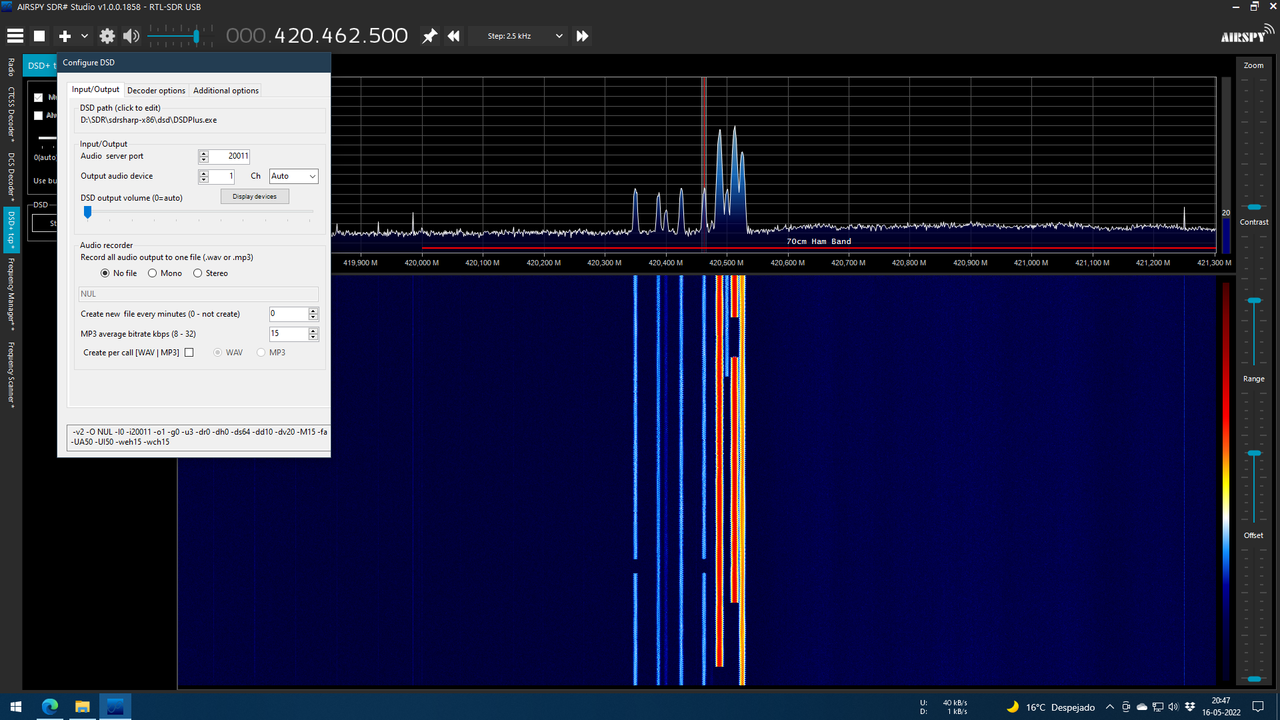
the default size for config window seems is too small and the buttons for "Default" and "Ok" can't be seen unless you double click the window to maximize it.

window-size.png
 

thewraith2008

Member
Joined
Nov 22, 2016
Messages
1,898
Reaction score
903
Hello,
This maybe a windows scaling issue. (DPI).
In Windows 7, it's at: Control Panel\Appearance and Personalization\Display.
I don't have Win10 handy to check where it is in settings.
Is is set > 100%

I will have a look to see want I can do.
 

MELERIX

Member
Joined
Nov 19, 2018
Messages
83
Reaction score
55
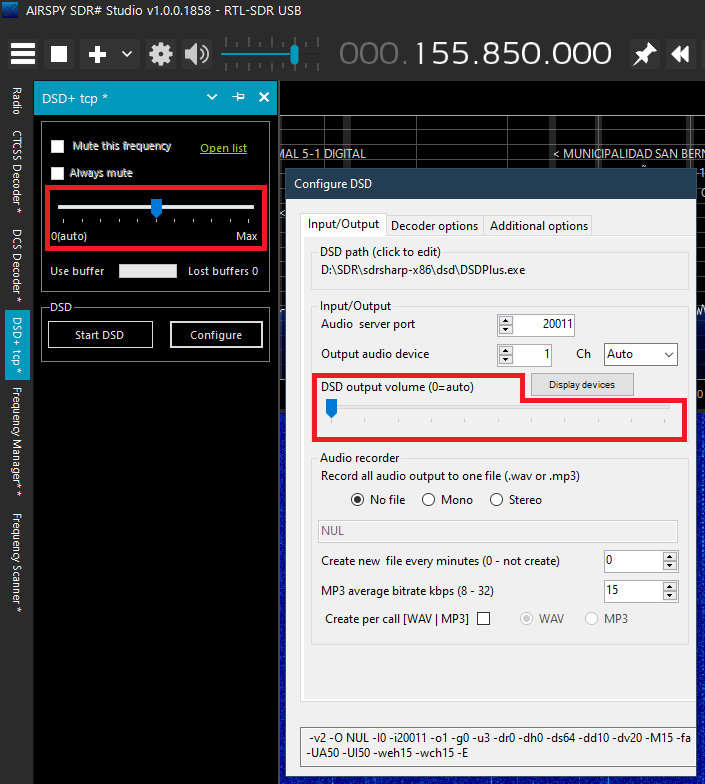
another thing I've noticed is this option in both windows seems are not in sync or I'm wrong and both are different things ?

possible-bug.png
 

thewraith2008

Member
Joined
Nov 22, 2016
Messages
1,898
Reaction score
903
Yes, different things:
  • The one on main panel is the level for audio sent of the TCP (to DSD+).
  • The one in the configuration is for the output speech level from DSD+.
 

thewraith2008

Member
Joined
Nov 22, 2016
Messages
1,898
Reaction score
903
OK, I've fixed (as far as I can tell) configuration window sizing for the DSDtcp plug-in.


Download - see relevant folder
NOTE: Use 7zip or WinRAR to extract files from the .7z file and read the .PDF or TXT file for installation and usage of files with SDR#.
NOTE: Don't select the Download as ZIP option in MEGA, just select standard download.
 

MELERIX

Member
Joined
Nov 19, 2018
Messages
83
Reaction score
55
Yes, different things:
  • The one on main panel is the level for audio sent of the TCP (to DSD+).
  • The one in the configuration is for the output speech level from DSD+.

I see, but I've noticed something strange, for example as you can see in my picture above in the "DSD+ tcp" panel I have the volumen in the middle, because if I put it in 0 (which is supposed to be auto), it works fine but only for the first digital frequency I listen, but if then I change to another digital frequency, then it stop showing audio activity in "DSD+ Source Audio" window, and nothing more is decoded.

I guess this is a bug?
 

thewraith2008

Member
Joined
Nov 22, 2016
Messages
1,898
Reaction score
903
Could be possible that the auto leveling (for the audio on the TCP out) does not like when switching abruptly to different frequencies with vastly different levels.

This is probably to be expected rather than a bug.
 

MELERIX

Member
Joined
Nov 19, 2018
Messages
83
Reaction score
55
Could be possible that the auto leveling (for the audio on the TCP out) does not like when switching abruptly to different frequencies with vastly different levels.

This is probably to be expected rather than a bug.

but then it'll cause the bug/issue to always happens if you use with scanner and option in 0 (auto) in "DSD+ tcp" panel, due the scanner will switch abruptly to different frequencies.

I hope there is a way to fix this bug/issue somehow, rather than using volume in the middle in "DSD+ tcp" panel.
 

MELERIX

Member
Joined
Nov 19, 2018
Messages
83
Reaction score
55
that the audio on TCP out will not stop working when volume in "DSD+ tcp" panel is set to "0(auto)" and you changes to another digital frequency or if you are using scanner and it changes to another digital frequency.

I hope now you understand it, otherwise I guess I'll need to make make a video to explain the bug/issue properly xD
 
Last edited:

thewraith2008

Member
Joined
Nov 22, 2016
Messages
1,898
Reaction score
903
I understand what you are saying it's just I'm not seeing that behavior here.
I've had SDR# v1716 + DSDtcp plug-in + DSD+ + Frequency Scanner running here now for almost 24 hours and it's running as expected with no stopping.
 

MELERIX

Member
Joined
Nov 19, 2018
Messages
83
Reaction score
55
I understand what you are saying it's just I'm not seeing that behavior here.
I've had SDR# v1716 + DSDtcp plug-in + DSD+ + Frequency Scanner running here now for almost 24 hours and it's running as expected with no stopping.

uhm, then maybe is a bug/issue that only happens with recent versions of SDR#? because I'm using SDR# 1.0.0.1858.
 

causeway74

Member
Joined
Jan 6, 2017
Messages
53
Reaction score
3
Thanks @thewraith2008 - your work on this is absolutely brilliant. Will come back with feedback after some testing.

Tested this with 1.0.0.1777 and it works a treat.

The option "mute this frequency" not persists on scanning which is great. Before this status was never preserved as soon as scanning resumed. I assume this is stored in a temporary variable for the duration of the session only?

I checked in the file that opens when the "open list" button is clicked but this is empty and I'm not sure what XML syntax is needed if this were to allow manual entry of digital frequencies. Is it possible to use this digital_frequencies.xml file to persist digital frequencies beyond the lifetime of the session?

I would like to use the "always mute" button but I am scanning a mix of analog and digital modes so this may not be the solution.

Thanks
 

thewraith2008

Member
Joined
Nov 22, 2016
Messages
1,898
Reaction score
903
Tested this with 1.0.0.1777 and it works a treat.

The option "mute this frequency" not persists on scanning which is great. Before this status was never preserved as soon as scanning resumed. I assume this is stored in a temporary variable for the duration of the session only?

I checked in the file that opens when the "open list" button is clicked but this is empty and I'm not sure what XML syntax is needed if this were to allow manual entry of digital frequencies. Is it possible to use this digital_frequencies.xml file to persist digital frequencies beyond the lifetime of the session?

I would like to use the "always mute" button but I am scanning a mix of analog and digital modes so this may not be the solution.

Thanks
When 'Mute this frequency' is enabled on a frequency, it is added to a list of frequencies that are to be muted when VFO is tuned to them.
When SDR# is closed, this list of frequencies (to be muted) is saved to the file 'digital_frequencies.xml'.

I can see that while using the DSDtcp or DSD Interface plug-in, if you mute frequencies then click 'Open list', these added frequencies will not appear in the file. As stated above, this file is only updated on SDR# close.
If you close SDR# and open again and click 'Open list', those frequencies will be show. (*)

Another thing I've noticed is the 'DSD Interface' and 'DSDtcp' plug-ins both use the same 'digital_frequencies.xml'.
This is going to be a problem if both plug-ins are installed in SDR#.
Problems are going to be:
  • A change by either plug-in will not be seen by the other until SDR# restart (*).
  • * Depending on plug-in order in Plugins.xml, the last plug-in to close will be the one to have the final update to 'digital_frequencies.xml'. So if order is A then B, then if A adds frequency to mute, when SDR# closed, B overwrites with version of list it has (which does not have the newly add frequency to mute).
Solution here is to make the plug-ins use a different file name or don't have both plug-ins installed at the same time.

I've also noted on newer SDR# versions, the XML files are not formatted (no indentation or white spaces) and appears as one long hard to readable line.
 

causeway74

Member
Joined
Jan 6, 2017
Messages
53
Reaction score
3
Another thing I've noticed is the 'DSD Interface' and 'DSDtcp' plug-ins both use the same 'digital_frequencies.xml'.
This is going to be a problem if both plug-ins are installed in SDR#.
Problems are going to be:
  • A change by either plug-in will not be seen by the other until SDR# restart (*).
  • * Depending on plug-in order in Plugins.xml, the last plug-in to close will be the one to have the final update to 'digital_frequencies.xml'. So if order is A then B, then if A adds frequency to mute, when SDR# closed, B overwrites with version of list it has (which does not have the newly add frequency to mute).
Solution here is to make the plug-ins use a different file name or don't have both plug-ins installed at the same time.

This is exactly the cause in my setup. I just removed the DSD Interface plugin and the settings from DSDTCP persisted as expected. A different input file would be ideal I think.
 

thewraith2008

Member
Joined
Nov 22, 2016
Messages
1,898
Reaction score
903
OK, I've updated both DSD Interface (v1.1.2.0) and DSDtcp (v1.0.5.0) plug-ins.

I have changed the file DSDtcp uses to store muted frequencies to 'digital_frequencies_tcp.xml'.
  • If you have existing frequencies you wish to keep, then copy the existing 'digital_frequencies.xml' and rename it to 'digital_frequencies_tcp.xml'.
Both plug-in now update the save file when a frequency mute state is changed. (added or removed)
  • This will mean that when you use 'Open list', it will now show the current list.
  • Do not edit this file while (SDR#) plug-in is running. Any changes will be over written on any change or SDR# close.
  • It not recommended to manually edit this file anyway. Any XML errors may stop SDR# or plug-in from opening.


Download - see relevant folder
NOTE: Use 7zip or WinRAR to extract files from the .7z file and read the .PDF or TXT file for installation and usage of files with SDR#.
NOTE: Don't select the Download as ZIP option in MEGA, just select standard download.
 

causeway74

Member
Joined
Jan 6, 2017
Messages
53
Reaction score
3
Thanks so much for this. Works perfectly. My scanning setup is almost complete!
 

Aslan

Member
Joined
Sep 13, 2021
Messages
6
Reaction score
0
hello. how do I find out why the dsdtcp plugin does not start (after clicking on the dsd start, the window opens and immediately closes)? is there an error log? when I return Vasily's plugin back, everything works. thank you! (translated by google)
 
Status
Not open for further replies.
Top