• To anyone looking to acquire commercial radio programming software:

    Please do not make requests for copies of radio programming software which is sold (or was sold) by the manufacturer for any monetary value. All requests will be deleted and a forum infraction issued. Making a request such as this is attempting to engage in software piracy and this forum cannot be involved or associated with this activity. The same goes for any private transaction via Private Message. Even if you attempt to engage in this activity in PM's we will still enforce the forum rules. Your PM's are not private and the administration has the right to read them if there's a hint to criminal activity.

    If you are having trouble legally obtaining software please state so. We do not want any hurt feelings when your vague post is mistaken for a free request. It is YOUR responsibility to properly word your request.

    To obtain Motorola software see the Sticky in the Motorola forum.

    The various other vendors often permit their dealers to sell the software online (i.e., Kenwood). Please use Google or some other search engine to find a dealer that sells the software. Typically each series or individual radio requires its own software package. Often the Kenwood software is less than $100 so don't be a cheapskate; just purchase it.

    For M/A Com/Harris/GE, etc: there are two software packages that program all current and past radios. One package is for conventional programming and the other for trunked programming. The trunked package is in upwards of $2,500. The conventional package is more reasonable though is still several hundred dollars. The benefit is you do not need multiple versions for each radio (unlike Motorola).

    This is a large and very visible forum. We cannot jeopardize the ability to provide the RadioReference services by allowing this activity to occur. Please respect this.

G5 Amp Base Range issue

KingLeonidas

Newbie
Premium Subscriber
Joined
Jun 29, 2017
Messages
15
Reaction score
2
Has anyone had an issue with the amp base of the G5? Mine has recently started saying out of range. It cuts in and out a few times every minute. I have this issue regardless of which of my G5s I use or which external antenna I hook up. I’ve checked and cleaned the contacts and that didn’t help. I feel like at this point it must be the base itself. I’ve read a few other threads on here but never really saw the real answer. Thanks for the advice.
 

hazrat8990

Active Member
Premium Subscriber
Joined
Apr 12, 2013
Messages
587
Reaction score
396
Location
Wyoming
Your issue is most likely RFI caused by a nearby device, or one that is plugged into the same circuit. It could even be caused by the wall wart for the amplifier base. Try moving it to a different spot that is away from other devices. If it is close to a Wi-Fi router, that might be the culprit.
 

OnYourSix

Member
Premium Subscriber
Joined
Aug 25, 2009
Messages
299
Reaction score
144
Rare, but maybe the control channels changed on the TG's you are monitoring?
 

Firebuff66

Member
Feed Provider
Joined
Jan 13, 2003
Messages
719
Reaction score
808
Location
CT
I have had 3 Amp base chargers and all 3 lost comms as soon as I put the pager in it , pull them out and all was well.
Unication has an issue with the Amp base and the ext antenna connecting to the pager
 

blackbelter

Member
Joined
Feb 1, 2004
Messages
958
Reaction score
548
Few questions regarding your inquiry:
1- Would the pagers showing out of range while outside of the amp charger?
2- Which FW are you using ?

as @On Your Six mentioned , most out of range issues are system related . Input all control channels and reboot.
 

K9KLC

Member
Premium Subscriber
Joined
Mar 31, 2007
Messages
2,837
Reaction score
3,053
Location
Southwest, IL
I've had this happen on both mine. One time it was solved by moving the base about 1 foot from where it was to another location on the desk. The other time. at a different location in the house, I couldn't get it to work correctly using 3 different back of charger antenna's. I since got one of the old RS antenna's (stubby) and its not happened since. Never in these locations would the pager itself loose signal out of the charger.

I did all of the cleaning/FW update/reload/and reboot/other tricks mentioned above but honestly moving it was the answer in one case and a different antenna in the other. Since I've done that, not one drop out when in the charging base.
 

Firebuff66

Member
Feed Provider
Joined
Jan 13, 2003
Messages
719
Reaction score
808
Location
CT
Few questions regarding your inquiry:
1- Would the pagers showing out of range while outside of the amp charger?
2- Which FW are you using ?

as @On Your Six mentioned , most out of range issues are system related . Input all control channels and reboot.
For Mine
Pagers are full bars out of charger
1.35
I have tried 8 different pagers and all the same, Unication sent me a new charger and it did the same thing
Its 100% the chargers, we have 5 right here in this post that don't work and if you look around there are more
I got them to stream audio to Broadcastify but since they are all bad, I bought 2 Harris XG75s with chargers for $200 and they are working great
 

K9KLC

Member
Premium Subscriber
Joined
Mar 31, 2007
Messages
2,837
Reaction score
3,053
Location
Southwest, IL
For Mine
Pagers are full bars out of charger
1.35
I have tried 8 different pagers and all the same, Unication sent me a new charger and it did the same thing
Its 100% the chargers, we have 5 right here in this post that don't work and if you look around there are more
I got them to stream audio to Broadcastify but since they are all bad, I bought 2 Harris XG75s with chargers for $200 and they are working great
Ya even though I got mine working, I honestly think it's something to do with the chargers. I can set the pager in exactly the same place the charger lost signal, and it's full scale, whereas the charger was loosing signal. While I was able to get it working in my case, I can see where others may have problems. I've had various firmwares on my two, and nothing firmware wise honestly made any difference.
 

goodmore

Member
Premium Subscriber
Joined
Dec 11, 2016
Messages
158
Reaction score
33
Location
Lancaster County PA
I had the base a few years ago. I sold it after a week of buying it. Compared to the quality if the G5 itself I thought it was a terrible product. The speaker was just horrible sounding.
 

K9KLC

Member
Premium Subscriber
Joined
Mar 31, 2007
Messages
2,837
Reaction score
3,053
Location
Southwest, IL
I had the base a few years ago. I sold it after a week of buying it. Compared to the quality if the G5 itself I thought it was a terrible product. The speaker was just horrible sounding.
I agree the speaker is horrible compared to the G5 itself. I use an external on it, sounds great then! I mainly have it for the external antenna connection on the thing for the times I need to receive VHF on it. (MOSIN system in MO on occasion).
 

JASII

Memory Capacity
Joined
Apr 29, 2006
Messages
3,257
Reaction score
321
I have noticed this same issue recently. The charger has been on the top of my computer desk near a lamp and T-Mobile G5AR gateway. I just moved it to see if it makes any difference, but it didn't seem to help.

If it is caused by interference, has anybody considered trying RF toroid chokes?

I have been using the back of set antenna on the charger, but I will also try a different antenna in a slightly different location to see it that makes a difference.
 

JASII

Memory Capacity
Joined
Apr 29, 2006
Messages
3,257
Reaction score
321
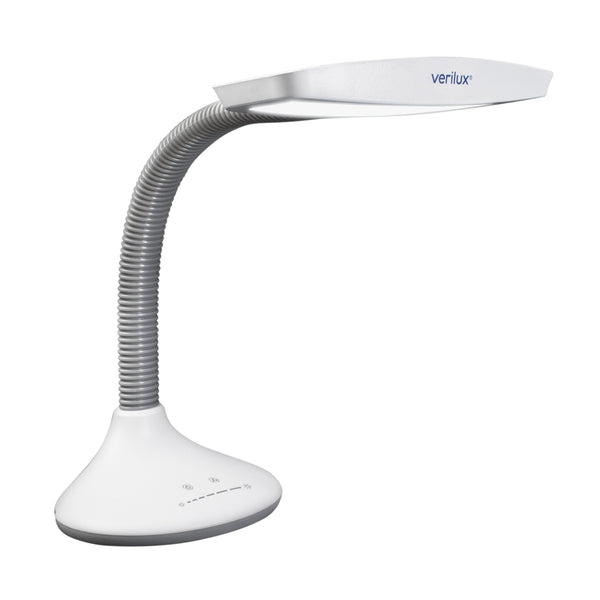
The light I have near my Unication is a Verilux. I Googlde this and the AI Overview gave me this:

AI Overview


Verilux lights, like many LED and compact fluorescent (CFL) lighting products, can cause
radio frequency interference (RFI) or electromagnetic interference (EMI) due to the electronic components (drivers or ballasts) that manage the light power. This interference often manifests as static on radios, buzzing noises, or disruptions to wireless devices.
Phoenix LightingPhoenix Lighting +4
Common Causes of Interference
  • LED Drivers/Ballasts: The switching components used to convert electricity to drive LEDs can emit noise, especially if they are poorly shielded or low quality.
  • Frequency Interference: These lights can emit noise across the radio spectrum, particularly in the VHF range.
  • Defective Unit: A flickering or failing light often indicates a faulty driver or ballast, which can increase the interference produced.
    FacebookFacebook +4
Solutions to Fix Verilux Light Interference
  • Add Ferrite Cores/Beads: Place snap-on ferrite cores (or ferrite chokes) on the power cord of the Verilux lamp. These absorb EMI and are effective at stopping noise from traveling up the cord.
  • Move or Separate Electronics: Keep the light away from radio receivers, antennas, and Bluetooth devices. Do not plug the light into the same outlet strip as sensitive electronics.
  • Check the Bulb/Lamp: If it is a replaceable bulb, ensure it is seated properly. If the unit is old, it might be necessary to replace the lamp itself.
  • Use a Filter: Install an RFI/EMI filter on the power cord.
  • Check Connections: Ensure all connectors are secure and the light is not flickering before it causes interference.
    FacebookFacebook +4
If the interference is severe, it is likely due to the internal driver of the specific unit failing or lacking sufficient, high-quality shielding.
Phoenix LightingPhoenix Lightingile

While I won't swear that this is the culprit, yet, I have the light off right now and I haven't noticed any odd behavior by the Unication G5 in the amplified charger. I also sent a message to Verilux and I will advise if I get a response from them.
 

JASII

Memory Capacity
Joined
Apr 29, 2006
Messages
3,257
Reaction score
321
I did get a reply:


Ann
(Verilux)
Apr 7, 2026, 11:30 AM PDT
Hello James,

Thank you for contacting Verilux! We're sorry to hear about the trouble you're experiencing and are happy to help.

If interference occurs, move the lamp away from the device, plug the lamp or the device into a different outlet, or move the lamp out of the line of sight of the remote control receiver.

If you come upon any questions or need additional assistance, please feel free to reach back out, and I will be more than happy to help you. My hours of operation are in my signature below.

Thank you,
Ann
Verilux Support
Monday through Friday 8:00 am PST to 5:00 pm PST


I did move the "wall wart" power supply a little farther away from the Unication "wall wart" power supply and that seems to have eliminated the problem.

 
Top