Exactly why I have 2 G5s.Perfect use case for TWO G4s


-
To anyone looking to acquire commercial radio programming software:
Please do not make requests for copies of radio programming software which is sold (or was sold) by the manufacturer for any monetary value. All requests will be deleted and a forum infraction issued. Making a request such as this is attempting to engage in software piracy and this forum cannot be involved or associated with this activity. The same goes for any private transaction via Private Message. Even if you attempt to engage in this activity in PM's we will still enforce the forum rules. Your PM's are not private and the administration has the right to read them if there's a hint to criminal activity.
If you are having trouble legally obtaining software please state so. We do not want any hurt feelings when your vague post is mistaken for a free request. It is YOUR responsibility to properly word your request.
To obtain Motorola software see the Sticky in the Motorola forum.
The various other vendors often permit their dealers to sell the software online (i.e., Kenwood). Please use Google or some other search engine to find a dealer that sells the software. Typically each series or individual radio requires its own software package. Often the Kenwood software is less than $100 so don't be a cheapskate; just purchase it.
For M/A Com/Harris/GE, etc: there are two software packages that program all current and past radios. One package is for conventional programming and the other for trunked programming. The trunked package is in upwards of $2,500. The conventional package is more reasonable though is still several hundred dollars. The benefit is you do not need multiple versions for each radio (unlike Motorola).
This is a large and very visible forum. We cannot jeopardize the ability to provide the RadioReference services by allowing this activity to occur. Please respect this.
You are using an out of date browser. It may not display this or other websites correctly.
You should upgrade or use an alternative browser.
You should upgrade or use an alternative browser.
Help with Unication info
- Thread starter bobruzzo
- Start date
- Status
- Not open for further replies.

OK thanks.....I basically want to set up 5 zones (sites). Here in Rhode Island we have a P25 system called "RISCON". Since RI is a small state the sites are not extremely huge. For example, I would like to program (in radio) position "1" the "METRO" site which is the Providence city area. In knob position "2" I would program the "NORTH" site......in knob position "3" I would program the "SOUTH" site.....in knob position 4 the "STATEWIDE 700" site.....and in knob position 5 I would have to manually enter in some ham and commercial DMR that I like. I dont want to bother with paging tones or anything like that. Just want to use as a scanner. We don't bother with Counties here as far as programming radios cause the state is so small. So I want to change zones by simply turning the knob with the sites I preset. Thats the plan anyway, but I still want to make sure I download the right programming software for this particular model unit. Its the Unication G5 UHF-D DMR version. I searched for the programming software, but also read elsewhere in this forum where you have to find out the actual model number of radio and use the appropriate programming software compatible with that radio model. So I might be over thinking a bit. I also read when you get radio hooked up to READ FROM RADIO first off. I see the DRIVERS are built in to the software. No doubt I will be asking for some help here! Radio will be here this weekend.It's important to understand what you want programmed and how to do it. I have Zones yes, but I have 3 different counties programmed in Zone 1, (the one I use at home) and I have those both, with talk groups I definitely want then that same county in a "trunking monitor position" where it gets every talk group in the county. The ones I do not have programmed in, do not show the name, simply the TG number which I'll cross reference later and decide if I want to add it in lieu of another one or in addition if I have slots left or what.
Obviously changing a channel knob is easy, changing zones takes a couple of steps which isn't hard or complicated, just more work for something I can accomplish by simply turning the knob from say position 1 to position 3. (in mine that switches counties to the next county east). It takes time, experimenting and such to see what TG may come out where in a situation like this.
I don't consider it really harder or easier than any other device I've programmed, just different. The problems I've run into is trying to make it do things it wasn't necessarily made to do, but will do. Ifor instance I was told it would not scan VHF and 700/800 on the moswin system and yes, it will if set up properly using full spectrum scan.
Frankly I'm still battling DMR a little bit, but I stopped trying to figure it out due to having other DMR devices and the unications were mainly brought for p-25 TRS to begin with. I started my journey about 7 months ago into Unications and am still tweaking or changing this or that as things pop up. Be patient, and ask questions. I've gotten a lot of help here and it's all been worth the journey.
Sounds like how I'd do it or, at least something similar. People often confuse "Zones"...and "knob positions". and it's way easier to simply switch the knob, for simpler stuff. I have Zones but some of those are for traveling outside of the area, and then switch to the appropriate state, as needed in that zone, then other stuff broke down in the state on various knob positions.OK thanks.....I basically want to set up 5 zones (sites). Here in Rhode Island we have a P25 system called "RISCON". Since RI is a small state the sites are not extremely huge. For example, I would like to program (in radio) position "1" the "METRO" site which is the Providence city area. In knob position "2" I would program the "NORTH" site......in knob position "3" I would program the "SOUTH" site.....in knob position 4 the "STATEWIDE 700" site.....and in knob position 5 I would have to manually enter in some ham and commercial DMR that I like. I dont want to bother with paging tones or anything like that. Just want to use as a scanner. We don't bother with Counties here as far as programming radios cause the state is so small. So I want to change zones by simply turning the knob with the sites I preset. Thats the plan anyway, but I still want to make sure I download the right programming software for this particular model unit. Its the Unication G5 UHF-D DMR version. I searched for the programming software, but also read elsewhere in this forum where you have to find out the actual model number of radio and use the appropriate programming software compatible with that radio model. So I might be over thinking a bit. I also read when you get radio hooked up to READ FROM RADIO first off. I see the DRIVERS are built in to the software. No doubt I will be asking for some help here! Radio will be here this weekend.
Yes it does ask for the exact model number, I"m sure you can get this form your dealer while en route if you need the exact one, or, the PPS has a convert to thing (which I've not used) so maybe it's not a big deal. The PPS as long as you have the one that isn't for the G1, should be fine.
I did always "read" from the pager first as I always bought used ones and wanted to see what was in there when they arrived. Frankly that's my policy on two way radios I program also so there's a recovery point if needed later.
Good luck, I'm sure you're going to enjoy it. Keep us posted!

I still want to make sure I download the right programming software for this particular model unit. Its the Unication G5 UHF-D DMR version. I searched for the programming software, but also read elsewhere in this forum where you have to find out the actual model number of radio and use the appropriate programming software compatible with that radio model. So I might be over thinking a bit. I also read when you get radio hooked up to READ FROM RADIO first off. I see the DRIVERS are built in to the software. No doubt I will be asking for some help here! Radio will be here this weekend.
There is only one PPS and one set of drivers, so that isn't an issue. You will want to either read from the radio to get correct profile in the PPS, or select the correct model in the PPS and create a new profile. Reading from the radio is the easiest.
OK thanks.....I basically want to set up 5 zones (sites).
It will help in the future is you use correct terms, you want 5 sites on 5 knob positions which would be on one zone.
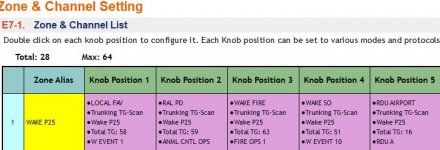
OK I saw a video on the software that now allows programming via Radio Reference....I downloaded and installed what appears to be the right software for my radio and there is a link at upper right corner for Radio Reference download, so thats great. So when I get radio, the first thing to do is READ from it......the next trick is to try to first set up one zone (knob position 1).....This is going to be the METRO site for Providence RI. Another question is Providence police has about 8 encrypted talk groups....will I manually have to DELETE these after programming in the software, or is there an option to NOT copy any ENC talk groups? I suppose once the data is downloaded into the software I can just delete the ENC TG's before I write to radio. And is it possible to ADD TG's to a site later? I will wait till I get radio all charged up and plugged in and come back on here for help.Sounds like how I'd do it or, at least something similar. People often confuse "Zones"...and "knob positions". and it's way easier to simply switch the knob, for simpler stuff. I have Zones but some of those are for traveling outside of the area, and then switch to the appropriate state, as needed in that zone, then other stuff broke down in the state on various knob positions.
Yes it does ask for the exact model number, I"m sure you can get this form your dealer while en route if you need the exact one, or, the PPS has a convert to thing (which I've not used) so maybe it's not a big deal. The PPS as long as you have the one that isn't for the G1, should be fine.
I did always "read" from the pager first as I always bought used ones and wanted to see what was in there when they arrived. Frankly that's my policy on two way radios I program also so there's a recovery point if needed later.
Good luck, I'm sure you're going to enjoy it. Keep us posted!
I would like to program (in radio) position "1" the "METRO" site which is the Providence city area. In knob position "2" I would program the "NORTH" site......in knob position "3" I would program the "SOUTH" site.....in knob position 4 the "STATEWIDE 700" site
Keep in mind, if the above is your plan (and it sounds like a good plan) when you load the system in C2 or E2 you need to load it multiple times, once for Metro sire, once for north, once for south and once for SW 700.
I double check everything on another screen against the RR database and simply don't download the ENC groups to the PPS. It's not like sentinel where you have to have everything and then delete what you don't need. The import feature you select what you want.
This is one of the last steps. The first step is download sites, 1 at a time like I said above in post #26. If I was you I would also load all TGs.the next trick is to try to first set up one zone (knob position 1).....
This is going to be the METRO site for Providence RI. Another question is Providence police has about 8 encrypted talk groups....will I manually have to DELETE these after programming in the software, or is there an option to NOT copy any ENC talk groups? I suppose once the data is downloaded into the software I can just delete the ENC TG's before I write to radio. And is it possible to ADD TG's to a site later? I will wait till I get radio all charged up and plugged in and come back on here for help.
Once you are ready to set up the Zone/Knobs you will need to select the TGs, so you just WON'T select the encrypted ones. Remember, you are limited to 64 TGs, or 63 TGs plus wildcard.
Yeah the terms "Sites" and "Zones" confusing. Let me clarify.....on knob position "1" I want to put the "Metro" or "Providence City" site...about 12 800 mhz freqs for control and voice. And maybe 30 talk groups. On knob position "2" I will put the "North" site....about 9 freqs for control channels and voice.....and so on.There is only one PPS and one set of drivers, so that isn't an issue. You will want to either read from the radio to get correct profile in the PPS, or select the correct model in the PPS and create a new profile. Reading from the radio is the easiest.
It will help in the future is you use correct terms, you want 5 sites on 5 knob positions which would be on one zone.
View attachment 181889
I disagree with this, it is better to have them, and not add them to a knob, rather than not have them and need them.I double check everything on another screen against the RR database and simply don't download the ENC groups to the PPS. It's not like sentinel where you have to have everything and then delete what you don't need. The import feature you select what you want.
Hahahaha and I thought the SDS200 programming was gonna be hard!!!!I disagree with this, it is better to have them, and not add them to a knob, rather than not have them and need them.
It is not difficult, just new to you.Hahahaha and I thought the SDS200 programming was gonna be hard!!!!
Yes either or will work, it was easier for me to work with it the other way however. I know in my area what is"E" and what is "e"....When traveling I usually rarely use anything but trunking monitor so if it happens to come thru, great, if not, that's ok too. I have no need to have what I know that will always be encrypted in one place and not the other. If I needed to add it to the pager, from the PPS, unless I'm mistaken I'd need a computer. If I have the computer, it's nothing to add it if needed. But you are correct, either way will work, depending on how much clutter the user want's on his PPS. At 70, it's just easier for me personally, this way.I disagree with this, it is better to have them, and not add them to a knob, rather than not have them and need them.
I agree with @RaleighGuy Different and new. Stay with it and don't make it harder than it is!Hahahaha and I thought the SDS200 programming was gonna be hard!!!!

I suggest creating the public resource for the system you want to monitor. I monitor MPSCS (Michigan) and therefore have the entire system, meaning every site and control freq. Along with the system identifiers. Next I add all of the law enforcement TGs.......the next trick is to try to first set up one zone (knob position 1).....This is going to be the METRO site for Providence RI. Another question is Providence police has about 8 encrypted talk groups....will I manually have to DELETE these after programming in the software, or is there an option to NOT copy any ENC talk groups? I suppose once the data is downloaded into the software I can just delete the ENC TG's before I write to radio. And is it possible to ADD TG's to a site later? I will wait till I get radio all charged up and plugged in and come back on here for help.
Zone 1
Knob Position
1 The entire MPSCS is on monitor
2 The entire Berrien County is on monitor. Most LE TGs added
3 The site closest to me, on scan. Just the LE TGs that are in range of the site.
4 The entire MPSCS on monitor with LE TGs on I-94 entered
5 The entire MPSCS on monitor with LE TGs on I-75 entered
6 The entire MPSCS on monitor with LE TGs for the Upper Peninsula
7 The entire Muskegon County is on monitor. Most LE TGs added
8 The entire AEP system on monitor
My remaining positions and zones are filled up the entire systems for states that I travel to regularly, or know I will be going to.
You could download the PPS and get started on this now.
Hi and thank you. I did download the software and it loos like the driver was installed. I did bring up the program just to look at it but it looked intimidating. I figured I would wait till radio arrives, hook it up and hope it connects to PC.....then read from radio. Thats about as far as I can think of what to do. Only I don't know the MODEL number of radio. There is a point in the video I watched where you have to select your radios model number from a BIG drop down list. The radio I ordered was the G5 UHF-D (450-520 mhz) with DMR. So this radio does both P25 and DMR. I think when radio is connected to PC the connected radio shows up in that drop down list of radio models. Anyway I think I have to create a profile. The system I want to monitor is the RISCON system in Rhode ISland. I am confused on how to program this system. I have it programmed in my SDS200 as a single system, no quick key. This system has 5 "sites" or "zones" I dont know what to call them. There is a zone/site called NORTH SIMULCAST and that has all the towns in the northern part of state......it has control/voice freqs and TG's for each town. Same thing with the SOUTH SIMULCAST......it handles all the towns in the Southern part of state. Then there is the EAST SIMULCAST (not interested in this one, too far away) ...then you have the "METRO or PROVIDENCE CITY SIMULCAST" which handles the downtown areas. Lastly there is the "STATEWIDE 700 SIMULCAST" which is a NEW "site/zone"....this one is for the state bus transportation and the DPW / Public Works of most of the towns in the state. So thats basically it for the P25....I want to assign the METRO, NORTH, SOUTH and STATEWIDE 700 sites/zones to their own knob number positions....like METRO on 1, NORTH on 2, SOUTH on 3 and STATEWIDE 700 on 4. Then once I get this done I can tackle the DMR part. I hope this makes sense cause all the examples on here a waaaay different than the system here. So it is hard for me to visualize....and we dont use Counties here cause the state is so small. There are 5 counties in Rhode Island but never referred to in radio stuff.I suggest creating the public resource for the system you want to monitor. I monitor MPSCS (Michigan) and therefore have the entire system, meaning every site and control freq. Along with the system identifiers. Next I add all of the law enforcement TGs.
Zone 1
Knob Position
1 The entire MPSCS is on monitor
2 The entire Berrien County is on monitor. Most LE TGs added
3 The site closest to me, on scan. Just the LE TGs that are in range of the site.
4 The entire MPSCS on monitor with LE TGs on I-94 entered
5 The entire MPSCS on monitor with LE TGs on I-75 entered
6 The entire MPSCS on monitor with LE TGs for the Upper Peninsula
7 The entire Muskegon County is on monitor. Most LE TGs added
8 The entire AEP system on monitor
My remaining positions and zones are filled up the entire systems for states that I travel to regularly, or know I will be going to.
You could download the PPS and get started on this now.
I'm pretty sure you can get to work on the resources without a profile. Maybe launch PPS and work through it. There is nothing fragile - see what happens. The left hand side is context sensitive help. It's pretty good in my opinion and it helps you learn the terminology as seen through the eyes of Unication.Hi and thank you...
If you create a profile, you'll be learning. If you select the wrong model number it is trivial to export your work from the wrong profile and import into the correct profile.
OK I will give it a go when I get the radio and post back here.I'm pretty sure you can get to work on the resources without a profile. Maybe launch PPS and work through it. There is nothing fragile - see what happens. The left hand side is context sensitive help. It's pretty good in my opinion and it helps you learn the terminology as seen through the eyes of Unication.
If you create a profile, you'll be learning. If you select the wrong model number it is trivial to export your work from the wrong profile and import into the correct profile.
You missed what @Hit_Factor said, go ahead and start creating a profile before the radio arrives, practice, if you aren't sure look at the help on the right, if you are totally lost come back and ask. You'll do fine @bobruzzoOK I will give it a go when I get the radio and post back here.
The help thing on the right helped me a time or two. Some good info there.You missed what @Hit_Factor said, go ahead and start creating a profile before the radio arrives, practice, if you aren't sure look at the help on the right, if you are totally lost come back and ask. You'll do fine @bobruzzo
- Status
- Not open for further replies.
Similar threads

- Replies
- 0
- Views
- 209
- Replies
- 2
- Views
- 269