No audio to computer

Status
Not open for further replies.

mjbjr

Member
Feed Provider
Joined
Dec 11, 2009
Messages
777
Reaction score
36
Location
Macon,Ga USA
I get audio out of the scanner but it will no broadcast. Any ideas? pro 197
 

mjbjr

Member
Feed Provider
Joined
Dec 11, 2009
Messages
777
Reaction score
36
Location
Macon,Ga USA
It's connected to the front headphone via into the mic on the back of the pc
 

Whiskey3JMC

Another Pesky Scanist
Premium Subscriber
Joined
Jul 16, 2006
Messages
9,919
Reaction score
8,538
Location
Simulcastylvania, TE
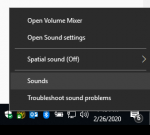
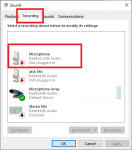
What operating system are you running? Assuming Windows 10, right-click the speaker icon on the bottom-right next to the clock and choose "Sounds" Click the "Recording" tab, look for "Microphone" (or similar) right-click to bring up the context menu and left-click choosing "Set as Default Device". If you see the green sound bar light up this means sound is coming through to the OS.
8099580996

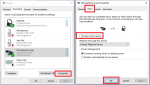
In addition, if you want to monitor the scanner through your speakers, you'll need to click "Properties" and the "Listen" tab. You'll want to make sure the box is checked by "Listen to this Device". Click the "Levels" tab and make sure the slider is adjusted to an adequate level (usually advisable not to adjust this much past the middle position to prevent audio overloading) Hope this helps

81001
 
Last edited:

mjbjr

Member
Feed Provider
Joined
Dec 11, 2009
Messages
777
Reaction score
36
Location
Macon,Ga USA
Ok so i unhooked everything and just moved it all to my desk instead of the bedroom. I have audio now,but it has a lot of static sound to it
 

IAmSixNine

Member
Feed Provider
Joined
Dec 19, 2002
Messages
2,522
Reaction score
705
Location
Dallas, TX
Listen to the scanner with out it being plugged in. Is the static a result of you moving the scanner and signal has been weaker? Or are you saying the static is coming form being connected to your computer?
 

mjbjr

Member
Feed Provider
Joined
Dec 11, 2009
Messages
777
Reaction score
36
Location
Macon,Ga USA
The audio is clear when I listen to the scanner itself. When I hear it on my phone,it's static
 

Whiskey3JMC

Another Pesky Scanist
Premium Subscriber
Joined
Jul 16, 2006
Messages
9,919
Reaction score
8,538
Location
Simulcastylvania, TE
Did you check everything I suggested? Are you able to hear the scanner audio clearly through the computer speakers?
 

IAmSixNine

Member
Feed Provider
Joined
Dec 19, 2002
Messages
2,522
Reaction score
705
Location
Dallas, TX
Is it static or over modulated?
Headphone jack on scanner is amplified audio. If you have scanner turned up, and your microphone input turned up on the computer it will sound terrible.
 

mjbjr

Member
Feed Provider
Joined
Dec 11, 2009
Messages
777
Reaction score
36
Location
Macon,Ga USA
Is it static or over modulated?
Headphone jack on scanner is amplified audio. If you have scanner turned up, and your microphone input turned up on the computer it will sound terrible.
I dont know the difference honestly. But i just turned the volume down on the computer and that seems to have fixed it. i will listen a bit longer and see.
 

Lghtning4u

Newbie
Premium Subscriber
Joined
Dec 23, 2014
Messages
3
Reaction score
0
Location
La Porte Texas
What operating system are you running? Assuming Windows 10, right-click the speaker icon on the bottom-right next to the clock and choose "Sounds" Click the "Recording" tab, look for "Microphone" (or similar) right-click to bring up the context menu and left-click choosing "Set as Default Device". If you see the green sound bar light up this means sound is coming through to the OS.
View attachment 80995View attachment 80996

In addition, if you want to monitor the scanner through your speakers, you'll need to click "Properties" and the "Listen" tab. You'll want to make sure the box is checked by "Listen to this Device". Click the "Levels" tab and make sure the slider is adjusted to an adequate level (usually advisable not to adjust this much past the middle position to prevent audio overloading) Hope this helps

View attachment 81001

Hello Chief
I'm trying to listen to my scanner locally through my computer speakers while broadcasting using a cable from the scanner to the microphone input jack on Win 10.

I followed your instructions here to no avail.

Any other suggestions?

Thanks
 
Status
Not open for further replies.
Top