Proscan Remote Scanner Over IP, Password Problem

Status
Not open for further replies.

Unidener

Member
Joined
May 28, 2012
Messages
422
Reaction score
90
Location
ENC
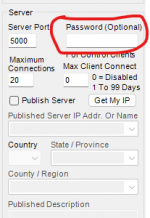
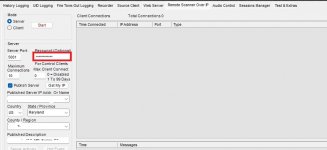
Ok, I can now view the Remote Scanner Over IP but I have no control. I entered a password on the server side but when I try to log in on the Remote Scanner Over IP on the other computer, I get "Incorrect Password"

What have I missed now?

Thanks to all!
 

Whiskey3JMC

Quiet numbskulls I'm broadcasting!
Premium Subscriber
Joined
Jul 16, 2006
Messages
10,143
Reaction score
8,856
Location
Simulcastylvania, TE
Pages 33 to 35 of the Proscan manual give you a full guide to make sure you have all your bases covered. Be sure to set the server computer as server & client computer as client. Did you port-forward whatever port you're using (Port 5000 by default) through your router?
 

Unidener

Member
Joined
May 28, 2012
Messages
422
Reaction score
90
Location
ENC
If you say you even tried 1234, do you have the correct password?
yes....5:oops:
That's
Pages 33 to 35 of the Proscan manual give you a full guide to make sure you have all your bases covered. Be sure to set the server computer as server & client computer as client. Did you port-forward whatever port you're using (Port 5000 by default) through your router?
I can connect to the Web Server and control....BUT on my phone for instance, I wanted to use RSOIP (no proscan client) but I cannot connect to via RSOIP. It was working last night but passwords would not work so I could control. Now I have must have changed something today that is prevent me for connecting even w/o a password.....

Yes I tried to follow the manual but no port forwarding since I'm keeping it within my network.
 

Whiskey3JMC

Quiet numbskulls I'm broadcasting!
Premium Subscriber
Joined
Jul 16, 2006
Messages
10,143
Reaction score
8,856
Location
Simulcastylvania, TE
Yes, to use your phone or computer's web browser for scanner control, you'll need to set up web server on the host machine, pages 28 to 32 of the manual I linked in post #9
 

Unidener

Member
Joined
May 28, 2012
Messages
422
Reaction score
90
Location
ENC
Might seem a bit obvious but is your caps lock key on?
You already asked that I believe....I've been using PCs since 1983.......
But you never know.... I just uninstalled and am reinstalling just in the event I messed something up this morning?

Funny part is I set it up yesterday morning at 230am (4 hr sleep) and it was working until I tried getting it to allow me to control....

Now I've completely FUBAR......that's why the uninstall/reinstall (yes data files removed)
 
Last edited:

Unidener

Member
Joined
May 28, 2012
Messages
422
Reaction score
90
Location
ENC
Everything is OK and passwords too not to mention remote control.

I had to take care of something then when I tried it again.....IT'S ALL WORKING

Guess I needed more patience?!?
 

Unidener

Member
Joined
May 28, 2012
Messages
422
Reaction score
90
Location
ENC
Unidener,
Are you using a web browser, or ProScan in RSOIP Client mode, or the RSOIP Client to try to connect to the RSOIP server?
Thanks for the reply....stopped working on it then when I got back to it....Everthing is working!?!

Like I said maybe I should not make changes and test immediately.....?

Not going to ask any questions or make changes!:D
 
Status
Not open for further replies.
Top