

You are using an out of date browser. It may not display this or other websites correctly.
You should upgrade or use an alternative browser.
You should upgrade or use an alternative browser.
Raspberry Pi Broadcastify Image
- Thread starter trauts14
- Start date
- Status
- Not open for further replies.
That posix error is normal. You should be streaming to bcfy now
i am not seeing any errors now. this is what i am seeing when starting darkice:
login as: pi
pi@192.168.1.41's password:
Linux raspberrypi 4.14.98-v7+ #1200 SMP Tue Feb 12 20:27:48 GMT 2019 armv7l
The programs included with the Debian GNU/Linux system are free software;
the exact distribution terms for each program are described in the
individual files in /usr/share/doc/*/copyright.
Debian GNU/Linux comes with ABSOLUTELY NO WARRANTY, to the extent
permitted by applicable law.
Last login: Thu Mar 14 20:25:39 2019 from 192.168.1.128
pi@raspberrypi:~ $ sudo darkice -c /etc/darkice1.cfg
DarkIce 1.0 live audio streamer, Google Code Archive - Long-term storage for Google Code Project Hosting.
Copyright (c) 2000-2007, Tyrell Hungary, Tyrell Hungary Corporation
Copyright (c) 2008-2010, Akos Maroy and Rafael Diniz
This is free software, and you are welcome to redistribute it
under the terms of The GNU General Public License version 3 or
any later version.
Using config file: /etc/darkice1.cfg
Using ALSA DSP input device: plughw:1,0
Using POSIX real-time scheduling, priority 98
login as: pi
pi@192.168.1.41's password:
Linux raspberrypi 4.14.98-v7+ #1200 SMP Tue Feb 12 20:27:48 GMT 2019 armv7l
The programs included with the Debian GNU/Linux system are free software;
the exact distribution terms for each program are described in the
individual files in /usr/share/doc/*/copyright.
Debian GNU/Linux comes with ABSOLUTELY NO WARRANTY, to the extent
permitted by applicable law.
Last login: Thu Mar 14 20:25:39 2019 from 192.168.1.128
pi@raspberrypi:~ $ sudo darkice -c /etc/darkice1.cfg
DarkIce 1.0 live audio streamer, Google Code Archive - Long-term storage for Google Code Project Hosting.
Copyright (c) 2000-2007, Tyrell Hungary, Tyrell Hungary Corporation
Copyright (c) 2008-2010, Akos Maroy and Rafael Diniz
This is free software, and you are welcome to redistribute it
under the terms of The GNU General Public License version 3 or
any later version.
Using config file: /etc/darkice1.cfg
Using ALSA DSP input device: plughw:1,0
Using POSIX real-time scheduling, priority 98
Correctdamn, it works! i certainly appreciate all of the assistance you, and others have provided. maybe it is best i address renaming the config file another day lol. @DC31 you did mention not closing the terminal window, correct?
Congratulations!
Your next two questions:
1. How do I get it to start automatically at boot?
2. How do I keep it running without keeping the terminal window open?
Answers:
1&2:
Sudo apt install screen
Then open your crontab file (crontab -e), choose 2 for nano and add this line at the end:
@reboot screen -dmS darkice-screen darkice -c /etc/darkice1.cfg
That assumes that you have not renamed your cfg file. If you renamed it to /etc/darkice.cfg you can use simply:
@reboot screen -dmS darkice-screen darkice
After starting it in a detached screen like this, there will be no indication that it is running. If you want to confirm type top at the command line and look for darkice in the collumn at the right. Then cntrl-c to exit top.
1. How do I get it to start automatically at boot?
2. How do I keep it running without keeping the terminal window open?
Answers:
1&2:
Sudo apt install screen
Then open your crontab file (crontab -e), choose 2 for nano and add this line at the end:
@reboot screen -dmS darkice-screen darkice -c /etc/darkice1.cfg
That assumes that you have not renamed your cfg file. If you renamed it to /etc/darkice.cfg you can use simply:
@reboot screen -dmS darkice-screen darkice
After starting it in a detached screen like this, there will be no indication that it is running. If you want to confirm type top at the command line and look for darkice in the collumn at the right. Then cntrl-c to exit top.
hahaha, yes! those were going to be my next questions at some point. i was a bit hesitant to ask, since the process so far is intimidatiing for a linux rookie. so far it has been one helluva a learning experience, and i appreciate the assistance. i did not rename my config file, so i will read/follow your instructions above. thank you.
BTW, how does a rookie get to the: Sudo apt install screen
BTW, how does a rookie get to the: Sudo apt install screen
At the command prompt simply type sudo apt install screen
Before doing the crontab part test it out by issuing the command from the command prompt. Type screen -dmS darkice-screen darkice -c /etc/darkice1.cfg. This should return nothing and bring you back to the prompt. Then use top to see if darkice is running.
Before doing the crontab part test it out by issuing the command from the command prompt. Type screen -dmS darkice-screen darkice -c /etc/darkice1.cfg. This should return nothing and bring you back to the prompt. Then use top to see if darkice is running.
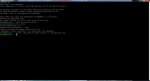
Ok, right where you are in that image, type top
Then look in the righ hand column
Then look in the righ hand column
@DC31 i followed the first set of instructions. darkice is running. it is the first item listed on that screen which shows all the processes or tasks. do i need to exit the processes/task page? if so, what is the best way. also, where do i find, "crontab file (crontab -e) " in order to begin with the next step of the instructions you mentioned? thank you.
The keyboarD combination cntrl-c exits the processes/tasks page.
At the prompt, type crontab -e
At the prompt, type crontab -e
@DC31 thank you, i did not see an option to "choose 2 for nano." here is what i am seeing when i type: crontab -eThe keyboarD combination cntrl-c exits the processes/tasks page.
At the prompt, type crontab -e
pic attached....
Attachments
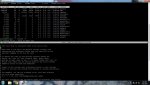
That is your crontab file. Just arrow to the bottom and put in the @reboot line mentioned in an earlier post. Cntrl-x then y to save@DC31 thank you, i did not see an option to "choose 2 for nano." here is what i am seeing when i type: crontab -e
pic attached....

Yes
@DC31 i guess i did not configure it accordingly. after power cycle, the live feed is showing as, "offline."
this is the current feed: https://www.broadcastify.com/listen/feed/30159/web
i had to restart the feed via: sudo darkice -c /etc/darkice1.cfg
this is the current feed: https://www.broadcastify.com/listen/feed/30159/web
i had to restart the feed via: sudo darkice -c /etc/darkice1.cfg
Last edited:

n8lwx
Member
HELP old man here but wanting to jump in and use a pi 3b+ to stream my feed vs the clunker pc i use. I grabbed the Raspberry_Pi_Broadcastify_Image and used etcher to install on the micro card... installed the card in the pi and it never booted. Am I correct in that I just need to put the image on the card, insert and power up? Any help appreciated.
The pi 3 B+ requires the latest and greatest OS to boot up. The broadcastify image you downloaded is at least a couple updates behind the curve. When you try to boot with a behind the curve image, it usually gives you a rainbow screen.HELP old man here but wanting to jump in and use a pi 3b+ to stream my feed vs the clunker pc i use. I grabbed the Raspberry_Pi_Broadcastify_Image and used etcher to install on the micro card... installed the card in the pi and it never booted. Am I correct in that I just need to put the image on the card, insert and power up? Any help appreciated.
Go to the raspberrypi.org website and download the Raspbian Stretch with Desktop image. You don’t need all the recommended software. Reimage that SD card with this image and get your pi booted up and updated. Then go to Raspberry pi /preferences / Add/remove/software and search for darkice. Put a checkmark in the box next to it, click apply, then when it finishes click ok.
Then you need to set up a configuration file in the /etc directory titled darkice.cfg (/etc/darkice.cfg):
# sample DarkIce configuration file, edit for your needs before using
# see the darkice.cfg man page for details
# this section describes general aspects of the live streaming session
[general]
duration = 0 # duration of encoding, in seconds. 0 means forever
bufferSecs = 5 # size of internal slip buffer, in seconds
reconnect = yes # reconnect to the server(s) if disconnected
# this section describes the audio input that will be streamed
[input]
device = hw:1,0 # OSS DSP soundcard device for the audio input
sampleRate = 11025 # sample rate in Hz. try 11025, 22050 or 44100
bitsPerSample = 16 # bits per sample. try 16
channel = 1 # channels. 1 = mono, 2 = stereo
# this section describes a streaming connection to an IceCast2 server
# there may be up to 8 of these sections, named [icecast2-0] ... [icecast2-7]
# these can be mixed with [icecast-x] and [shoutcast-x] sections
[icecast2-0]
bitrateMode = cbr # constant bit rate
bitrate = 16
format = mp3 # format of the stream: mp3
quality = .1 # quality of the stream sent to the server
lowpass = 3000 # low pass filter to save bandwidth
server = audioX.broadcastify.com# host name of the server
port = 80 # 8000 port of the IceCast2 server, usually 8000
password = aaaaaaaaa # stream631 # source password to the IceCast2 server
mountPoint = bbbbbbbbbb #EMR1 # mount point of this stream on the IceCast2 server
name = Fire/EMS # name of the stream
description = AAAAA # description of the stream
url = http://localhost # URL related to the stream
genre = Public Safety # genre of the stream
public = yes # advertise this stream?
Put in your credentials. Server, port, password and mount point
Save
Then open a terminal window and type darkice at the prompt to start.
And, old is relative...

n8lwx
Member
DC31, Roger that. Am getting the stretch now...will follow your instructions and let you know how it's going. Thank you. 73
- Status
- Not open for further replies.
Similar threads

- Replies
- 7
- Views
- 851

- Replies
- 3
- Views
- 490

- Replies
- 6
- Views
- 910