SDR SHARP INSTALL HELP

dave3825

* * * * * * * * * * * *
Premium Subscriber
Joined
Feb 17, 2003
Messages
10,114
Reaction score
5,692
Location
Suffolk County NY
If the program opens and closes, scroll up to post 10.

You need to update/install dotnet on your machine.

Or find an older version of sdr# that does not require all that bs.
 

KJ4DHF

Member
Joined
Aug 5, 2024
Messages
227
Reaction score
135

lamarrsy

Member
Premium Subscriber
Joined
Mar 12, 2003
Messages
240
Reaction score
203
Location
Rimouski, PQ, Canada
I can concur that I have the same behavior as the OP, Windows 10, same SDR dongle.
What puzzles me is that a previous install of SDR# (around 6 months ago, uninstalled few weeks later) installed correctly, with a correct .bat file to start the program.
No luck this time, I’m at the same place as MarkyMark…
 

dave3825

* * * * * * * * * * * *
Premium Subscriber
Joined
Feb 17, 2003
Messages
10,114
Reaction score
5,692
Location
Suffolk County NY
If the program is starting and shutting down, it’s nothing to do with the dongle. It has to do with the dependencies not being installed on your PC. Sdr# needs the dotnet crap to run the program The bat file is only going to install the drivers needed for the dongle. Sdr# will start and stay open without even having a dongle plugged in.
 

PDXh0b0

Active Member
Premium Subscriber
Joined
Mar 31, 2020
Messages
989
Reaction score
706
Location
Woodland, WA
Another thought, in your sdrsharp folder, is there a file named pluginError.log? If so, open it with a text editor, copy the contents and past here
 

32dave

Member
Premium Subscriber
Joined
Dec 19, 2002
Messages
208
Reaction score
84
Location
Oxford County, Ontario Canada
I two questions is the dongle in device manager and did you right click on either exe (depending on which dot is installed) and running it as administrator ? That is the only way it will work for me for both DOTs. I am on Win11 24H2
 

dave3825

* * * * * * * * * * * *
Premium Subscriber
Joined
Feb 17, 2003
Messages
10,114
Reaction score
5,692
Location
Suffolk County NY
Dongle showing in dev manager is not relevant at this point since OP stated sdr# opens and closes.

Before trouble shooting the dongle, should there be an issue with that, OP needs to get sdr# to open and stay open without closing. Could be his dotnet is not in order.

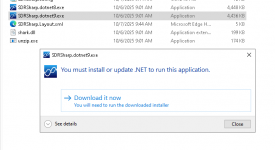
I have 1921 (dotnet8) open with no dongles connected to PC.

Dotnet9 pops this up because I only have 8 installed on this PC.

1759845113613.png


new install of windows 10

What version of windows 10 do you have?


.
 
Last edited:

UTE-GE

Member
Premium Subscriber
Joined
Nov 14, 2022
Messages
175
Reaction score
173
"OP stated sdr# opens and closes."

I had this very same issue before. It was the dot.net. I had to go in and delete all older files of it and start fresh.

It was very frustrating to figuire out after it had ran flawlessly previously to a fresh W10 reload to have a SDR dedicated PC.
 

PDXh0b0

Active Member
Premium Subscriber
Joined
Mar 31, 2020
Messages
989
Reaction score
706
Location
Woodland, WA
"OP stated sdr# opens and closes."

I had this very same issue before. It was the dot.net. I had to go in and delete all older files of it and start fresh.

It was very frustrating to figuire out after it had ran flawlessly previously to a fresh W10 reload to have a SDR dedicated PC.
Something to keep in mind if you face another fresh windows install, that I've used to get going right away...

Install sdr-console aka sdr-radio, it will add most of the dependencies needed.

One thing most of us forget, is all the needed support/dependencies files we have installed over the years.

After the headache of starting from scratch before, I've cloned my windows for sdr on two ssd's, same with my Linux for sdr.
 

rabbit108

Member
Joined
Jan 4, 2021
Messages
429
Reaction score
154
Location
S.E. VA
Yep I’ve tried both, you get the airspy logo in the middle of The screen for 3 seconds then it disappeared
I tried my RTL-SDR V3 in my backup Windows 10 computer which had never been used for SDRs.

Sometimes, when I click on the .exe to open the v1921 software, it does the same as your computer.

hiding1_1.jpg

hiding2_1.jpg

hiding3_1.jpg
 
Top