

You are using an out of date browser. It may not display this or other websites correctly.
You should upgrade or use an alternative browser.
You should upgrade or use an alternative browser.
SDS100/SDS200: SDS-100 boot screen
- Thread starter ecarvalho
- Start date
- Status
- Not open for further replies.

Can’t find the original thread. Just wanted to post some new images.
Sent from my iPhone using Tapatalk Pro
Seen the boot screen once 7 months ago haven’t turned it off since
Sent from my iPhone using Tapatalk
Seen the boot screen once 7 months ago haven’t turned it off since
Sent from my iPhone using Tapatalk

Love changing it once in a while...
Sent from my iPhone using Tapatalk Pro
Here is a dropbox link with my images if anyone is interested.
Dropbox - SDS100 boot image - Simplify your life
Dropbox - SDS100 boot image - Simplify your life

Love changing it once in a while...
Sent from my iPhone using Tapatalk Pro
...no one is supposed to know of our affiliations with umbrella corp. but I have been informed that our scanners have never been involved in any T-virus outbreaks, and would be very handy should one occur.
...no one is supposed to know of our affiliations with umbrella corp. but I have been informed that our scanners have never been involved in any T-virus outbreaks, and would be very handy should one occur.
LMAO! Love it! We are ready for it!!!!
Sent from my iPhone using Tapatalk Pro

You can upload your own image?
Sent from my iPad using Tapatalk Pro
Sent from my iPad using Tapatalk Pro
You can upload your own image?
Sent from my iPad using Tapatalk Pro
Yes
Sent from my iPhone using Tapatalk Pro
That’s awesome looks like I need to open up photoshop
Sent from my iPad using Tapatalk Pro
Sent from my iPad using Tapatalk Pro
That’s awesome looks like I need to open up photoshop
Sent from my iPad using Tapatalk Pro
Keep the file with the same size and ensure is 24 bit. Drop it inside the main directory of your microsd card.
Sent from my iPhone using Tapatalk Pro
Keep the file with the same size and ensure is 24 bit. Drop it inside the main directory of your microsd card.
Sent from my iPhone using Tapatalk Pro
Thanks that’s awesome!
Sent from my iPhone using Tapatalk Pro

djeplett
Member
I kept it simple. I like the black on white.

Super Mario Brothers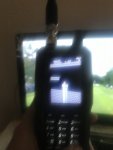

Blackink
Member
Way cool!

TailGator911
Silent Key/KF4ANC
Could someone please repost step-by-step instructions on how to do this? THNX
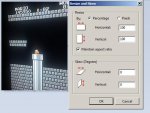
I used paint and did resize.
Than make sure you save as opening.bmp (not sure if file name -opening- matters)
Than transfer the file to the folder of the micro card.
It will show for a split second when you turn on the scanner.
I kept it simple. I like the black on white.
Do you have the file available? I love this!
Sent from my iPhone using Tapatalk Pro

If I recall, the original notes on the opening graphic were that it could not be larger than 240 by 320 pixels, file size ~226kb, and file extension *.bmp.View attachment 67537
I used paint and did resize.
Than make sure you save as opening.bmp (not sure if file name -opening- matters)
Than transfer the file to the folder of the micro card.
It will show for a split second when you turn on the scanner.
I use this one, the patch for the closest DFR station to me.

djeplett
Member
Let me see if I can attach it tomorrow.Do you have the file available? I love this!
Sent from my iPhone using Tapatalk Pro
I can't seem to get this to work. I put together a graphic to try and it does not show when I power up my scanner? How exactly do you do this?
- Status
- Not open for further replies.
Similar threads

- Replies
- 1
- Views
- 353

- Replies
- 0
- Views
- 286
- Replies
- 5
- Views
- 622

- Replies
- 9
- Views
- 1K
