346XT and FreeScan computer control

Status
Not open for further replies.

NWI_Scanner_Guy

SCANNING THE AIRWAVES SINCE 1987
Premium Subscriber
Joined
Jan 23, 2008
Messages
2,337
Reaction score
356
Location
Dyer, IN
I seem to be having a problem with the FreeScan program controlling my 346XT.

I open up the program, start computer control and all works well for about 10 minutes, then the "radio" on the screen goes blank (for lack of a better term) and I get the following pop-up error message...
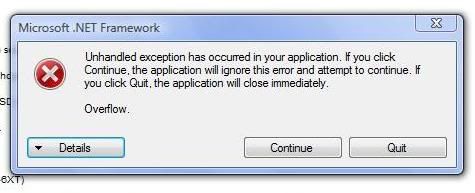
error.jpg


I guess I'm wondering if any one else is having this problem or if it's perhaps something wrong with my computer (I'm running Vista Home Premium w/32 bit operating system), or the .NET Framework program (whatever the heck that is).

Any suggestions / tips / comments / help will be greatly appreciated. Many thanks in advance.

SSSG

:)
 

cpuerror

Member
Joined
Aug 26, 2007
Messages
1,199
Reaction score
4
Location
Ontario, Canada
This error usually results from communications problems with the scanner. If you are using a USB -Serial adaptor, check to make sure you have the latest available drivers for it. Also remove any hubs or extension cables. You can also goto Device Manager, click on the adaptor and under advanced setting lower the UART buffer to minimum. Doing that usually helps clear up COM port issues.
 

NWI_Scanner_Guy

SCANNING THE AIRWAVES SINCE 1987
Premium Subscriber
Joined
Jan 23, 2008
Messages
2,337
Reaction score
356
Location
Dyer, IN
This error usually results from communications problems with the scanner. If you are using a USB -Serial adaptor, check to make sure you have the latest available drivers for it. Also remove any hubs or extension cables. You can also goto Device Manager, click on the adaptor and under advanced setting lower the UART buffer to minimum. Doing that usually helps clear up COM port issues.

No, no USB-Serial adapter in use. However, I did have the cable hooked up to a USB extension hub. I have unplugged the cable from that and plugged it in to an outlet in the back of my computer. So far so good. Hopefully that was problem. I'll be keeping my fingers crossed.

Thanks for the quick reply. I really appreciate it.

SSSG

:)
 

cpuerror

Member
Joined
Aug 26, 2007
Messages
1,199
Reaction score
4
Location
Ontario, Canada
No, no USB-Serial adapter in use. However, I did have the cable hooked up to a USB extension hub. I have unplugged the cable from that and plugged it in to an outlet in the back of my computer. So far so good. Hopefully that was problem. I'll be keeping my fingers crossed.

Thanks for the quick reply. I really appreciate it.

SSSG

:)

I am alittle confused. So your scanner is hooked up through a USB hub? If that is the case then you are indeed using a USB-Serial adaptor, as these scanners cannot be directly connected to USB. In that case, I would suggest trying to lower the UART settings.

Something about Vista and the Uniden USB cable makes it drop packets when talking with FreeSCAN, this corrupts data and causes various problems.
 

NWI_Scanner_Guy

SCANNING THE AIRWAVES SINCE 1987
Premium Subscriber
Joined
Jan 23, 2008
Messages
2,337
Reaction score
356
Location
Dyer, IN
I am alittle confused. So your scanner is hooked up through a USB hub? If that is the case then you are indeed using a USB-Serial adaptor, as these scanners cannot be directly connected to USB. In that case, I would suggest trying to lower the UART settings.

Something about Vista and the Uniden USB cable makes it drop packets when talking with FreeSCAN, this corrupts data and causes various problems.

Now I guess I'm a little confused. On one end of my cable is a USB plug; at the other is the connector to the scanner. Am I not using the correct cable? I didn't seem to have this problem when I was using this same cable and program to control and program my old 246T.

Also, I tried lowering the UART settings, and the program kept telling me it couldn't connect to the scanner.
 

cpuerror

Member
Joined
Aug 26, 2007
Messages
1,199
Reaction score
4
Location
Ontario, Canada
The Uniden cable you are using is a USB-Serial adaptor, the actual adaptor is the lumpy part of the cable. Someone mentioned in another thread that there is a special Vista driver you need for it, perhaps you could give that a try?
 

NWI_Scanner_Guy

SCANNING THE AIRWAVES SINCE 1987
Premium Subscriber
Joined
Jan 23, 2008
Messages
2,337
Reaction score
356
Location
Dyer, IN
The Uniden cable you are using is a USB-Serial adaptor, the actual adaptor is the lumpy part of the cable. Someone mentioned in another thread that there is a special Vista driver you need for it, perhaps you could give that a try?

I didn't realize that was a USB-Serial adapter there in the middle. Still have a lot to learn I guess LOL.

I'll see what I can find in the way of a driver.

I do appreciate your help. We'll get this fixed yet.

SSSG

:)
 

N9JIG

Sheriff
Moderator
Joined
Dec 14, 2001
Messages
6,528
Reaction score
5,998
Location
Far NW Valley
Go to Uniden USB Cable and download the Vista driver for the USB-1 cable that you have.

Check the Hardware Manager and see what com port the new driver is assigned. I think FreeScan will allow you to search for radios connected to the computer if you don't know what Com Port is used.

You might also want to check that you have DotNet installed. FreeScan should do this for you by sending you to the MicroSoft web page for the latest version (3.5.x I think....). You can see what version you have by going to the "Add-Remove Software" control panel.

Enjoy!
 

NWI_Scanner_Guy

SCANNING THE AIRWAVES SINCE 1987
Premium Subscriber
Joined
Jan 23, 2008
Messages
2,337
Reaction score
356
Location
Dyer, IN
Go to Uniden USB Cable and download the Vista driver for the USB-1 cable that you have.

Check the Hardware Manager and see what com port the new driver is assigned. I think FreeScan will allow you to search for radios connected to the computer if you don't know what Com Port is used.

You might also want to check that you have DotNet installed. FreeScan should do this for you by sending you to the MicroSoft web page for the latest version (3.5.x I think....). You can see what version you have by going to the "Add-Remove Software" control panel.

Enjoy!

DotNet was already installed on my computer. Wasn't sure about the Vista driver for the USB cable so I downloaded and installed it. There still seems to be a hiccup or two, but it is working a lot better than it was, and at least I'm not getting that pop-up error message like I was.

Thanks for your input, I appreciate it.

SSSG

:)
 
Status
Not open for further replies.
Top