BCD325P2/BCD996P2: BCD325P2 not displaying P25 Sites

davemorin40

Member
Premium Subscriber
Joined
Jun 30, 2024
Messages
20
Reaction score
4
Location
Nahant, Ma
Hello All
I've had my BCD325P2 for a while now and this is the first time programming in P25 frequencies. I'm using the ProScan software and I import from RR. The database shows the site and uploads to the scanner but the scanner does not display or scan the frequencies uploaded. If I choose to download from the scanner the site shows up and I'm able to download.

What am I missing?
 

Whiskey3JMC

Another Pesky Scanist
Premium Subscriber
Joined
Jul 16, 2006
Messages
9,915
Reaction score
8,530
Location
Simulcastylvania, TE
Did you assign quick keys at the system, site and/or group levels & if so are they turned on?
 

Harold

Member
Premium Subscriber
Joined
Dec 19, 2002
Messages
414
Reaction score
246
Location
Texas
It does not need to "scan" the frequencies, once it has acquired the control channel. The control channel assigns a talkgroup to a selected frequency. The scanner reads the data on the control channel and automatically goes to the frequency for which your selected talkgroup has been assigned.
 

Whiskey3JMC

Another Pesky Scanist
Premium Subscriber
Joined
Jul 16, 2006
Messages
9,915
Reaction score
8,530
Location
Simulcastylvania, TE
Are said frequencies conventional or trunked? Only seeing one P25 conventional listed for your city. Giving specific info about what you're monitoring may help your cause

Nahant​

FrequencyInputLicenseTypeToneAlpha TagDescriptionModeTag
472.7125475.7125WIL584RM581 NACNahant PDPolice OperationsP25Law Dispatch


davemorin40

Member
Premium Subscriber
Joined
Jun 30, 2024
Messages
20
Reaction score
4
Location
Nahant, Ma
So when it's scanning I do not see that site at all displayed on the scanner nor if I put in hold mode and toggle through the channels I don't see it displayed either
 

Whiskey3JMC

Another Pesky Scanist
Premium Subscriber
Joined
Jul 16, 2006
Messages
9,915
Reaction score
8,530
Location
Simulcastylvania, TE
I don't own a 325p2 so I'm not familiar with the specific Proscan options but I do know when x36HP or SDS are set as target model there's a checkbox to erase all favorites lists on the scanner before writing to it. Are you seeing this checkbox & if so, is it UNchecked?
 

davemorin40

Member
Premium Subscriber
Joined
Jun 30, 2024
Messages
20
Reaction score
4
Location
Nahant, Ma
I don't have an erase all favorites lists as the 325p2 does not use favorites. I do select delete all systems before sending checked and it does it.
 

wtp

Member
Joined
Apr 3, 2008
Messages
7,179
Reaction score
2,951
Location
Port Charlotte FL
OK, now for the slow way to turn on/unlock systems/folders.
for conventional/one freq.
hit the menu button, program system, hit yes
turn the top knob to highlight the system you want, hit yes
turn the top knob to highlight edit system option, hit yes
turn knob to set lockout, hit yes
turn the knob to unlock.
hit scan
for trunked system
hit the menu button, program system, hit yes
turn the knob to the system you want, hit yes
turn the knob to edit site, hit yes
select the site you want (it might be the only one), hit yes
turn the knob to set lockout, hit yes
turn to highlight unlock, hit yes.
hit scan.
and you can have many things running at once.
 

davemorin40

Member
Premium Subscriber
Joined
Jun 30, 2024
Messages
20
Reaction score
4
Location
Nahant, Ma
OK, now for the slow way to turn on/unlock systems/folders.
for conventional/one freq.
hit the menu button, program system, hit yes
turn the top knob to highlight the system you want, hit yes
turn the top knob to highlight edit system option, hit yes
turn knob to set lockout, hit yes
turn the knob to unlock.
hit scan
for trunked system
hit the menu button, program system, hit yes
turn the knob to the system you want, hit yes
turn the knob to edit site, hit yes
select the site you want (it might be the only one), hit yes
turn the knob to set lockout, hit yes
turn to highlight unlock, hit yes.
hit scan.
and you can have many things running at once.
Ok the system is def in there . It's a trunked system when I go to the site it does not have a set lockout. I have a clr all L/O Ids option
 

Whiskey3JMC

Another Pesky Scanist
Premium Subscriber
Joined
Jul 16, 2006
Messages
9,915
Reaction score
8,530
Location
Simulcastylvania, TE
Ok the system is def in there . It's a trunked system when I go to the site it does not have a set lockout. I have a clr all L/O Ids option
So it's there, you can press Hold and manually scroll through channels? You're certain you didn't inadvertently assign any quick keys?
 
Joined
Apr 18, 2009
Messages
6,403
Reaction score
3,854
Location
CT
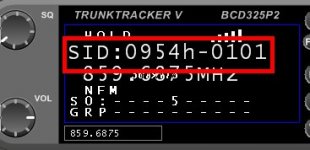
Try this to confirm you are receiving a Control Channel:

  1. Press HOLD
  2. Use the knob to scroll through the channels one by one

When you land on an active CC, you should see a SID pop up like this:

SID.jpg

If you don't see a CC, you won't receive the system.

Good luck!
 
  • Like
Reactions: wtp

davemorin40

Member
Premium Subscriber
Joined
Jun 30, 2024
Messages
20
Reaction score
4
Location
Nahant, Ma
ok seems nothing is locked out I'm attaching my txt file. It's the last entry.
 

Attachments

  • Dave's good stuff.txt
    23.3 KB · Views: 18
Top