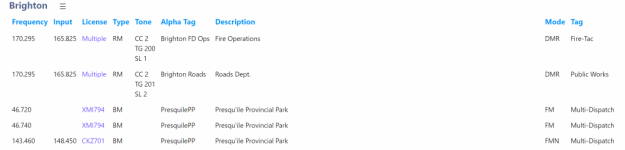
For the Whistler, DMR capable, scanners, such as the TRX-1 & TRX-2, you can create a conventional channel, and, besides the frequency, you can also enter the talkgroup, slot, and color code.
When entering a DMR frequency as a conventional channel, in a scanner such as the BCD436HP or BCD536HP, you can enter the frequency, as well as the color code. However, you do not have the option to enter a talkgroup nor a slot setting.
What you need to do is create a One Frequency Trunked system, or OFT. Doing that, you can specify the color code, as well as the talkgroup and slot.
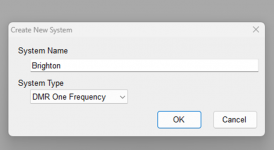
For the frequencies in your example, create a DMR One Frequency system in Sentinel:
View attachment 193298
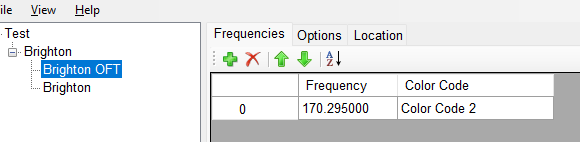
Your Frequency, as well as the color code, are entered as a SITE in the OFT system.
View attachment 193299
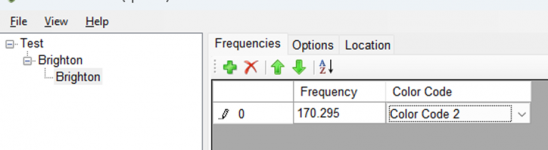
Enter the Frequency and Color Code in the Site detail.
View attachment 193304
Now, create a Department, so that the Talkgroup & Slot, as well as a Description, can be entered.
View attachment 193301
In the Department, you can enter the Channel details, including the talkgroup as well as the slot for each channel.
View attachment 193302
You can also, if desired, set Roads Department to Avoid, if it is not of interest at this time. IF, say during the winter, that talkgroup is used for crews clearing snow and ice from the roads, you could remove the Avoid so that you can hear them during the winter.If additional departments are using that same frequency, you can add those channels, along with the appropriate talkgroup and/or slot assignment.
You also can assign an alert color for either or both channels, as well as set an Alert Tone, if you wanted an audio signal to clue you that the channel is active.
View attachment 193303
The additional channels & frequencies in your example above could be placed in a standard Conventional system if you also wanted to monitor them.