SDS100/SDS200: SDS 100 Priority Scan

Status
Not open for further replies.

huntercody

Member
Premium Subscriber
Joined
Sep 1, 2009
Messages
42
Reaction score
14
Hi All,

I am receiving a message on startup "Priority Scan No Channel" - what'd I do wrong now!
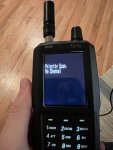
IMG_3776.JPG
 

dave3825

* * * * * * * * * * * *
Premium Subscriber
Joined
Feb 17, 2003
Messages
10,776
Reaction score
6,334
Location
Suffolk County NY
It basically means you have Priority on and no priority channels programmed.

If you don't use that feature you may have ticked it on by mistake. Try toggling until its off as seen here

Scan Priority Modes
 

ofd8001

Member
Premium Subscriber
Joined
Feb 6, 2004
Messages
8,492
Reaction score
1,618
Location
Louisville, KY
Additionally, you can have a frequency programmed as a Priority Channel but the scanner can't "locate" it. That could be because the priority channel is Avoided, the Department or System it is in is Avoided or has a Quick Key Off or is Off because of a Location parameter.

"Priority Scan. No Channel" is a "harmless" situation. If the scanner cannot locate a Priority Channel, the Priority Scan setting is turned off and the scanner continues on.
 

werinshades

Member
Premium Subscriber
Joined
Jan 21, 2002
Messages
6,885
Reaction score
3,341
Location
Chicago , IL
Don't bother using priority on a P25 trunked system. It doesn't work!

Actually it does, but functions as a DND (Do Not Disturb) and not a Preemptive Priority. When the conversation ends on a non-priority talkgroup, if activity is detected on a Priority talkgroup, it will go right to that talkgroup "if" you're still on the same system. I have it set up on all my trunking systems and works well and find it convenient.
 

ofd8001

Member
Premium Subscriber
Joined
Feb 6, 2004
Messages
8,492
Reaction score
1,618
Location
Louisville, KY
Yeah priority works different on trunked systems as compared to conventional systems. (The Priority Scan message pertains to conventional scanning).

Priority ID Scanning (trunked) is also good if you are holding on a given talkgroup that is not active and a priority talkgroup becomes active.

I remember seeing posts from Joe Bearcat lamenting about the non-preemption situation. Hopefully he can talk nice to the engineers. With that said even "regular system radios" also miss out conversations when scanning. My radio can be set on channel 1 and scanning away. If a conversation happens on Channel 2, the radio may not jump to channel 2 fast enough. (I'll have another radio going which is on channel 2, so I know there is a conversation).
 

werinshades

Member
Premium Subscriber
Joined
Jan 21, 2002
Messages
6,885
Reaction score
3,341
Location
Chicago , IL
Yeah priority works different on trunked systems as compared to conventional systems. (The Priority Scan message pertains to conventional scanning).

Priority ID Scanning (trunked) is also good if you are holding on a given talkgroup that is not active and a priority talkgroup becomes active.

I remember seeing posts from Joe Bearcat lamenting about the non-preemption situation. Hopefully he can talk nice to the engineers. With that said even "regular system radios" also miss out conversations when scanning. My radio can be set on channel 1 and scanning away. If a conversation happens on Channel 2, the radio may not jump to channel 2 fast enough. (I'll have another radio going which is on channel 2, so I know there is a conversation).

Yes on all of this...but you must mean Voyager Joe Bearcat :LOL: :unsure:. Conventional programming has the same DND option, which I also use and comes in quite handy. Quite honestly, after seeing the posts about the "new 536's not decoding P25 above 171mhz", I'm in no hurry for another hardware/firmware fiasco, and I'll be content just the way it is.
 

huntercody

Member
Premium Subscriber
Joined
Sep 1, 2009
Messages
42
Reaction score
14
So I am attempting to have a channel on a P25 be set as priority. Also, is there a setting to set delays before proceeding in search the list? I am using Sentinel and stilling figuring it all out. Currently I have created groups to scan but am working to fine tune it. An aside-I do tend to miss the beginning of the conversation, even while holding. I live in town but sometimes doubt the comet antenna.
 

ofd8001

Member
Premium Subscriber
Joined
Feb 6, 2004
Messages
8,492
Reaction score
1,618
Location
Louisville, KY
I'm presuming this is a conventional system. As it appears you have done, set Priority Scan to On in Sentinel. Then go to where the individual channels are and set the P-Ch column to On for those you wish to be priority. (You can do more than one, but the more you do the scanner might end up scanning only the priority channels.

Some times you do miss the first little bit of a transmission. Many reasons too numerous to explain. It just happens.

No setting to delay checking a priority channel. It will check for traffic on priority channels every X seconds, where X is the value you choose for Priority Interval Time. The only thing you can do is select DND for the type of priority scan, but that means no jumping off an in progress transmission to check for traffic on a priority channel.
 
Last edited:

werinshades

Member
Premium Subscriber
Joined
Jan 21, 2002
Messages
6,885
Reaction score
3,341
Location
Chicago , IL
So I am attempting to have a channel on a P25 be set as priority. Also, is there a setting to set delays before proceeding in search the list? I am using Sentinel and stilling figuring it all out. Currently I have created groups to scan but am working to fine tune it. An aside-I do tend to miss the beginning of the conversation, even while holding. I live in town but sometimes doubt the comet antenna.

Trunking or Conventional system?
 

Ubbe

Member
Joined
Sep 8, 2006
Messages
11,073
Reaction score
4,754
Location
Stockholm, Sweden
An aside-I do tend to miss the beginning of the conversation, even while holding.
The squelch can be a bit sluggish on the SDS scanners and open later than other scanners. If you have priority DND activated it will start to scan the prio channels as soon as the squelch close and it will include the current channel in that scanning cycle. If you have many prio channels programmed it could take a while until the scanner are back at the current channel and ready to detect if a conversation have started and you might loose the start of it. Easily checked by turning prio off, Fn+.No

/Ubbe
 

huntercody

Member
Premium Subscriber
Joined
Sep 1, 2009
Messages
42
Reaction score
14
Trunking or Conventional system?
Here is the system: Benton County, Oregon (OR) Scanner Frequencies and Radio Frequency Reference. You'll see law is on an interop.

The squelch can be a bit sluggish on the SDS scanners and open later than other scanners. If you have priority DND activated it will start to scan the prio channels as soon as the squelch close and it will include the current channel in that scanning cycle. If you have many prio channels programmed it could take a while until the scanner are back at the current channel and ready to detect if a conversation have started and you might loose the start of it. Easily checked by turning prio off, Fn+.No

/Ubbe

Thank you. I'll have a look at the settings.
 

huntercody

Member
Premium Subscriber
Joined
Sep 1, 2009
Messages
42
Reaction score
14
So I updated the profile for priority scan. Then I updated the list with a priority group and priority channel. I'm doing something wrong...
Screen Shot 2022-04-15 at 14.21.44.png
Screen Shot 2022-04-15 at 14.22.58.png
 

Ubbe

Member
Joined
Sep 8, 2006
Messages
11,073
Reaction score
4,754
Location
Stockholm, Sweden
I'm doing something wrong...
The priority setting in General Options only apply to conventional channels, not TG's. If you do not have any conventional channels set as priority you will get that error message.

The ID scan prio and TG prio you set in trunked systems are a separate thing not at all connected to the settings in General, they run completely independent of each other and TG prio are always active and cannot be turned off, unless you program them to be off.

In your current configuration you do not need to set priority scan mode to Priority or DND. You must have that set to Off but TG priority will still be active and check your special priority group, but it will only check those TG's while it is monitoring that specific system.

/Ubbe
 

huntercody

Member
Premium Subscriber
Joined
Sep 1, 2009
Messages
42
Reaction score
14
The priority setting in General Options only apply to conventional channels, not TG's. If you do not have any conventional channels set as priority you will get that error message.

The ID scan prio and TG prio you set in trunked systems are a separate thing not at all connected to the settings in General, they run completely independent of each other and TG prio are always active and cannot be turned off, unless you program them to be off.

In your current configuration you do not need to set priority scan mode to Priority or DND. You must have that set to Off but TG priority will still be active and check your special priority group, but it will only check those TG's while it is monitoring that specific system.

/Ubbe

Received. I'll update the settings and try it out tonight.
 

Anderegg

Enter text in this field
Premium Subscriber
Joined
Mar 7, 2010
Messages
2,701
Reaction score
499
Location
San Diego
And there is no keypad button to enable or disable TRUNKING PRIORITY operation, you need to dig into the fav list menu.

Paul
 

werinshades

Member
Premium Subscriber
Joined
Jan 21, 2002
Messages
6,885
Reaction score
3,341
Location
Chicago , IL
Edit...Edit Favorite List..(in right pane) choose system it's programmed in...Options...Priority ID Scan...ON.

(In same pane on right)...Department...Channel Name...(scroll to right)...PCh ON...channel(s) you want in priority.

(Left pane)...File...Save...Write to Scanner (You'll be prompted of a change in your favorite list)...

Once it's done, monitor that system only and when activity is present on that talkgroup, the scanner will "jump" to that channel once the other channel releases it's transmission.

As Ubbe mentioned, you have Trunking Priority set up on Conventional channels. If you have any channels priority, the scanner will check every 2 seconds for a transmission and interrupt what you're listening to. This does not apply to trunking systems.
 

ofd8001

Member
Premium Subscriber
Joined
Feb 6, 2004
Messages
8,492
Reaction score
1,618
Location
Louisville, KY
Ah, now its falling into place. The Priority settings mentioned before, the ones set in the Profile, are only applicable to conventional systems. But since the system you mention is a trunked system, it is a different ballgame.

Turn off the Priority things in the profile. You get the error because the scanner is looking for a conventional frequency set as priority. Because you have a trunked system, there are no conventional channels involved. (Like trying to watch a television show on an AM radio).

Restating what was said above, edit your Favorites List, go to the system and look in the options tab. Turn on Priority ID Scan. Then set one or more talkgroups so that P-Ch is On.

Trunked priority and conventional priority are two different things. Priority on Uniden scanners is confusing so don't beat yourself up. Also, with Priority ID Scan, there is no preemption, so don't expect a conversation to "stop" while the scanner checks for traffic on a priority channel.
 
Status
Not open for further replies.
Top