SDS100/SDS200: SDS200 Connection To Internet

BelleValleyFD

Newbie
Feed Provider
Joined
Dec 4, 2015
Messages
19
Reaction score
4
Location
Erie, PA
For the last several years, have been using ProScan to connect our SDS200 to the internet through Broadcastify. The scanner randomly goes offline for a variety of reasons. Sometimes I just need to reconnect it in Proscan (even though I have the automatically reconnect box checked). Sometimes I have to shutdown the ProScan software and restart it. Sometimes I have to reboot the scanner itself, and sometimes I have to reboot the computer that has the ProScan software on it. I have not been able to tie a specific cause to a specific solution, but I used to live a very short distance away from our fire department where we run the scanner and I would just run to the station and apply whatever fix was needed to reconnect. Sometimes that would be good for a few weeks and sometimes only for a few hours.

However, I recently moved further away from the station and it's now an inconvenience as well as an expense to make frequent trips to the station just to fix this and I'm looking for some suggestions for what the cause might be. I currently cannot get it to connect at all for other than a very short time. I have a fixed IP address set on the scanner and that address reserved in our router as a static address. We have very stable 300 MBPS fiber optic connection to our ISP, so I don't think that the cause is unstable/erratic internet.

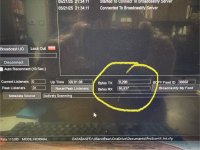
The one constant that I have observed is that the TX BYTES field in ProScan always stops at 9,296 bytes, but beyond that symptom, I can't discover any cause. (see attached picture).

By way of background, let me say that I know a little more than basics about computers and networking, but not a lot more and am by no means an expert.

Thank you in advance.
 

Attachments

  • Proscan.jpg
    Proscan.jpg
    162.1 KB · Views: 36

Enforcer52

Broadcastify, Calls Platform, Public Playlist
Feed Provider
Joined
Sep 4, 2023
Messages
1,071
Reaction score
945
Location
Lake Livingston, TX
First thing I would do is change out the patch cable between the scanner and router, and probably plug the cable into a different port on the router.
 

BelleValleyFD

Newbie
Feed Provider
Joined
Dec 4, 2015
Messages
19
Reaction score
4
Location
Erie, PA
First thing I would do is change out the patch cable between the scanner and router, and probably plug the cable into a different port on the router.
I think I have done that somewhere along the way, but I don't recall for sure. Never hurts to verify the basics! Thanks.
 

Enforcer52

Broadcastify, Calls Platform, Public Playlist
Feed Provider
Joined
Sep 4, 2023
Messages
1,071
Reaction score
945
Location
Lake Livingston, TX
Here is what I do for Proscan and SDRTrunk hiccups when I am away from the house.

1. I have wifi controlled plugs on both the computer and on the scanner.
2. Scanner and/or computer can be restarted remotely if needed.
3, In the bios of the computer, I have it set to boot on power connect (may not be available on all bios) and not to pause if a boot error is detected. This works great except for automatic Windows updates that boot to a screen you have to interact with. I have Proscan and/or SDRTrunk link in the startup directory of windows so it automatically starts on boot up.
4. I have Chrome Remote loaded on the Computer so that I can access it from anywhere, even from my phone, if need be.
5. Always keep a backup of the sdcard in the sds200, and a backup of the Proscan programming on the computer.

If set up this way no matter where you are you can get access to the system and reboot either scanner or computer. If the system is in a fire station, someone should be around if needed to help.

I use this system and it has worked great when I am 200 miles away visiting my son in Fort Worth. I maintain my SDRTrunk system the same way. Like I said the only glitch is when window updates and comes up with a screen you have to click on something.
 

BelleValleyFD

Newbie
Feed Provider
Joined
Dec 4, 2015
Messages
19
Reaction score
4
Location
Erie, PA
I think I have done that somewhere along the way, but I don't recall for sure. Never hurts to verify the basics! Thanks.

Here is what I do for Proscan and SDRTrunk hiccups when I am away from the house.

1. I have wifi controlled plugs on both the computer and on the scanner.
2. Scanner and/or computer can be restarted remotely if needed.
3, In the bios of the computer, I have it set to boot on power connect (may not be available on all bios) and not to pause if a boot error is detected. This works great except for automatic Windows updates that boot to a screen you have to interact with. I have Proscan and/or SDRTrunk link in the startup directory of windows so it automatically starts on boot up.
4. I have Chrome Remote loaded on the Computer so that I can access it from anywhere, even from my phone, if need be.
5. Always keep a backup of the sdcard in the sds200, and a backup of the Proscan programming on the computer.

If set up this way no matter where you are you can get access to the system and reboot either scanner or computer. If the system is in a fire station, someone should be around if needed to help.

I use this system and it has worked great when I am 200 miles away visiting my son in Fort Worth. I maintain my SDRTrunk system the same way. Like I said the only glitch is when window updates and comes up with a screen you have to click on something.
I have some similar setups for reboot and power up. The idea of wifi plugs to enable me to restart the computer and scanner is a good suggestion. I'm still hoping to find the root cause, but if I can't and continue to have to babysit it, those might at least enable me to do it more easily. We are a 100% volunteer department, so no one is generally around the station except for shortly after a call when we are cleaning equipment and hoses, etc. We do have a member who is pretty well trained in I/T and networking issues, but he and his wife recently had a baby and his time is pretty well taken up at the moment. We talked about running the software on a virtual machine or docker, but I will need his help with that.

But thank you for the suggestions. It might be that some way to more remotely recover from a problem will be the best that I can do if I can't find the root cause of the failure.
 

dave3825

* * * * * * * * * * * *
Premium Subscriber
Joined
Feb 17, 2003
Messages
10,076
Reaction score
5,654
Location
Suffolk County NY
The idea of wifi plugs to enable me to restart the computer and scanner is a good suggestion.

Install TeamViewer on the PC and your Phone and you can reboot PC that way as opposed to just killing the power via a Wi-Fi switch.

As far as the scanner, If needs to write to the card (during a power cycle) and you just kill the power, you can corrupt the sd card.

Some people have the 200 wired to their ignition and just shut the car off without shutting down the scanner. Mentioned here, if replay and record are not enabled, it wont write to the card so if that's true than the Wi-Fi could work on the scanner also.


Enforcer52

Broadcastify, Calls Platform, Public Playlist
Feed Provider
Joined
Sep 4, 2023
Messages
1,071
Reaction score
945
Location
Lake Livingston, TX
I only use the wifi plugs if either are locked up and I can't access them.

Teamviewer makes you jump thru hoops these days to get a free account (and then it only worked for a week), Chrome Remote is free always.

SD card corruption is a possibility, hence the backup files of the sdcard directory and Proscan files.
 

BelleValleyFD

Newbie
Feed Provider
Joined
Dec 4, 2015
Messages
19
Reaction score
4
Location
Erie, PA
Install TeamViewer on the PC and your Phone and you can reboot PC that way as opposed to just killing the power via a Wi-Fi switch.

As far as the scanner, If needs to write to the card (during a power cycle) and you just kill the power, you can corrupt the sd card.

Some people have the 200 wired to their ignition and just shut the car off without shutting down the scanner. Mentioned here, if replay and record are not enabled, it wont write to the card so if that's true than the Wi-Fi could work on the scanner also.

I don't believe it is anything with the SD card. The scanner works fine, I just can't connect it to Broadcastify.
 

BelleValleyFD

Newbie
Feed Provider
Joined
Dec 4, 2015
Messages
19
Reaction score
4
Location
Erie, PA
I only use the wifi plugs if either are locked up and I can't access them.

Teamviewer makes you jump thru hoops these days to get a free account (and then it only worked for a week), Chrome Remote is free always.

SD card corruption is a possibility, hence the backup files of the sdcard directory and Proscan files.
I don't think there is an issue with sdcards since the scanner scans just fine, I just can't get it to connect to Broadcastify.
 

Enforcer52

Broadcastify, Calls Platform, Public Playlist
Feed Provider
Joined
Sep 4, 2023
Messages
1,071
Reaction score
945
Location
Lake Livingston, TX
Do you have any anti-virus program running? If so turn it off temporarily and see if it connects to Broadcastify. If it does then put an exception in the anti-virus for Proscan. An update to the anti-virus maybe the culprit.
 

BelleValleyFD

Newbie
Feed Provider
Joined
Dec 4, 2015
Messages
19
Reaction score
4
Location
Erie, PA
Do you have any anti-virus program running? If so turn it off temporarily and see if it connects to Broadcastify. If it does then put an exception in the anti-virus for Proscan. An update to the anti-virus maybe the culprit.
Great suggestion, I will check that in Norton and make sure I add it as an exception if that seems to be the problem. You guys are thinking of stuff that never occurred to me!
 
  • Like
Reactions: wtp

Enforcer52

Broadcastify, Calls Platform, Public Playlist
Feed Provider
Joined
Sep 4, 2023
Messages
1,071
Reaction score
945
Location
Lake Livingston, TX
I'm sure you have probably checked, but make sure your broadcastify login is all spelled correctly, and has the right server.
 

belladog9651

Member
Joined
Feb 16, 2022
Messages
31
Reaction score
24
Location
IL
If you know the ip addresses of your end points, you could try the pinging back and fourth.
Open a dos prompt and type 'ping -t xxx.xxx.xxx.xxx'
It will return continuous results, including a time metric, and packet loss. This might help indicate which side the problem is occurring if the time or packets show erratic results. This can run days, so remember to close the window when your done testing.
 

dmurman

Member
Feed Provider
Joined
Jan 19, 2008
Messages
47
Reaction score
4
Location
Texas
Since I both the SDS200 I was only using to listen locally. A while back I bought ProScan and connected the SDS200 to my router. Worked fine for a couple days then lost connection to the computer. I tried many cables and then switched from the ethernet port on the router to WIFI dongle. Same issue. I then monitored the connection using WireShark. Noticed I was seeing both send and receive data. When the connection failed I saw that the lan connection on the SDS200 stopped sending data. Turning off and back on I see the data and it comes up in ProScan. I contacted Uniden and they wanted me to send in the scanner. I noticed on FB that others were seeing the same problem. I asked Uniden to please check it out but I got no response. There is a problem with the ethernet port that stops sending data to the router. Uniden should be able to duplicate and get a fix. Doesn't help to have to power cycle the SDS200 to get it working again with ProScan. Especially if your not near the radio.
 

fxdscon

¯\_(ツ)_/¯
Premium Subscriber
Joined
Jan 15, 2007
Messages
7,585
Reaction score
3,756
There is a problem with the ethernet port that stops sending data to the router.

Did you set a static IP address for the scanner through the scanner's menu screen, or did you set a reserved address for the scanner in your router?

The ethernet port on the scanner wouldn't be bad if the data is getting to ProScan.
 

hazrat8990

Active Member
Premium Subscriber
Joined
Apr 12, 2013
Messages
549
Reaction score
337
Location
Wyoming
There is a problem with the ethernet port that stops sending data to the router.
Set everything on the scanner for manual and set a static IP on the router side. The router lease time for the IP address probably expired, which makes the scanner have to be power cycled in order for it to ask for a new IP assignment.
 
Top
