• To anyone looking to acquire commercial radio programming software:

    Please do not make requests for copies of radio programming software which is sold (or was sold) by the manufacturer for any monetary value. All requests will be deleted and a forum infraction issued. Making a request such as this is attempting to engage in software piracy and this forum cannot be involved or associated with this activity. The same goes for any private transaction via Private Message. Even if you attempt to engage in this activity in PM's we will still enforce the forum rules. Your PM's are not private and the administration has the right to read them if there's a hint to criminal activity.

    If you are having trouble legally obtaining software please state so. We do not want any hurt feelings when your vague post is mistaken for a free request. It is YOUR responsibility to properly word your request.

    To obtain Motorola software see the Sticky in the Motorola forum.

    The various other vendors often permit their dealers to sell the software online (i.e., Kenwood). Please use Google or some other search engine to find a dealer that sells the software. Typically each series or individual radio requires its own software package. Often the Kenwood software is less than $100 so don't be a cheapskate; just purchase it.

    For M/A Com/Harris/GE, etc: there are two software packages that program all current and past radios. One package is for conventional programming and the other for trunked programming. The trunked package is in upwards of $2,500. The conventional package is more reasonable though is still several hundred dollars. The benefit is you do not need multiple versions for each radio (unlike Motorola).

    This is a large and very visible forum. We cannot jeopardize the ability to provide the RadioReference services by allowing this activity to occur. Please respect this.

SPD bonding question

KevinC

32D2T/957.282
Super Moderator
Joined
Jan 7, 2001
Messages
14,654
Reaction score
24,002
Location
I'm everywhere Focker!
Not really a industry discussion topic, but I figured I'd get more professional responses here as opposed to "Is her squelch set to 2".

Monday night a nasty storm came through and my daughters apartment was either hit by lightning or the strike was EXTREMELY close. All her breakers tripped and after I had her reset them everything came back except her cable modem/router. Thinking it was just the power supply I had her order a new one, but it's still DOA. Everything else on that surge protected power strip survived so I'm thinking the surge came through the coax to the modem/router.

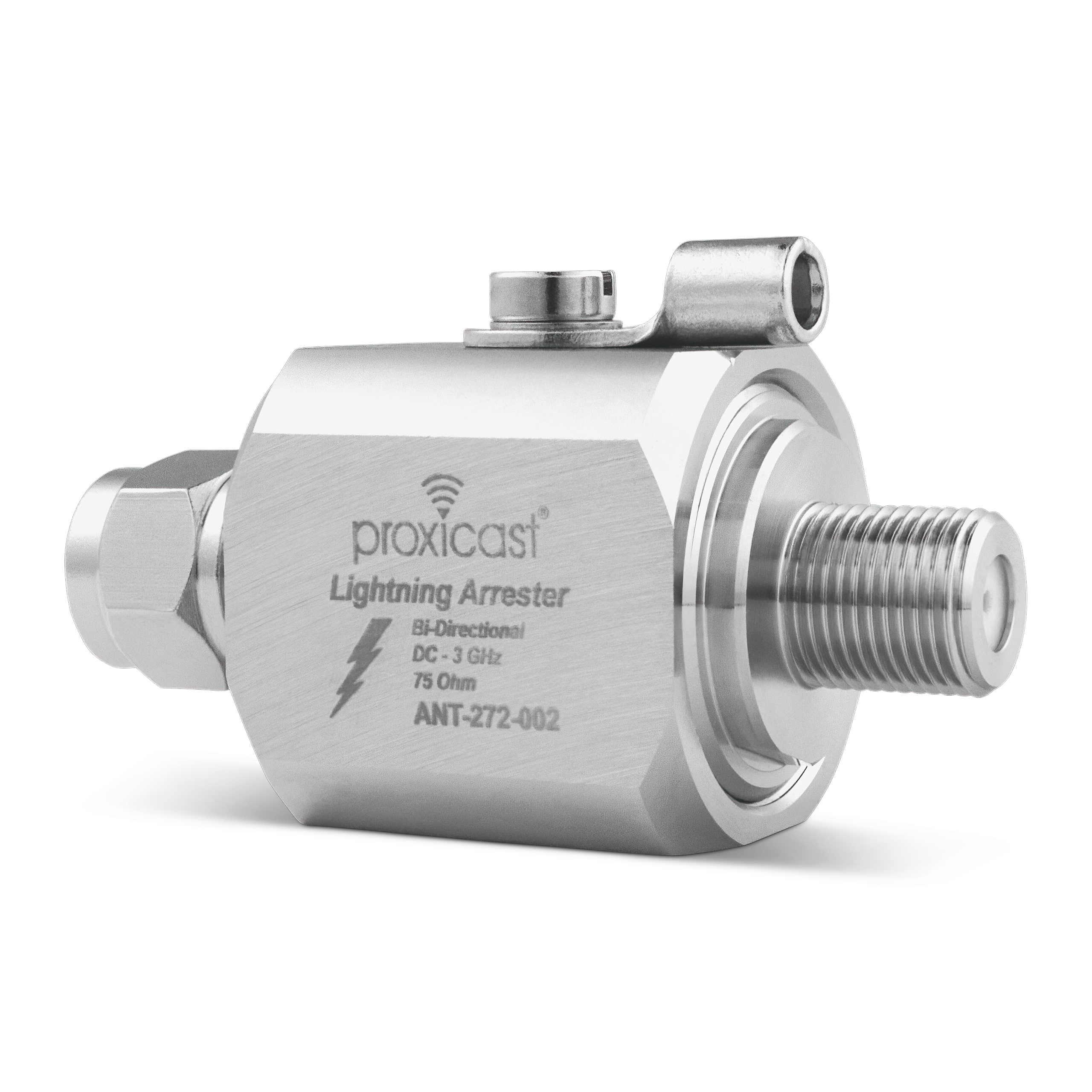
How can she effectively protect her modem in the future? Any SPD would require a ground to bond it and that's not possible in an apartment environment.
 

bharvey2

Member
Joined
Mar 12, 2014
Messages
2,076
Reaction score
981
Surge protectors that mount in or on the breaker panel are available. Some are mounted outside of the panel and some are mounted just like a breaker. They aren't terribly expensive anymore (often less than $100) and can offer whole house protection to a degree. (Not going to do much for a direct hit)

Dealing with the incoming coax effectively is going to be a greater challenge. The lightning arrester that KevinC has shown above is probably your best bet but getting a worthwhile ground point in an apartment probably won't be easy as those arresters should be outside the building.
 

N1FKO

Member
Joined
Jul 26, 2019
Messages
133
Reaction score
75
How can she effectively protect her modem in the future? Any SPD would require a ground to bond it and that's not possible in an apartment environment.
Some UPSes have coax/ethernet surge protection built in. I use the big APC Back-UPS (BR-xxxx).
 

prcguy

Member
Joined
Jun 30, 2006
Messages
18,616
Reaction score
14,770
Location
So Cal - Richardson, TX - Tewksbury, MA
Stuff at different ground potential can kill electronics and a CATV feed is rarely bonded to the building AC entry panel. Finding the CATV feed and installing a ground block at or near the building AC entry panel is a start. Damage from difference in potential between coax shield and center conductor is rare and probably between AC hot and neutral as lightning can act like common mode across all conductors when a power pole is hit. A couple thousand volts difference between your wall socket ground and any other so called grounded conductor touching the appliance or an ungrounded two prong device can cause significant damage. An F type ground lift device installed at a modem might help it survive a nearby strike as most are two prong power.
 

bharvey2

Member
Joined
Mar 12, 2014
Messages
2,076
Reaction score
981
I'm not sure if one of those would work on a cable modem. I had looked at them, but none seem to mention cable modems specifically.
I have an APC powering my cable modem and home edge router. Everything works fine but that is power only. Having the APC there does help overcome brown outs and smaller line voltage spikes) If you purchased one that has surge suppression on a pair of F connectors, you'd have to test it out. Since cable is bi-directional these days, the surge suppression circuitry might interfere with that.

I use APC UPSes at work (servers, workstations, remote network switches, etc.) I've only seen the surge F connector surge suppression on lower end "consumer" UPSes though.
 

KevinC

32D2T/957.282
Super Moderator
Joined
Jan 7, 2001
Messages
14,654
Reaction score
24,002
Location
I'm everywhere Focker!
I have an APC powering my cable modem and home edge router. Everything works fine but that is power only. Having the APC there does help overcome brown outs and smaller line voltage spikes) If you purchased one that has surge suppression on a pair of F connectors, you'd have to test it out. Since cable is bi-directional these days, the surge suppression circuitry might interfere with that.

I use APC UPSes at work (servers, workstations, remote network switches, etc.) I've only seen the surge F connector surge suppression on lower end "consumer" UPSes though.
I'm not even sure how to respond to this. Obviously I was referring to the coax surge protection not working on said UPS and again obviously using one for power only wouldn't affect the performance of the modem/router.
 

KevinC

32D2T/957.282
Super Moderator
Joined
Jan 7, 2001
Messages
14,654
Reaction score
24,002
Location
I'm everywhere Focker!
Yes, but cable companies don't follow it. At best they typically drive in a 4ft ground rod on the property near their demark which is usually nowhere near the AC entry panel and its not bonded to it.
Fair enough, But this isn't a residential install, it's a large, modern apartment complex in a very large city, with permits and inspections and all sorts of red tape crap. So hopefully it was done properly.
 

prcguy

Member
Joined
Jun 30, 2006
Messages
18,616
Reaction score
14,770
Location
So Cal - Richardson, TX - Tewksbury, MA
Fair enough, But this isn't a residential install, it's a large, modern apartment complex in a very large city, with permits and inspections and all sorts of red tape crap. So hopefully it was done properly.
I've seen apartments/condos where there is a communications closet with prewired coax to every unit fed from amplifiers, with and without proper grounds. And I've seen other places with individual cable feeds to each unit from the pole. It just depends. If your close by why not make a visit, trace the cable feed and see where it goes?
 

KevinC

32D2T/957.282
Super Moderator
Joined
Jan 7, 2001
Messages
14,654
Reaction score
24,002
Location
I'm everywhere Focker!
I've seen apartments/condos where there is a communications closet with prewired coax to every unit fed from amplifiers, with and without proper grounds. And I've seen other places with individual cable feeds to each unit from the pole. It just depends. If your close by why not make a visit, trace the cable feed and see where it goes?
If they have feeds from the pole I hate to see that distribution device, this complex is multi-story with hundreds of units.

It would be impossible to trace any cable due to the sheer size of the complex. And she's only about 10 miles from me but I have to stay home to take care of my wife.
 

12dbsinad

Member
Joined
Mar 15, 2010
Messages
2,117
Reaction score
1,454
Pretty hard since it's an apartment building, but a lighting arrester like shown would be your best bet. The problem will be finding a suitable ground. Most newer construction utilize plastic outlet boxes, so the outlet cover screw is useless.
 

prcguy

Member
Joined
Jun 30, 2006
Messages
18,616
Reaction score
14,770
Location
So Cal - Richardson, TX - Tewksbury, MA
I would expect other residents of the complex to have some damage and it would be interesting to ask around and find out. If there is it would be good to have an expert look things over and recommend the best way to protect cable devices in the future.
 

bharvey2

Member
Joined
Mar 12, 2014
Messages
2,076
Reaction score
981
I'm not even sure how to respond to this. Obviously I was referring to the coax surge protection not working on said UPS and again obviously using one for power only wouldn't affect the performance of the modem/router.

Didn't mean to sound like I was insulting your intelligence (I was not). I wanted to point out that a decent UPS (with voltage regulation in normal running mode) could still provide some measure of protection in the scenario that your daughter experienced. granted, it'll do nothing to prevent a spike coming in on the coax. Even though a new power supply didn't bring her cable modem back to life, I still wouldn't discount the possibility that the trouble rode in on the power and not the coax. Heck, the event may have ruined both.

I think a UPS would be a good choice for your daughter as it's "DIY"able. The APC Back-UPS Pro line is decent enough and some do have the F connectors. Will the cable modem work with it? Won't know until it's tested but I can't imagine it causing any damage -just a period of 'no internet" during a test if it doesn't. If it doesn't, there is still some incoming power protection.

For the reasons prcguy mentioned above, the coax side is a crap shoot and she's pretty much at the mercy of the skills and knowledge of the techs who installed and or work on the apartment's cable system.
 

bharvey2

Member
Joined
Mar 12, 2014
Messages
2,076
Reaction score
981
I would expect other residents of the complex to have some damage and it would be interesting to ask around and find out. If there is it would be good to have an expert look things over and recommend the best way to protect cable devices in the future. What I have done in the past is find the building manager, introduce myself as the cable or satellite company (I have uniforms and badges) then get them to open the communications closet so I can check things out or make changes.

Just sayin......

View attachment 188793

On that note, Xfinity, my cable provider has an online forum for problems that is frequented by Xfinity personnel. Rather than calling their help line and putting up with the "is your cable box plugged in" questions, dealing with them online has allowed me to get help directly from their engineering department. I've had them come out to replace the drop on my home and provide me with distribution amps. Perhaps if the cable company in kevinC's area has the same type of forum, explaining that a number of users in the complex have been having similar problems might net a trip out to check out the complex's installation. Talking in terms of lightning arresters, proper electrical bonding, etc. will probably get him past the first tier of forum help and on to someone who can make things happen.
 
Joined
Apr 30, 2008
Messages
1,967
Reaction score
975
Location
Pittsboro IN
I switched to fiber from cable without thinking that was a advantage from a lightning hit. I disconnected by coax feed at the demarc so I don't have to worry about that.

My wife and I were in a motel when a huge storm hit, we both happened to look outside at the exact moment lightning hit a tree at the north side of this parking lot.

The energy went through the sprinkler system wiring and blew the panel off the wall.
 

Attachments

  • lightning strike 3.jpg
    lightning strike 3.jpg
    303.6 KB · Views: 20
  • lightning strike 1.jpg
    lightning strike 1.jpg
    91.1 KB · Views: 20
  • lightning strike 2.jpg
    lightning strike 2.jpg
    197.5 KB · Views: 20
Top