SDS100/SDS200: UID Text Tags Not Working

Status
Not open for further replies.

AA5ST

Member
Joined
Jan 14, 2006
Messages
72
Reaction score
12
Location
Azle, TX - Parker County
Hello Group

I have a SDS100 and I’m trying to use UID numbers I have entered them
in Sentinel and uploaded to the scanner but it is NOT displaying them.
Am I missing something? Also I have the scanner display in detail mode.

Any help appreciated

Michael Stuart - AA5ST
Azle, Texas - Parker County
 

JoeBearcat

Active Member
Uniden Representative
Joined
Jun 30, 2020
Messages
2,019
Reaction score
2,585
Did you set that tag to show on the display?
 

n1chu

Member
Premium Subscriber
Joined
Oct 18, 2002
Messages
3,187
Reaction score
992
Location
Farmington, Connecticut
Another possible cause… if you customize your display colors, make sure the background color isn’t the same as your alpha-numerics color. While this may be useful for blocking out certain parts of the display, it can also be overlooked when nothing appears in the respective block that is used for UID’s.
 

doc62

Member
Premium Subscriber
Joined
Apr 5, 2013
Messages
186
Reaction score
144
When I have my SDS100 side by side with my G4, the G4 always shows the UID, but the SDS100 does not always show them.
 

dave3825

* * * * * * * * * * * *
Premium Subscriber
Joined
Feb 17, 2003
Messages
10,527
Reaction score
6,112
Location
Suffolk County NY
I have a SDS100 and I’m trying to use UID numbers I have entered them
in Sentinel and uploaded to the scanner but it is NOT displaying them.
Am I missing something? Also I have the scanner display in detail mode.

Follow the steps here where another user was looking for the display to display site id. Same steps, just choose detail trunk, instead of Search/CC mode.

And when you get to it, choose UID and or UID Name, instead of site id.


When I have my SDS100 side by side with my G4, the G4 always shows the UID, but the SDS100 does not always show them.

My 436 and 200 do the same. They are either not fast enough (all the time) or decoding at that time is not that stellar.
 

KevinC

32D2T/957.282
Super Moderator
Joined
Jan 7, 2001
Messages
14,517
Reaction score
23,684
Location
I'm everywhere Focker!
Follow the steps here where another user was looking for the display to display site id. Same steps, just choose detail trunk, instead of Search/CC mode.

And when you get to it, choose UID and or UID Name, instead of site id.


My 436 and 200 do the same. They are either not fast enough (all the time) or decoding at that time is not that stellar.
Are you on the new FW? My SDS’s went from showing the UID randomly to about 99.9% of the time after I updated.
 

werinshades

Member
Premium Subscriber
Joined
Jan 21, 2002
Messages
6,735
Reaction score
3,271
Location
Chicago , IL
To add to this, UID w/Name can be seen in Simple Trunk. As mentioned, you have to edit a field under the Display Options. Since the 1.23 firmware versions, UID's (radio ID's) are displaying consistently.
 

phask

Member
Premium Subscriber
Joined
Dec 19, 2002
Messages
3,792
Reaction score
663
Location
zanesville
Phase 1 or Phase 2? PH2 had a known issue and latest firmware is a fix.
 

dave3825

* * * * * * * * * * * *
Premium Subscriber
Joined
Feb 17, 2003
Messages
10,527
Reaction score
6,112
Location
Suffolk County NY
Are you on the new FW? My SDS’s went from showing the UID randomly to about 99.9% of the time after I updated.
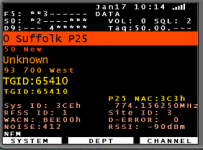
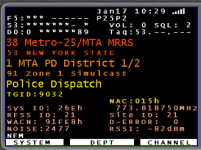
Good catch. Was looking on a 200 with old FW that I am programming for someone that told me it was up to date.


On my 200 with the latest FW, its almost dead on with displaying rids.


Really wish it would display FQSUID's from ISSI linked systems. Rid is enabled.


1705504491889.png


1705505398666.png
 
Last edited:
Status
Not open for further replies.
Top