ProScan: Virtual Display

rcool101

Member
Feed Provider
Joined
May 31, 2002
Messages
1,025
Reaction score
216
Location
Eastern Ohio
I have 3 scanners running ProScan that run 24/7. SDS200, 536 and a 780 and have not a problem till now. For some reason I can now longer see the Virtual Display on my 2nd monitor or anywhere since Saturday. The editor shows when I open ProScan but that's all. I tried my laptop with a SDS100 and no problem. I undid latest Win 11 update and no luck. Reinstalled ProScan didn't help ether
 

ProScan

Software Provider
Premium Subscriber
Joined
Jul 2, 2006
Messages
8,281
Reaction score
4,671
Location
Ontario, Calif.
All is good now. Thanks for the help. I ended up wiping Win 11 again and reinstalling everything. This time started with a clean slate. Editor and Virtual Display are playing nice now all in their own folders, which they always were
If something like this happens again, email me the ProScan.cfg file so I can see what's happening. Probably the program was minimized.
If you delete the ProScan.cfg file when ProScan is not running then start ProScan, all the options will revert to the defaults.
 

crippledchicken

Member
Premium Subscriber
Joined
Dec 28, 2004
Messages
1,097
Reaction score
279
Location
Butler County MO
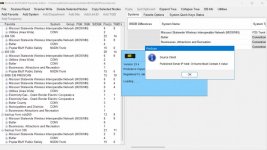
Hello Bob, when you get the time, would you look at this please? I get the popup box every time I open Proscan. I don't think I'm needing it just for monitoring my bcd536hp scanner. I've been trying to figure out how to disable the popup with no luck. Thanks! :)
 

Attachments

  • Screenshot 2025-01-14 150530.jpg
    Screenshot 2025-01-14 150530.jpg
    96.4 KB · Views: 16

ProScan

Software Provider
Premium Subscriber
Joined
Jul 2, 2006
Messages
8,281
Reaction score
4,671
Location
Ontario, Calif.
Hello Bob, when you get the time, would you look at this please? I get the popup box every time I open Proscan. I don't think I'm needing it just for monitoring my bcd536hp scanner. I've been trying to figure out how to disable the popup with no luck. Thanks! :)
If you're not using the Source Client feature then go to the Options - Startup tab then uncheck the option 'Source Client Auto Connect.
 
Last edited:
Top