

DonS
Member
1. No support.
2. Works like a stripped-down version of the PC version of Win500Client
3. Control of scanner not yet implemented Now it is
4. It is presumed that you know how to download a .CAB file, put it on your phone, and "install" it
5. No support
Requirements:
1. PocketPC device running Windows Mobile 5.0 or later
2. QVGA (240x320) display size, minimum
3. A network connection on the phone (ActiveSync, WiFi, a cellular data plan, etc)
4. .NET Compact Framework 3.5. If you don't have it, you can download/install it from Microsoft
Minimalist instructions:
1. Download the .CAB file
2. Copy the .CAB file to your PocketPC device
3. Install the .CAB file (i.e. by "clicking" on it in File Explorer on the PocketPC)
4. Run "Win500Client" from the Programs menu
This release is the result of some "goofing around" this past weekend with some new development tools. My "day job" has some pretty hectic deadlines approaching, so I won't be able to spend much time adding new features, fixing any found problems, etc. (this is why there is currently "no support"!).
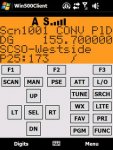
This version has only been tested on an HTC Touch Pro and an HTC 6800 ("Mogul"). It has also been tested on a PPC "emulator" running WM5.0. The attached image is how it looks on my Touch Pro...
2. Works like a stripped-down version of the PC version of Win500Client
3. Control of scanner not yet implemented Now it is
4. It is presumed that you know how to download a .CAB file, put it on your phone, and "install" it
5. No support
Requirements:
1. PocketPC device running Windows Mobile 5.0 or later
2. QVGA (240x320) display size, minimum
3. A network connection on the phone (ActiveSync, WiFi, a cellular data plan, etc)
4. .NET Compact Framework 3.5. If you don't have it, you can download/install it from Microsoft
Minimalist instructions:
1. Download the .CAB file
2. Copy the .CAB file to your PocketPC device
3. Install the .CAB file (i.e. by "clicking" on it in File Explorer on the PocketPC)
4. Run "Win500Client" from the Programs menu
This release is the result of some "goofing around" this past weekend with some new development tools. My "day job" has some pretty hectic deadlines approaching, so I won't be able to spend much time adding new features, fixing any found problems, etc. (this is why there is currently "no support"!).
This version has only been tested on an HTC Touch Pro and an HTC 6800 ("Mogul"). It has also been tested on a PPC "emulator" running WM5.0. The attached image is how it looks on my Touch Pro...
Attachments
Last edited:

 Any help would be apprecriated.


