• To anyone looking to acquire commercial radio programming software:

    Please do not make requests for copies of radio programming software which is sold (or was sold) by the manufacturer for any monetary value. All requests will be deleted and a forum infraction issued. Making a request such as this is attempting to engage in software piracy and this forum cannot be involved or associated with this activity. The same goes for any private transaction via Private Message. Even if you attempt to engage in this activity in PM's we will still enforce the forum rules. Your PM's are not private and the administration has the right to read them if there's a hint to criminal activity.

    If you are having trouble legally obtaining software please state so. We do not want any hurt feelings when your vague post is mistaken for a free request. It is YOUR responsibility to properly word your request.

    To obtain Motorola software see the Sticky in the Motorola forum.

    The various other vendors often permit their dealers to sell the software online (i.e., Kenwood). Please use Google or some other search engine to find a dealer that sells the software. Typically each series or individual radio requires its own software package. Often the Kenwood software is less than $100 so don't be a cheapskate; just purchase it.

    For M/A Com/Harris/GE, etc: there are two software packages that program all current and past radios. One package is for conventional programming and the other for trunked programming. The trunked package is in upwards of $2,500. The conventional package is more reasonable though is still several hundred dollars. The benefit is you do not need multiple versions for each radio (unlike Motorola).

    This is a large and very visible forum. We cannot jeopardize the ability to provide the RadioReference services by allowing this activity to occur. Please respect this.

XPR 4550 Programming ugh

italiasown

Newbie
Joined
Aug 28, 2018
Messages
8
Reaction score
2
 I.
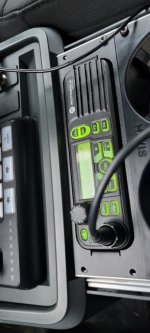
Just purchased a Motorola XPR4550. I am having the worst time trying to program it. I purchased an authentic cable and have the software.But when I plug the u s b cable into the radio it is not recognized. I have seen a lot of posts regarding this but no way to actually fix it. Usually when a USB is plugged into a port, it will show up that there is a connection. This cable does nothing. I have tried several cables.So I believe it is something specific to the cable that is making the computer not recognize it. My XPR firmware is R011217 and i was using the Motorola CPS 16 (build 828). I am not sure if I am missing a driver or something but this does not make sense to me at all. Any assistance would be greatly appreciated.
 

Attachments

  • 17370612521506574864281977085433.jpg
    17370612521506574864281977085433.jpg
    59.1 KB · Views: 42

clbsquared

Member
Joined
Oct 13, 2015
Messages
1,060
Reaction score
622
Location
Isle of Wight County
Even though it’s a USB cable, it uses a network connection. Turn your WiFi off or disconnect your computer from the internet. Do the radio in this order. Open CPS , turn your radio on, connect the cable to the radio, connect the USB end to your computer. It may take a few seconds but you should get a “new network” pop up.
 

italiasown

Newbie
Joined
Aug 28, 2018
Messages
8
Reaction score
2
No new networks popped up that i notice. Firewall is off. Not sure what the name of the network would be if i am missing it. Neither the computer nor the radio show any indication that the cable is even connected, and i have tried 3, one of which was from motorola.
 

W6VVM

Member
Joined
Jul 6, 2009
Messages
108
Reaction score
45
Id suggest trying a rear programming cable however seeing as it's mounted in a console that's not exactly an easy option
Yes, or remove the extension cable from the radio itself and connect your USB cable directly to the radio (not the head unit).

I had an extension cable somehow go bad awhile back. The round plug one, not the one that resembles an old parallel port. It didn’t fail completely, so a standard mic still worked, but the backlit DTMF mic, and programming cable, would not work when connected directly to the head unit while the extension was used. Replacing the extension fixed the issue.

Also, I often notice that the first time I connect an XPR 4550 to my PC, it doesn’t establish a connection, but simply unplugging the USB cable and reconnecting it solves it. Happens pretty often but the disconnect/reconnect always solves it for me.
 

dickie757

Wired
Joined
Apr 25, 2017
Messages
662
Reaction score
317
Location
Out of range
Are you twisting the lock ring "closed?" I have noticed some radios will not connect until it locks.

And I also suggest going into back. It is really easy to make the cable from scratch. I used a long APX usb cable.
 

kayn1n32008

ØÆSØ Say it, say 'ENCRYPTION'
Joined
Sep 20, 2008
Messages
7,768
Reaction score
2,876
Location
Sector 001
Are you twisting the lock ring "closed?" I have noticed some radios will not connect until it locks.

And I also suggest going into back. It is really easy to make the cable from scratch. I used a long APX usb cable.
Yep, 100% agree. I've always used a rear accessory cable to program my XPR5550. Never failed.

I use a home made cable. A $5 mouse donated it's USB cable, a friend had the accessory connector and pins and assembled it for me. It's never let me down, and I've used it to read and write XPR8x00 repeaters as well.

There are no electronics in the cable, everything is in the radio itself. If that doesn't work, then there is likely something else wrong with either your computer or your radio.
 

italiasown

Newbie
Joined
Aug 28, 2018
Messages
8
Reaction score
2
No new networks popped up that i notice. Firewall is off. Not sure what the name of the network would be if i am missing it. Neither the computer nor the radio show any indication that the cable is even connected, and i have tried 3, one of which was from motorola.
I figured it out, thanks all who assisted. The issue was that the programming cable doesnt work via the mic port on the remote head. I need to plug the programming cable into the port on the radio itself and it works
 

K2NEC

Member
Joined
Oct 23, 2017
Messages
3,676
Reaction score
2,508
Location
5F6
I know you said you bought an authentic cable however I know I've had issues with some GCAI cables working with XPRs. Despite being the same connector, I could only get some to work on XTL/APX and not XPR
 

italiasown

Newbie
Joined
Aug 28, 2018
Messages
8
Reaction score
2
I know you said you bought an authentic cable however I know I've had issues with some GCAI cables working with XPRs. Despite being the same connector, I could only get some to work on XTL/APX and not XPR
I tried several cables, from aftermarket to genuine. I think it was the port, although my friend said his model programmed through the remote head 🤷‍♂️
 

jhale1

Member
Premium Subscriber
Joined
Aug 30, 2001
Messages
4
Reaction score
9
Location
Sulphur Springs, TX
What has worked best for me was similar to what @clbsquared said.... I disable all network adapters in my laptop & can usually get the 4550 to read (may take a few USB cable unplug & replugs). If its gonna work, the radio will show up as a new network adapter. Once it reads the first time, if I update the radio firmware I can read it every time after that with no issue. If I just make a code plug change, then the radio usually has trouble reading again after the power cycle.
 

n3obl

ØAES-1056
Database Admin
Joined
Dec 19, 2002
Messages
2,324
Reaction score
1,617
Location
PA
I have seen people have issues with questionable programming cables. The OEM cable is not terribly expensive for these and should allow programming from the mic jack.
 

natedawg1604

Member
Premium Subscriber
Joined
Jun 29, 2013
Messages
2,819
Reaction score
576
Location
Colorado
I am having this exact issue with a 4550 (with firmware v. 1.12.17) I've owned for several years. Recently a windows 7 computer I've used for several years to program several 4550s stopped recognizing the programming cable. For several years I used a homemade rear cable, when that unexpectedly stopped working I got a rear and front cable from BlueMax 49ers. However the computer isn't recognizing either cable. Oddly, the CPS (16, v. 828) on the same computer still works fine with a 6550 portable. I tried disabling network connections and unplugging all other USB cables, as well as un-installing and re-installing the CPS, still nothing. The 4550 itself works fine, and the physical connectors seem fine.

Is there any way to isolate whether I have a radio or computer issue?
 

VK6NCB

Member
Joined
Jan 21, 2024
Messages
49
Reaction score
24
Yep, 100% agree. I've always used a rear accessory cable to program my XPR5550. Never failed.

I use a home made cable. A $5 mouse donated it's USB cable, a friend had the accessory connector and pins and assembled it for me. It's never let me down, and I've used it to read and write XPR8x00 repeaters as well.

There are no electronics in the cable, everything is in the radio itself. If that doesn't work, then there is likely something else wrong with either your computer or your radio.
fun fact, if you have the apprentice assemble ignition sense cables, they will mess some up, and put the plug in the opposite corner to where they are supposed to be.
the radio will still function normally, but it kills the USB chip in the radio, and makes it impossible to program without the radio taking a vacation to motorola.

I may have learned this lesson the hard way, after spending waaaaay too long trying to reprogram a radio.
and I didnt kill the programmability of a second radio at the same time. nope, that wasnt me....
 

troyken

Member
Joined
May 22, 2025
Messages
16
Reaction score
3
29
Yep, 100% agree. I've always used a rear accessory cable to program my XPR5550. Never failed.

I use a home made cable. A $5 mouse donated it's USB cable, a friend had the accessory connector and pins and assembled it for me. It's never let me down, and I've used it to read and write XPR8x00 repeaters as well.

There are no electronics in the cable, everything is in the radio itself. If that doesn't work, then there is likely something else wrong with either your computer or your radio.
fun fact, if you have the apprentice assemble ignition sense cables, they will mess some up, and put the plug in the opposite corner to where they are supposed to be.
the radio will still function normally, but it kills the USB chip in the radio, and makes it impossible to program without the radio taking a vacation to motorola.

I may have learned this lesson the hard way, after spending waaaaay too long trying to reprogram a radio.
and I didnt kill the programmability of a second radio at the same time. nope, that wasnt me....

I am experiencing this exact problem on an XPR-5550E radio. Same programming cable , new drivers the whole bit. Great support on that by the way. I just printed the rear connector pinout and the Ign sense wire pin 25 , if improperly installed, will connect to the D+, pin1, on the radio. Those are the programming pins I believe. The radio works fine otherwise but I cannot establish connection with programming computer via the mic jack. I will have to check as the rear connector is being used on this truck.

If this is the case is the rear jack inoperative for programming too?

This radio was installed at the time the truck was built ( 2017) by a professional radio shop.
 

VK6NCB

Member
Joined
Jan 21, 2024
Messages
49
Reaction score
24
29

fun fact, if you have the apprentice assemble ignition sense cables, they will mess some up, and put the plug in the opposite corner to where they are supposed to be.
the radio will still function normally, but it kills the USB chip in the radio, and makes it impossible to program without the radio taking a vacation to motorola.

I may have learned this lesson the hard way, after spending waaaaay too long trying to reprogram a radio.
and I didnt kill the programmability of a second radio at the same time. nope, that wasnt me....

I am experiencing this exact problem on an XPR-5550E radio. Same programming cable , new drivers the whole bit. Great support on that by the way. I just printed the rear connector pinout and the Ign sense wire pin 25 , if improperly installed, will connect to the D+, pin1, on the radio. Those are the programming pins I believe. The radio works fine otherwise but I cannot establish connection with programming computer via the mic jack. I will have to check as the rear connector is being used on this truck.

If this is the case is the rear jack inoperative for programming too?

This radio was installed at the time the truck was built ( 2017) by a professional radio shop.
Yes. It kills the USB chip and you cant program by either the rear 26 pin plug or the mic port.
 

N4KVE

Member
Joined
Mar 1, 2003
Messages
4,438
Reaction score
1,218
Location
PALM BEACH, FLORIDA
I figured it out, thanks all who assisted. The issue was that the programming cable doesnt work via the mic port on the remote head. I need to plug the programming cable into the port on the radio itself and it works
Had that exact problem with a trunk mount MCS2000. I could program front mount 2000’s, but not this trunk mount radio. I made a cable to program through the acc connector, & that worked fine. Don’t know why, but that solved the problem.
 
Top