Cloudflare Origin and ProScan HTTPS server

johndball

I have the "expensive hobby" autism
Premium Subscriber
Joined
Jan 13, 2018
Messages
14
Reaction score
5
Location
Virginia
Hi folks,

I'm trying to configure ProScan HTTPS using a Cloudflare Origin certificate and it is failing. I pinged Bob via email and he suggested that I open a thread here but followed up a bit later asking if there were any error messages. This is what I replied with and I'm hoping somebody has gotten this to work.

Hi Bob,

No rush on this. It has been on my back burner for a while. Yes, I am receiving an error on the HTTPS Web Server page of ProScan.

The goal here is to allow access to the ProScan server on my DMZ only from users that are forced through Cloudflare. This is achieved through various methods, but it boils down to restricted access to the ProScan server only though Cloudflare-supplied IPV4 subnets and secured through a Cloudflare Origin certificate/connection. I have this working on a few servers already but not with ProScan.

The requirement for this is running a Cloudflare Origin Certificate on the server using a Cloudflare-provided public and private key pair although I can supply my own CSR to Cloudflare if Proscan allowed for CSR generation. The Origin Certificate is a certificate that is supplied by Cloudflare that runs on the local web server and will only allow communication between Cloudflare and the server. Think if it as a client certificate. Cloudflare has a blog post on this feature from 2014: Introducing CloudFlare Origin CA

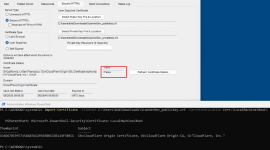
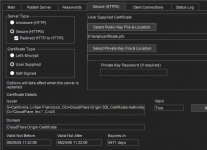
The challenge is that the ProScan server will accept the certificate but does not recognize the certificate as valid. Cloudflare will generate for me a public and private key pair which I’ve added to the server, but the result is that I receive a Valid “False” error message in ProScan. My gut tells me is has something to do with the domain checking that is done on the certificate, but without a deep knowledge of ProScan’s programing, I can only guess.

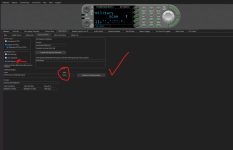
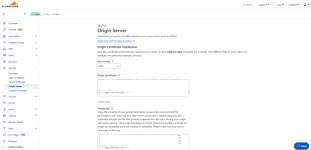
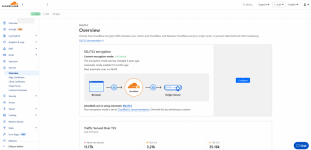
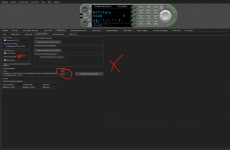
I’ve attached a few screenshots for reference.
 

Attachments

  • ProScan Origin not working.png
    ProScan Origin not working.png
    243.8 KB · Views: 14
  • ProScan self-signed working.png
    ProScan self-signed working.png
    317.3 KB · Views: 15
  • Cloudflare Origin public-private pair.png
    Cloudflare Origin public-private pair.png
    164.5 KB · Views: 15
  • Cloudflare Origin cert creation.png
    Cloudflare Origin cert creation.png
    191.5 KB · Views: 13
  • Cloudflare origin settings.png
    Cloudflare origin settings.png
    188.1 KB · Views: 14

mtindor

FMP24 PRO USER
Database Admin
Joined
Dec 5, 2006
Messages
11,991
Reaction score
3,243
Location
Carroll Co OH / EN90LN
I run a Linux RDIO Scanner server through Cloudflared. Love it. And no problem whatsoever with remote SDRTrunk / RDIO servers connecting to my port 443 to feed my RDIO server, and of course no problems with outbound from RDIO. Cloudflared is pretty handy for some things.
 

ndebaggis

Member
Premium Subscriber
Joined
Jan 24, 2021
Messages
53
Reaction score
41
It does not work. The ProScan web server does not start as it flags the Origin certificate as an invalid certificate.
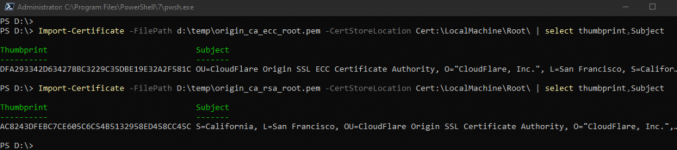
Very odd indeed. When you added the Origin CA root to Trusted Roots was Powershell Run-As Administrator? I've never seen a valid cert chain fail validation like that unless one of them is expired...
 

ProScan

Software Provider
Premium Subscriber
Joined
Jul 2, 2006
Messages
8,360
Reaction score
4,787
Location
Ontario, Calif.
@johndball I'm curious, does it still work if you revert ProScan back to the non-custom release version? if so, then Bob @ProScan should be able to revert the change: "I changed the ChainPolicy to AllowUnknownCertificateAuthority"...

That didn't work for me using the old way which was X509Certificate2.Verify without the chainPolicy AllowUnknownCertificateAuthority

Untitled.png
 
Last edited:

ndebaggis

Member
Premium Subscriber
Joined
Jan 24, 2021
Messages
53
Reaction score
41

ndebaggis

Member
Premium Subscriber
Joined
Jan 24, 2021
Messages
53
Reaction score
41
That didn't work for me using the old way which was X509Certificate2.Verify

View attachment 186138
That look like your importing the actual issued cert into Trusted Roots which won't work since that's making the issued cert appear as a self-signed cert. Remove that from Trusted Roots then try importing both the ECC and RSA certs.

The two Origin root CA certs thumbprints should be:
Screenshot 2025-07-02 105226.png
 
Last edited:

ProScan

Software Provider
Premium Subscriber
Joined
Jul 2, 2006
Messages
8,360
Reaction score
4,787
Location
Ontario, Calif.
That look like your importing the actual issued cert into Trusted Roots which won't work since that's making the issued cert appear as a self-signed cert. Remove that from Trusted Roots then try importing both the ECC and RSA certs.

The two Origin root CA certs thumbprints should be:
View attachment 186140
Not working for me. Still shows Verify=false. Does this screenshot look okay? and does the computer need rebooting?
Untitled.png
 

ndebaggis

Member
Premium Subscriber
Joined
Jan 24, 2021
Messages
53
Reaction score
41
Not working for me. Still shows Verify=false. Does this screenshot look okay? and does the computer need rebooting?
View attachment 186141
Those two look correct. Take a peek at the Personal\Certificates directory as well as the Intermediate Certification Authorities\Certificates directory to ensure that original cert with "CN=Cloudflare Origin Certificate" didn't end up landing in one of those stores, if it did delete it. Also you might need to re-check those stores in certmgr.msc running just under your user context (not Administrator) as it could have landed there as well. All said, with just those two CA roots in local machine Trusted Roots the "CN=Cloudflare Origin Certificate" *should* verify in Proscan. If not, I'm at a loss to explain this one. Windows certificate management abyss of misery! - edit: maybe also a reboot will flush it out.
 
Last edited:

ProScan

Software Provider
Premium Subscriber
Joined
Jul 2, 2006
Messages
8,360
Reaction score
4,787
Location
Ontario, Calif.
Still not showing cert as valid. Basically this is the code I was using, using .NET Framework 4.8.

Before - Was working great without any issues up until CloudFlare Origin
X509Certificate2 cert = [BouncyCastle routines to get cert and private key]
bool valid = cert.Verify; // returns false using CloudFlare Origin

After
X509Chain chain = new X509Chain();
chain.ChainPolicy.VerificationFlags = X509VerificationFlags.AllowUnknownCertificateAuthority;
bool chainBuild = chain.Build(Cert); // returns true using CloudFlare Origin
 

ndebaggis

Member
Premium Subscriber
Joined
Jan 24, 2021
Messages
53
Reaction score
41
Still not showing cert as valid. Basically this is the code I was using, using .NET Framework 4.8.

Before - Was working great without any issues up until CloudFlare Origin
X509Certificate2 cert = [BouncyCastle routines to get cert and private key]
bool valid = cert.Verify; // returns false using CloudFlare Origin

After
X509Chain chain = new X509Chain();
chain.ChainPolicy.VerificationFlags = X509VerificationFlags.AllowUnknownCertificateAuthority;
bool chainBuild = chain.Build(Cert); // returns true using CloudFlare Origin
Very odd indeed. I haven't used bouncy castle for a good number of years and that was just a small project. There's got to be a reason the API is not seeing those imported Origin CA roots, I just don't know why. I thought bouncy just utilized the Windows built-in cert stores. Can you DM me that ScannerDev_publickey.crt file so I can try to replicate on my end?
 

ProScan

Software Provider
Premium Subscriber
Joined
Jul 2, 2006
Messages
8,360
Reaction score
4,787
Location
Ontario, Calif.
Very odd indeed. I haven't used bouncy castle for a good number of years and that was just a small project. There's got to be a reason the API is not seeing those imported Origin CA roots, I just don't know why.
You know your stuff. That's for sure.

I thought bouncy just utilized the Windows built-in cert stores.
Probably can. I'm not using the Windows built-in cert stores at all but rather bouncy to get the cert and key files.
To me, the cert stores adds a layer of complications and I rather try to keep it as simple as possible.

Can you DM me that ScannerDev_publickey.crt file so I can try to replicate on my end?
I'm not privy to. Perhaps @johndball can.
 
Last edited:

johndball

I have the "expensive hobby" autism
Premium Subscriber
Joined
Jan 13, 2018
Messages
14
Reaction score
5
Location
Virginia
You know your stuff. That's for sure.


Probably can. I'm not using the Windows built-in cert stores at all but rather bouncy to get the cert and key files.
To me, the cert stores just adds a layer of complications and I rather try to keep it as simple as possible.


I'm not privy to. Perhaps @johndball can.
I can generate any public/private key pair that y'all want to test.

If we keep it to DM and the three of us, I will send you the public/private pair I am using on the production server. Give me a few minutes. If you DM me your email, I'll add you to the Cloudflare Access portal so you can pull any data from the stream that may help.
 

ndebaggis

Member
Premium Subscriber
Joined
Jan 24, 2021
Messages
53
Reaction score
41
You know your stuff. That's for sure.


Probably can. I'm not using the Windows built-in cert stores at all but rather bouncy to get the cert and key files.
To me, the cert stores just adds a layer of complications and I rather try to keep it as simple as possible.


I'm not privy to. Perhaps @johndball can.
I know enough to get me in trouble! a few years managing Windows ADCA PKI that sometimes I wish I could forget... thank you though. So I noticed that my Letsencrypt cert in the proscan directory is a PFX file which is a self-contained store, it contains BOTH my server cert AND the letsencrypt root CA, it's pretty much a standalone file-based cert store. I'm wondering if creating a new PFX file with these:

origin_ca_rsa_root.pem - root CA
ScannerDev_publickey.crt - server cert

would resolve and verify correctly. Unfortunately, if it does work that really doesn't help on your end much unless you were to make bouncy castle use the windows cert store for CA root lookups...

Sorry, this seems to be turning into a personal challenge on my end! and I don't even use Cloudflare Origin LOL.
 

johndball

I have the "expensive hobby" autism
Premium Subscriber
Joined
Jan 13, 2018
Messages
14
Reaction score
5
Location
Virginia
@ProScan - I rolled the ProScan.exe version back to the original v24 not using the test .exe's that you sent me. I then took the Cloudflare public / private key pair as well as the Cloudflare Origin RSA PEM and combined all three files into a .PFX certificate. I renamed the certificate to letsencrypt.pfx and loaded that into ProScan. The server starts up without issue now.

This may be the route that @ndebaggis was going ...
 

Attachments

  • Screenshot 2025-07-02 134054.png
    Screenshot 2025-07-02 134054.png
    397.8 KB · Views: 2

ndebaggis

Member
Premium Subscriber
Joined
Jan 24, 2021
Messages
53
Reaction score
41
@ProScan - I rolled the ProScan.exe version back to the original v24 not using the test .exe's that you sent me. I then took the Cloudflare public / private key pair as well as the Cloudflare Origin RSA PEM and combined all three files into a .PFX certificate. I renamed the certificate to letsencrypt.pfx and loaded that into ProScan. The server starts up without issue now.

This may be the route that @ndebaggis was going ...
That would be the route I just took as well!

Screenshot 2025-07-02 134509.png

So, effectively what we have is, Windows Certificate HELL! I removed all the Cloudflare Origin root CA certs I had installed to test, then only added back the origin root CA RSA file to Windows LocalMachine Trusted Root Certificates, then added @johndball PFX to ProScan. Good to go! Bob @ProScan it looks like you can close this one out! Now maybe I'll actually take a better look the Cloudflare Origin proxy and what it offers.
 

ProScan

Software Provider
Premium Subscriber
Joined
Jul 2, 2006
Messages
8,360
Reaction score
4,787
Location
Ontario, Calif.
@ProScan - I rolled the ProScan.exe version back to the original v24 not using the test .exe's that you sent me. I then took the Cloudflare public / private key pair as well as the Cloudflare Origin RSA PEM and combined all three files into a .PFX certificate. I renamed the certificate to letsencrypt.pfx and loaded that into ProScan. The server starts up without issue now.

This may be the route that @ndebaggis was going ...
Thanks for that. I'm have to decide on my end what route to take. 1) Keep it as is (before the test files) or 2) If it is a ClouldFlare Origin cert then use the chain policy AllowUnknownCertificateAuthority. Probably 1.
 

ndebaggis

Member
Premium Subscriber
Joined
Jan 24, 2021
Messages
53
Reaction score
41
@ProScan - I rolled the ProScan.exe version back to the original v24 not using the test .exe's that you sent me. I then took the Cloudflare public / private key pair as well as the Cloudflare Origin RSA PEM and combined all three files into a .PFX certificate. I renamed the certificate to letsencrypt.pfx and loaded that into ProScan. The server starts up without issue now.

This may be the route that @ndebaggis was going ...
Curious, did you generate the PFX on the Cloudflare admin panel or did you hand-roll it?
 

ndebaggis

Member
Premium Subscriber
Joined
Jan 24, 2021
Messages
53
Reaction score
41
Thanks for that. I'm have to decide on my end what route to take. 1) Keep it as is (before the test files) or 2) If it is a ClouldFlare Origin cert then use the chain policy AllowUnknownCertificateAuthority. Probably 1.
I would totally go back to the original version 24.0. Allowing unknown CA is pretty big no-no in InfoSec. Sometimes you have no choice but to do it for in-house servers but where your software is out in the wild it's probably not a good option.
 
Top