Updating Broadcastify Pi Image

Status
Not open for further replies.

IcomIcR20

Member
Premium Subscriber
Joined
Jun 16, 2014
Messages
1,043
Reaction score
594
I am also running into some issues with the new image. I am trying to get Trunk-recorder running on the new image so that I can use two Airspy SDRs instead of one. When performing some preliminary testing with the same config.json file that worked correctly with the previous image, I immediately received some error messages when attempting to start Trunk-recorder.

At least part of the issue seemed to be that the trunk recorder folder is named "tr," rather than the expected "trunk-recorder." After changing that, I get the following message:
Starting trunk-recorder...
â trunk-recorder.service - BCFY Trunk Recorder Service
Loaded: loaded (/etc/systemd/system/trunk-recorder.service; disabled; preset: enabled)
Active: activating (auto-restart) (Result: exit-code) since Wed 2024-12-25 19:11:44 CST; 2s ago
Process: 2856 ExecStart=/bin/sh -c /home/pi/bcfy/trunk-recorder/recorder --config=/home/pi/bcfy/configs/trunk-recorder/config.json >> /home/pi/bcfy/logs/trunk-recorder.log 2>&1 (code=exited, status=127)
Main PID: 2856 (code=exited, status=127)
CPU: 5ms

Dec 25 19:11:44 bcfy-89de68a0 systemd[1]: trunk-recorder.service: Main process exited, code=exited, status=127/n/a
Dec 25 19:11:44 bcfy-89de68a0 systemd[1]: trunk-recorder.service: Failed with result 'exit-code'.
Press [Enter] to return to the main menu...
The Trunk-recorder log file states:
/bin/sh: 1: /home/pi/bcfy/trunk-recorder/recorder: not found
However, that file does exist at that location.

Like I said, this is a fresh, otherwise untouched install. Any words of wisdom regarding how to proceed would be much appreciated as I am not super knowledgeable about such things.
 
Last edited:

blantonl

Founder and CEO
Staff member
Super Moderator
Joined
Dec 9, 2000
Messages
11,591
Reaction score
6,803
Location
Dallas, TX
Please continue here. I'll take all feedback on the image here and incorporate into any changes to the image that might be necessary.
 

blantonl

Founder and CEO
Staff member
Super Moderator
Joined
Dec 9, 2000
Messages
11,591
Reaction score
6,803
Location
Dallas, TX
I am also running into some issues with the new image. I am trying to get Trunk-recorder running on the new image so that I can use two Airspy SDRs instead of one. When performing some preliminary testing with the same config.json file that worked correctly with the previous image, I immediately received some error messages when attempting to start Trunk-recorder.

At least part of the issue seemed to be that the trunk recorder folder is named "tr," rather than the expected "trunk-recorder." After changing that, I get the following message:

The Trunk-recorder log file states:

However, that file does exist at that location.

Like I said, this is a fresh, otherwise untouched install. Any words of wisdom regarding how to proceed would be much appreciated as I am not super knowledgeable about such things.
Can you post your config.json so I can have a look? Remove any API keys from it.

I think I know what the problem is - I might need to update the service definition. I'll get it fixed after the new year and I'll update this thread.
 

flippinfleck

Member
Joined
Jan 19, 2009
Messages
27
Reaction score
2
Location
worcester county
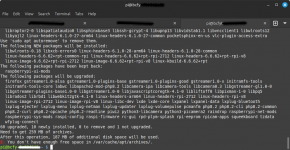
For starters, after writing the image I am unable to update due to a lack of free space.

Perhaps the documentation should include something about expanding to utilize the whole SD?
 

Attachments

  • Screenshot from 2024-12-25 20-11-45.png
    Screenshot from 2024-12-25 20-11-45.png
    114.1 KB · Views: 8

IcomIcR20

Member
Premium Subscriber
Joined
Jun 16, 2014
Messages
1,043
Reaction score
594
Can you post your config.json so I can have a look? Remove any API keys from it.

I think I know what the problem is - I might need to update the service definition. I'll get it fixed after the new year and I'll update this thread.
I tested a few different variations, but this is one basic config.json that works with the previous image version but does not work with v3.0:
JSON:
{
    "ver": 2,
    "sources": [{
        "center": 852556250.0,
        "rate": 3000000,
        "error": -167,
        "lnaGain": 15,
                "mixGain": 15,
                "ifGain": 7,
        "digitalLevels": 4,
        "digitalRecorders": 4,
        "driver": "osmosdr",
        "device": "airspy=0x10A862DC351E2463"
    }, {
        "center": 858900000.0,
        "rate": 3000000,
        "error": -300,
        "lnaGain": 15,
                "mixGain": 15,
                "ifGain": 7,
        "digitalLevels": 4,
        "digitalRecorders": 4,
        "driver": "osmosdr",
        "device": "airspy=0x10A862DC346A2263"
    }],
    "systems": [{
        "control_channels": [859787500],
        "type": "p25",
        "shortName": "VIPER CLEM",
        "modulation": "qpsk"
    }]
}
 

IcomIcR20

Member
Premium Subscriber
Joined
Jun 16, 2014
Messages
1,043
Reaction score
594
For starters, after writing the image I am unable to update due to a lack of free space.

Perhaps the documentation should include something about expanding to utilize the whole SD?
I ran into the same thing. You can free up the remaining space on your SD card by: sudo raspi-config > Advanced Settings > Expand File System > Reboot.
 

blantonl

Founder and CEO
Staff member
Super Moderator
Joined
Dec 9, 2000
Messages
11,591
Reaction score
6,803
Location
Dallas, TX
I am aware of that. As noted, others may not be so it should be in the documentation.
It was supposed to automatically do this on first boot. I’ll find out why it isn’t.

what other questions, concerns, or issues do you have?
 

blantonl

Founder and CEO
Staff member
Super Moderator
Joined
Dec 9, 2000
Messages
11,591
Reaction score
6,803
Location
Dallas, TX
I tested a few different variations, but this is one basic config.json that works with the previous image version but does not work with v3.0:
JSON:
{
    "ver": 2,
    "sources": [{
        "center": 852556250.0,
        "rate": 3000000,
        "error": -167,
        "lnaGain": 15,
                "mixGain": 15,
                "ifGain": 7,
        "digitalLevels": 4,
        "digitalRecorders": 4,
        "driver": "osmosdr",
        "device": "airspy=0x10A862DC351E2463"
    }, {
        "center": 858900000.0,
        "rate": 3000000,
        "error": -300,
        "lnaGain": 15,
                "mixGain": 15,
                "ifGain": 7,
        "digitalLevels": 4,
        "digitalRecorders": 4,
        "driver": "osmosdr",
        "device": "airspy=0x10A862DC346A2263"
    }],
    "systems": [{
        "control_channels": [859787500],
        "type": "p25",
        "shortName": "VIPER CLEM",
        "modulation": "qpsk"
    }]
}
I would try opening a terminal, changing directory to /home/pi/bcfy/configs/trunk-recorder and just type "trunk-recorder" to see if it starts.

I think the problem is the service creation which needs to be fixed by me. I should have a new image rolled out next week to fix some of these issues.
 

blantonl

Founder and CEO
Staff member
Super Moderator
Joined
Dec 9, 2000
Messages
11,591
Reaction score
6,803
Location
Dallas, TX
I've released an update to the image:


Change Log:
  • Fixed filesystem auto-expand for the image. Image now expands to use your entire SD card correctly upon first boot
  • Fixed trunked recorder auto-start service
Enjoy!

I am open to any enhancement ideas folks have for this image, including more details about SDRPlay support, and any other software, scripts, templates, etc you'd like to see for the image.
 

DC31

Member
Feed Provider
Joined
Feb 19, 2011
Messages
1,642
Reaction score
181
Location
Massachusetts
Lindsay, I am a fairly accomplished Raspberry pi user. Started with the pi1 in 2013 streaming to BCFY. Just today I downloaded the new image to give it a whirl On my pi5. Where did I get stuck? It took me close to half an hour to find the login password! Actually, I gave up and handed the iPad to my wife who found it in the “Advanced” section of the instructions. It needs to be included in item
7: When the flash has completed, insert the SD card into your Raspberry Pi, Power On, and follow the configuration sections below. When you first boot the image, the raspberry pi will reboot 3 or more times to complete the initialization process.

you can’t Get past the “power on“ step without the password.
 

blantonl

Founder and CEO
Staff member
Super Moderator
Joined
Dec 9, 2000
Messages
11,591
Reaction score
6,803
Location
Dallas, TX
Lindsay, I am a fairly accomplished Raspberry pi user. Started with the pi1 in 2013 streaming to BCFY. Just today I downloaded the new image to give it a whirl On my pi5. Where did I get stuck? It took me close to half an hour to find the login password! Actually, I gave up and handed the iPad to my wife who found it in the “Advanced” section of the instructions. It needs to be included in item
7: When the flash has completed, insert the SD card into your Raspberry Pi, Power On, and follow the configuration sections below. When you first boot the image, the raspberry pi will reboot 3 or more times to complete the initialization process.

you can’t Get past the “power on“ step without the password.
I'm not sure what you mean by "can't get past the 'power on'" step without the password.

Where in the power on process are you getting prompted for a password? The image is designed to open directly to the window desktop without logging on or requiring any password etc.

Did you change the username on the image? How did you flash the image? Walk me through your exact process, from OS, to software used, etc.
 

DC31

Member
Feed Provider
Joined
Feb 19, 2011
Messages
1,642
Reaction score
181
Location
Massachusetts
I'm not sure what you mean by "can't get past the 'power on'" step without the password.

Where in the power on process are you getting prompted for a password? The image is designed to open directly to the window desktop without logging on or requiring any password etc.

Did you change the username on the image? How did you flash the image? Walk me through your exact process, from OS, to software used, etc.
Ah, I think I see the hiccup. I flashed the card and then VNC’d in without hooking up any monitor or keyboard. It was the vnc log in that needed the password.
 
Status
Not open for further replies.
Top