HELP :win500 software /pro-106

Status
Not open for further replies.

cfh32

Member
Joined
Jan 2, 2009
Messages
3
Reaction score
0
Location
Riverton,utah
I have been using one of the old scanners and different software, so I have a couple of questions....

1. trying out the trial version of win500 is it fully operational or do you have to register it for it to be fully working??
2. How do I just enter frequencies into win500??

trying to figure out this software and how to run the new pro-106. Really nice scanner just a bit of a learning curve.

Thanks
Craig
 

qlajlu

Silent Key
Joined
Jul 25, 2005
Messages
2,286
Reaction score
2
Location
Kearns, Utah
I have been using one of the old scanners and different software, so I have a couple of questions....
Well, let's see what we can do.
1. trying out the trial version of win500 is it fully operational or do you have to register it for it to be fully working??
Yes. It is fully operational as soon as you unzip the downloaded file, but I know you will like it and once you buy it, it's yours forever. Just save your key.
2. How do I just enter frequencies into win500??
Sorry, Craig. Gonna need some more information here. Which frequencies do you want to enter? (1) Conventional frequencies? or (2) The frequencies used for trunking?
trying to figure out this software and how to run the new pro-106. Really nice scanner just a bit of a learning curve.
Yes, there is a steep learning curve, but it is worth it in the long run.

Okay, getting back to #2 above (You thought I wasn't gonna tell ya, huh? :lol: ):

  1. Open the Win500 software.
  2. Click on "File" in the upper left corner.
  3. From the drop-down menu point to "Web import" > "RadioReference.com" > and then click on "Trunked Systems" or "Conventional Frequencies."
  4. Once you do that you will be taken to a page where you will enter your credentials that you use to log into RR.

Now that is as far as I'm taking you for the time being because we really do need to know whether it is Trunking Systems you are after or Conventional Frequencies. There are certain things that are different from this point on and I don't want to guess which you want. You may even be able to figure it out from there yourself. Don't worry about messing anything up because you can always start over. Don't worry about asking questions if you get into a jam, however, you will be way ahead if you can figure out most of it yourself rather than being led through it all.

Also, read the GRE scanners in Utah thread. Your Pro-106 is the brother to the GRE-500. There is also step-by-step instructions in this post.
 

cfh32

Member
Joined
Jan 2, 2009
Messages
3
Reaction score
0
Location
Riverton,utah
win500 questions

Thanks for the reply, In answer to the # 2 question for right now I was after trunked systems but of course want to know how to do it all. So I did your tip that you gave me and I am not a member so I will change that at some point, because I think there is so much knowledge out here on rr that it is priceless.
(will save you alot of pulling your hair out) which is good thing cause I don't have alot left to pull out. I have a rr list of the ucan system that has all the sites from 001 to 053, and was just wanting to be able to pull up like in win95.exe a blank template and enter frequencies into it. Can you not do that with the win500 and the pr0-106? I know it is different than ever before so if I wanted to do my own custom list or just figure all of this out and how it works so that is your answer to the question. I read your other link and I need to look some other things first before I get the dcs and the key to open the right door.

Thanks
Craig
 

qlajlu

Silent Key
Joined
Jul 25, 2005
Messages
2,286
Reaction score
2
Location
Kearns, Utah
I owe you an apology because I did not notice last night/early this morning that you were not a Premium Subscriber. I urge you go get one (that is what pays to keep this site and all its valuable information up and running), but different strokes for different folks. I will put a post together a little later to help you out without the subscription, but right now I'm pressed for time.
 

qlajlu

Silent Key
Joined
Jul 25, 2005
Messages
2,286
Reaction score
2
Location
Kearns, Utah
Using WIN500 to program your scanner to trunk without a Premium Subscription:

  • Open the WIN500 software.
  • Click on File > New Template (upper left corner).
  • Click on the TSYS Objects tab.
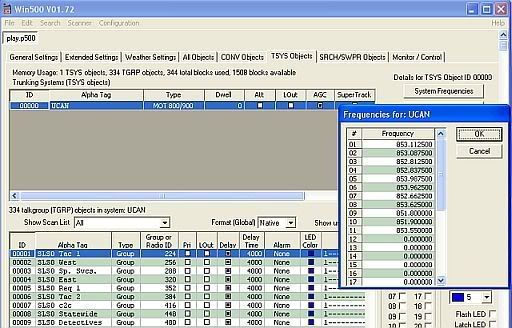
  • Click on System Frequencies bar.

CCFrequencies.jpg


  • Enter the Control Channel frequencies of the Sites you plan to monitor.
  • Click OK
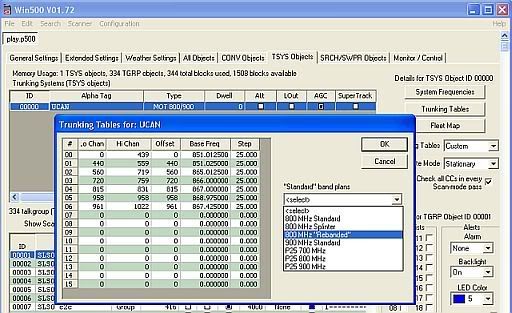
  • Click on Trunking Tables bar.

TrunkTables.jpg


  • Click on Select > 800 MHz "Rebanded".
  • Click OK

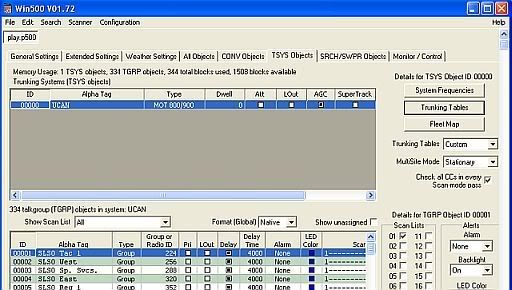
TSYSPage.jpg


  • Select Custom in the Trunking Tables drop-down menu.
  • In the MultiSite Mode drop-down menu, you will have to decide which of Off, Roam, or Stationary that best suits your type of scanning.
The rest of the settings are personal preference in nature. You will have to do some research and play with them to find that setting best suited to your scanning use.

Enter an Alpha Tag and Type in the Trunking Systems [TSYS objects] list (where I have "UCAN" entered).

From here you can start scanning IF you have a Wildcard Object in the list of objects to be scanned (where I have the TGs entered). Otherwise, you will have to enter individual TGs with all the information. I cannot help beyond this point because I used the Import function taking advantage of my Premium Subscription.

Be sure to save your file to the WIN500 folder on your computer by clicking File > Save as....

Hope this helps.
 

cfh32

Member
Joined
Jan 2, 2009
Messages
3
Reaction score
0
Location
Riverton,utah
Ya that helps and actually i had gotten that far on my own. But where I am stuck is the drop down menu below where you had ucan entered. the big box where it has the the tg's and aphla tags and the l/out and all that it does not pop into anything where you can enter the information mentioned above.

Craig
 

cfh32

Member
Joined
Jan 2, 2009
Messages
3
Reaction score
0
Location
Riverton,utah
Got playing around with it again and got it figured out. Will let you know if I have other questions. I am sure I will.

Craig
 

cfh32

Member
Joined
Jan 2, 2009
Messages
3
Reaction score
0
Location
Riverton,utah
I guess I got lucky the one time and I can't remember how I did it so tell me how you do this . Where I am stuck is the drop down menu below where you had ucan entered. the big box where it has the the tg's and aphla tags and the l/out and all that it does not pop into anything where you can enter the information mentioned above.

craig
 

qlajlu

Silent Key
Joined
Jul 25, 2005
Messages
2,286
Reaction score
2
Location
Kearns, Utah
I guess I got lucky the one time and I can't remember how I did it so tell me how you do this . Where I am stuck is the drop down menu below where you had ucan entered. the big box where it has the the tg's and aphla tags and the l/out and all that it does not pop into anything where you can enter the information mentioned above.

craig
Nothing there is going to "pop" into anything. I have read your statement several times and I'm having a bit of difficulty following it, but if I get your meaning, you are saying you don't know how to enter TGs.

Now before I tell you, I want to say that I am only telling you these things expecting that you WILL purchase this software. If you do not, it is the next thing to stealing to use it to program your scanner and then just let it go. That being said, here is how you do it:
  • Click on the column heading marked "ID."
  • Click on the Edit menu at top and select "New Item at end" or do Ctrl+Shift+N on the keyboard. That will open a line for you to enter a TG.
  • Repeat as needed.
  • One new line will open up each time you do this.

That should get you started. You really would be much better off to purchase a few days of Premium Subscription so you could simply import the TGs from the Database to populate your scanner.
 

cfh32

Member
Joined
Jan 2, 2009
Messages
3
Reaction score
0
Location
Riverton,utah
That worked, I knew there was some little secret to it. Yes I am planning on purchasing the software and I am wanting to learn the manual imput of it. Also all the other things of the software . I am sure that you get alot of people that do what you were suggesting, what I guess you think I am doing. I have other questions but maybe you don't want to answer them. I will leave that up to you. I was wondering what all of these items did.

The options you can pick what do these do:

att
agc
supertrack
nfm
boost

Then under type should that always be set at mot 800/900 for trunking or can you select some of the others.

Thanks for your help
 

qlajlu

Silent Key
Joined
Jul 25, 2005
Messages
2,286
Reaction score
2
Location
Kearns, Utah
The options you can pick what do these do:

att
agc
supertrack
nfm
boost

Then under type should that always be set at mot 800/900 for trunking or can you select some of the others.
I had to do some research on these because I am not a guru or geek. :lol: The Wiki is your friend in these situations.

ATT: This is the Attenuator or Attenuation. You will find a good discussion on this Wiki page. Mine is off.

AGC: AGC (Automatic Gain Control) is described here and is much to long to copy for our purpose. You can go read about it by following the link. I have AGC selected.

Supertrack: According to my owner's guide for my PSR-600, Supertrack is an alternative DSP (Digital Signal Processor) decoding algorithm. May help reception on some systems. I do not have this selected.

NFM: This page in the Wiki says: NFM - Narrowband FM (called FM on most scanners) -- is used on most current analog public safety communications and the total deviation is generally limited to 30 KHz down to about 12 KHz.

SNFM - Super-Narrowband FM (called NFM on most scanners) -- is used on most digital FM and future analog public safety communications, is generally limited to 11 KHz and below in width.

I do not have this selected.

Boost: Is Audio Boost and from the Wiki it says: Audio Boost: Expert menu, AudioBoost, On or OFF, Applies a 6 dB boost to audio levels when the object is active. I do not have this selected.

There is a whole page full of tips about Object-oriented scanning on this page that you should read.

Yes, Mot 800/900 will be the type unless you are monitoring an EDACS or LTR trunking system.
 
Last edited:
Status
Not open for further replies.
Top